


Mo 62A
シングルボードコンピュータ
TI AM62A74を搭載したエントリーレベルのオープンソースAIシングルボードコンピュータ。軽量エッジ推論および産業用ビジョン向けに2 TOPSの性能を提供します。
Mo 62A
シングルボードコンピュータ
TI AM62A74を搭載したエントリーレベルのオープンソースAIシングルボードコンピュータ。軽量エッジ推論および産業用ビジョン向けに2 TOPSの性能を提供します。
写真
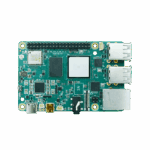
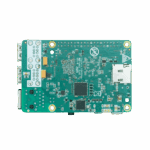
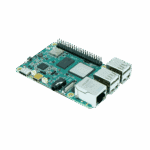
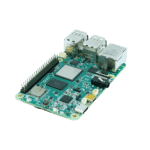
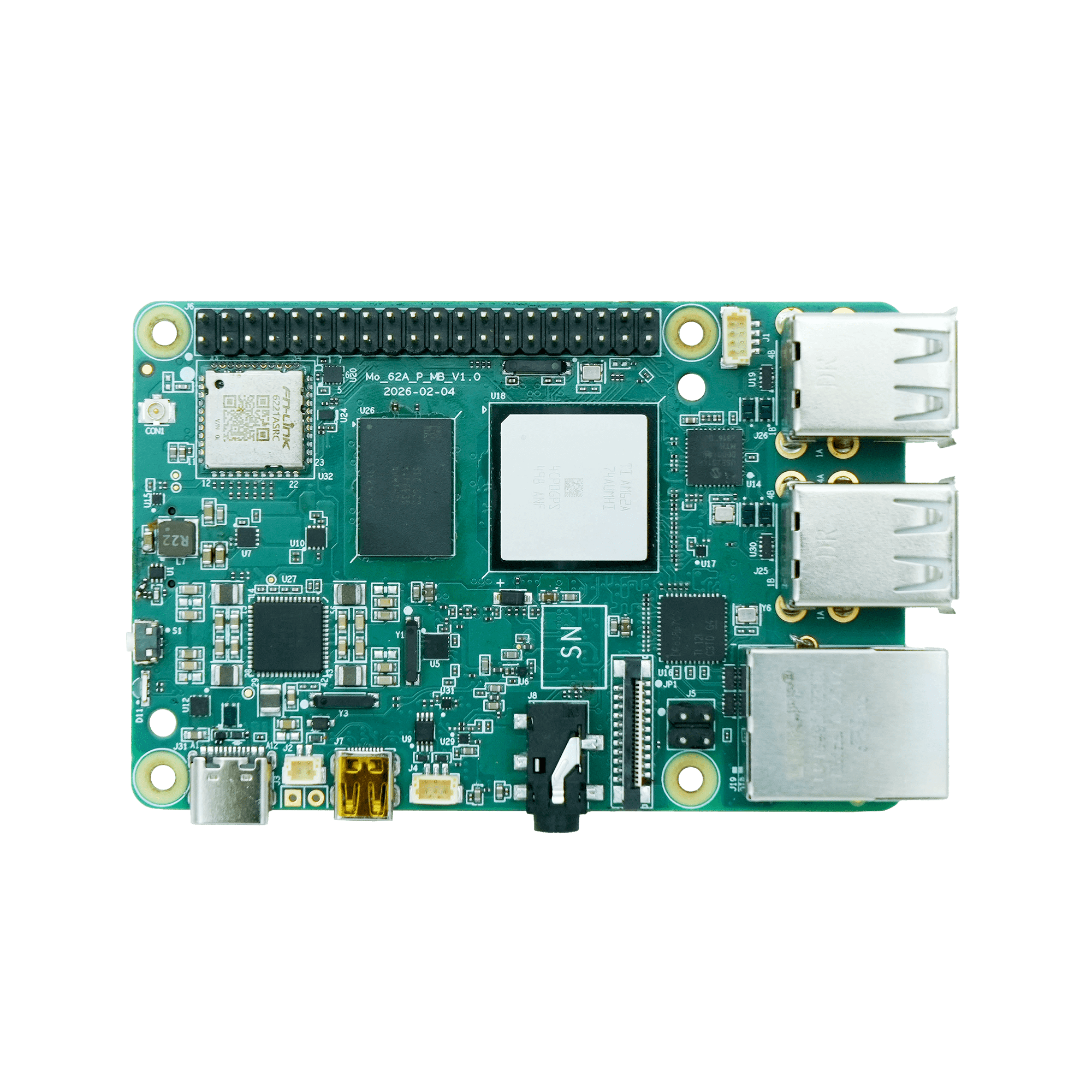
軽量エッジ推論向けオープンソースAI SBC 2 TOPS

高性能プロセッサ
テキサス・インスツルメンツ製AM62A AIビジョンプロセッサを搭載し、最大1.4GHzのクアッドコア64ビットArm® Cortex®-A53 CPUを備えています。

AI加速
C7x DSPとマトリックス乗算アクセラレータ(MMA)を搭載し、最大2 TOPSのディープラーニング性能を実現

豊富な接続性
マルチモーダルインターフェース:ギガビットイーサネット、USB 2.0に加え、コスト効率の高いマルチカメラおよびマルチディスプレイシステムのための柔軟なマルチメディアI/O

ラピッドプロトタイピング
40ピン拡張ヘッダーにより、はんだ付け不要のプロトタイピングが可能になり、センサー、アクチュエーター、接続アクセサリとの幅広い互換性が実現します。
高性能プロセッサ
テキサス・インスツルメンツ製AM62A AIビジョンプロセッサを搭載し、最大1.4GHzのクアッドコア64ビットArm® Cortex®-A53 CPUを備えています。
AI加速
C7x DSPとマトリックス乗算アクセラレータ(MMA)を搭載し、最大2 TOPSのディープラーニング性能を実現
豊富な接続性
マルチモーダルインターフェース:ギガビットイーサネット、USB 2.0に加え、コスト効率の高いマルチカメラおよびマルチディスプレイシステムのための柔軟なマルチメディアI/O
ラピッドプロトタイピング
40ピン拡張ヘッダーにより、はんだ付け不要のプロトタイピングが可能になり、センサー、アクチュエーター、接続アクセサリとの幅広い互換性が実現します。
-
主要技術仕様
AIアクセラレーター C7x DSP + ディープラーニングアクセラレータ、2 TOPSAIランタイム TI TIDL、TFLite / ONNX をサポートブルートゥース BLE 4.2CPU 4 × Cortex-A53 @ 1.4 GHz寸法(幅×奥行×高さ) 85 × 56 mm (3.35 × 2.2 in)インタフェース ギガビットイーサネット×1、USB 2.0×4、マイクロHDMI、MIPI CSI-2、40ピンHAT動作温度 0 °C ~ +50 °C (32 °F ~ +122 °F)OS Debian 13(組み込みLinux)力 USB Type-C 5V/5A DC; ≤ 25Wラム LPDDR4 4GB(標準)/ 2GB / 8GB安全 セキュアブート、トラストゾーン、OP-TEE、ハードウェアAES-256Wi-Fi Wi-Fi 5 (802.11ac)、デュアルバンド 2.4 / 5 GHz
-
ハードウェアプラットフォーム
AIアクセラレーター C7x DSP + ディープラーニングアクセラレータ、2 TOPSCPU TI AM62A74、4 × Cortex-A53 @ 1.4 GHzISP / ビジョン オンチップISP + VPAC(RGB-IR、WDR、LDC)ラム LPDDR4 4GB(標準)/ 2GB / 8GB
-
インタフェース
40ピンコネクタ GPIO / I²C / SPI / UART / PCM、HAT互換オーディオ 3.5mmジャック+40ピンコネクタ経由のPCMボタン リセットボタン×1カメラ 1 × 4レーンMIPI CSI-2UARTのデバッグ 1 × TTL UART画面 マイクロHDMI×1イーサネット ギガビットイーサネット×1ファンコネクタ 4ピンファンコネクタ×1導かれた 電源、ユーザーストレージ microSDUSB USB 2.0 Type-Aポート×4
-
無線
アンテナ Wi-Fi / BLE: オンボード着脱式アンテナブルートゥース BLE 4.2Wi-Fi Wi-Fi 5 (802.11ac)、デュアルバンド 2.4 / 5 GHz
-
力
消費電力 25W(最大)電源入力 USB Type-C 5V / 5A DC
-
機械
冷却 アクティブファン(オプション)寸法(幅×奥行×高さ) 85 × 56 mm (3.35 × 2.2 in)ハウジング PCBRTC サポート(バッテリーバックアップ)重さ 47 g (0.1 lb)
-
環境
動作温度 0 °C ~ +50 °C (32 °F ~ +122 °F)保管温度 -20 °C ~ +70 °C (-4 °F ~ +158 °F)
-
オペレーティング·システム
カーネル Linuxカーネル6.12OS Debian 13.2 Trixie
-
AIとビジョン
AIランタイム TI TIDL、TFLite / ONNX をサポートカメラフレームワーク V4L2ディスプレイフレームワーク DRM / KMSVision SDK TI EdgeAI SDK
-
ネットワーク機能
知的財産権の適用 TCP/UDP、ICMP、DNS、DHCPIPルーティング 静的ルーティング
-
安全
暗号通貨アクセラレーター ハードウェアAES-256オプティー サポートセキュアブート サポートトラストゾーン サポート
-
発達
言語 Python、C/C++図書館 OpenCV、GStreamer、NumPyOpen SDK お客様によるカスタムシステム構築をサポートしますパッケージマネージャー apt (Debian)
-
システム管理
デバッグ UARTコンソールファームウェアのアップグレード SDカードフラッシュリモートアクセス SSH
-
製品モデル
Mo 62A-2G 2GBMo 62A-4G 4ギガバイトMo 62A-8G 8GB
標準パッケージ*
- Mo 62A AI Single Board Computer *1
オプションアクセサリー
- 電源ユニット×1
- Wi-Fiアンテナ *1
- RTC用バッテリー×1
- TTLデバッグシリアルケーブル *1
- ファン1個
- イーサネットケーブル *1
- 32GB SDカード×1
- Micro HDMI - HDMI変換アダプター(MO 62A)*1
- ミニDP-DP(MO 68A)*1
※標準パッケージの内容は、標準注文コードによって異なります。
お問い合わせ パッケージオプションの詳細については、直接お問い合わせください。
仕様
-
主要技術仕様
AIアクセラレーター C7x DSP + ディープラーニングアクセラレータ、2 TOPSAIランタイム TI TIDL、TFLite / ONNX をサポートブルートゥース BLE 4.2CPU 4 × Cortex-A53 @ 1.4 GHz寸法(幅×奥行×高さ) 85 × 56 mm (3.35 × 2.2 in)インタフェース ギガビットイーサネット×1、USB 2.0×4、マイクロHDMI、MIPI CSI-2、40ピンHAT動作温度 0 °C ~ +50 °C (32 °F ~ +122 °F)OS Debian 13(組み込みLinux)力 USB Type-C 5V/5A DC; ≤ 25Wラム LPDDR4 4GB(標準)/ 2GB / 8GB安全 セキュアブート、トラストゾーン、OP-TEE、ハードウェアAES-256Wi-Fi Wi-Fi 5 (802.11ac)、デュアルバンド 2.4 / 5 GHz
-
ハードウェアプラットフォーム
AIアクセラレーター C7x DSP + ディープラーニングアクセラレータ、2 TOPSCPU TI AM62A74、4 × Cortex-A53 @ 1.4 GHzISP / ビジョン オンチップISP + VPAC(RGB-IR、WDR、LDC)ラム LPDDR4 4GB(標準)/ 2GB / 8GB
-
インタフェース
40ピンコネクタ GPIO / I²C / SPI / UART / PCM、HAT互換オーディオ 3.5mmジャック+40ピンコネクタ経由のPCMボタン リセットボタン×1カメラ 1 × 4レーンMIPI CSI-2UARTのデバッグ 1 × TTL UART画面 マイクロHDMI×1イーサネット ギガビットイーサネット×1ファンコネクタ 4ピンファンコネクタ×1導かれた 電源、ユーザーストレージ microSDUSB USB 2.0 Type-Aポート×4
-
無線
アンテナ Wi-Fi / BLE: オンボード着脱式アンテナブルートゥース BLE 4.2Wi-Fi Wi-Fi 5 (802.11ac)、デュアルバンド 2.4 / 5 GHz
-
力
消費電力 25W(最大)電源入力 USB Type-C 5V / 5A DC
-
機械
冷却 アクティブファン(オプション)寸法(幅×奥行×高さ) 85 × 56 mm (3.35 × 2.2 in)ハウジング PCBRTC サポート(バッテリーバックアップ)重さ 47 g (0.1 lb)
-
環境
動作温度 0 °C ~ +50 °C (32 °F ~ +122 °F)保管温度 -20 °C ~ +70 °C (-4 °F ~ +158 °F)
-
オペレーティング·システム
カーネル Linuxカーネル6.12OS Debian 13.2 Trixie
-
AIとビジョン
AIランタイム TI TIDL、TFLite / ONNX をサポートカメラフレームワーク V4L2ディスプレイフレームワーク DRM / KMSVision SDK TI EdgeAI SDK
-
ネットワーク機能
知的財産権の適用 TCP/UDP、ICMP、DNS、DHCPIPルーティング 静的ルーティング
-
安全
暗号通貨アクセラレーター ハードウェアAES-256オプティー サポートセキュアブート サポートトラストゾーン サポート
-
発達
言語 Python、C/C++図書館 OpenCV、GStreamer、NumPyOpen SDK お客様によるカスタムシステム構築をサポートしますパッケージマネージャー apt (Debian)
-
システム管理
デバッグ UARTコンソールファームウェアのアップグレード SDカードフラッシュリモートアクセス SSH
-
製品モデル
Mo 62A-2G 2GBMo 62A-4G 4ギガバイトMo 62A-8G 8GB
ダウンロード
注文
標準パッケージ*
- Mo 62A AI Single Board Computer *1
オプションアクセサリー
- 電源ユニット×1
- Wi-Fiアンテナ *1
- RTC用バッテリー×1
- TTLデバッグシリアルケーブル *1
- ファン1個
- イーサネットケーブル *1
- 32GB SDカード×1
- Micro HDMI - HDMI変換アダプター(MO 62A)*1
- ミニDP-DP(MO 68A)*1
※標準パッケージの内容は、標準注文コードによって異なります。
お問い合わせ パッケージオプションの詳細については、直接お問い合わせください。
関連事例
よくある質問
MO-62Aにはどのような特長がありますか?
MO-62Aは、エッジデバイスでのオンデバイスビジョン推論のための2TOPS AIシングルボードコンピュータです。主な仕様:
| — | — |
| 計算する | 4× Cortex-A53 @ 1.4 GHz + C7x DSP + 2-TOPS ディープラーニングアクセラレータ |
| ビジョンパイプライン | オンチップISP + VPAC(RGB-IR、WDR、LDC);1×4レーンMIPI CSI-2 |
| ラム | LPDDR4、 2GB / 4GB(標準) / 8GB SKU( MO-62A-2G/-4G/-8G ) |
| OS | Debian Linux |
| 接続性 | ギガビットイーサネット×1、Wi-Fi 5デュアルバンド、BLE 4.2 |
| その他の入出力 | USB 2.0 Type-A×4、micro HDMI、3.5mmオーディオ、40ピンHAT互換ヘッダー、micro SD |
| 安全 | セキュアブート、ARM TrustZone、OP-TEE、ハードウェアAES-256 |
| 電力/サイズ | USB Type-C 5V(最大25W)、85×56mm、47g |
85 × 56 mmのボードと40ピンのレイアウトは、標準的なSBCエンクロージャおよびHATアクセサリと機械的に互換性があります。典型的なアプリケーション:AIビジョンボックス、インテリジェントカメラ、欠陥検査、その他のエッジAI推論端末。MO-62Aは、SSHと標準的なDebianツールを介して管理される開発者向けSBCです。 ない InHand IEOSまたはDeviceLiveを実行します。
MO-62Aを初めてフラッシュして起動するにはどうすればよいですか?
- SDカードに書き込む — 最新版をダウンロード
.img.zipリリースページから (GitHub の SDK:github.com/inhandnet/mo-62a)。 使用 balenaEtcher (Windows / macOS / Linux) またはdd画像を 16GB以上 クラス10 / UHS-I マイクロSDカード。 - 周辺機器を接続する カードを挿入し、マイクロHDMI経由でモニターを接続し、RJ45をネットワークに接続し、必要に応じてUSBキーボード/マウスとIMX219カメラリボンを接続します。
- 最後に電源を入れる USB Type-C (5 V、≥3 A) 経由で接続します。赤い電源 LED がすぐに点灯します。通常の起動時間は 30~45 秒です。 初回起動時は1~2分かかります。 ルートファイルシステムがSDカード全体を埋めるまで拡張した後、ボードは自動的に再起動してXFCEデスクトップ環境に移行します。
- ログイン ユーザー名付き
デビアンパスワードtemppwd— 有効 ログインは1回のみすると、すぐに新しいパスワードを設定するように求められます。
ヘッドレス設定の場合、ボードは自動的にDHCPを取得し、次のアドレスにアクセスできます。 ssh [email protected] (mDNS)または ssh debian@ シリアルコンソールへのアクセス用に、3ピンTTL UARTデバッグコネクタ(115200ボー、8N1)も用意されています。
MO-62AでAIモデルを実行するにはどうすればよいですか?
モデルは TIディープラーニング(TIDL) ランタイムは、 TFLite ( .tflite ) そして ONNX( .onnx ) モデル。オンチップのISP/VPACは、RAW→RGB変換、WDR、レンズ補正を処理するため、DLAはクリーンな入力を受け取ります。PythonまたはC/C++による前処理および後処理では、一般的にOpenCVとGStreamerが使用されます。
MO-62Aは2 TOPSの処理能力を持ち、画像分類、軽量物体検出(YOLO-Nanoの派生モデルなど)、OCR、存在/異常検知、ジェスチャー/姿勢認識などに適しています。マルチストリーム/高解像度検出をより高いフレームレートで行うには、より高TOPSのInHand AIエッジコンピュータをご利用ください。
MO-62Aの40ピンヘッダーはどのように使用すればよいですか?
40ピンHAT互換ヘッダーは、GPIO、I²C、SPI、UART、PWM、およびPCMを露出します。 3.3V ロジック。標準のSBC HATアクセサリは機械的に取り付けられます。接続する前に電気的互換性(3.3V)を確認してください。
ピンノート:
- すべてのユーザーピンはデフォルトで GPIO代替機能は、デバイスツリーオーバーレイを介して有効化されます。
- ピン27/28は予約済みです カメラのI²Cバス用なので、一般的なGPIOとして使用することはできません。
- ボードには以下のものが付属しています libgpiod v2.x; その
-cフラグはチップを指定するために必要です。3 つの gpiochips (gpiochip0–gpiochip2)MCUと主要ドメインをカバーします。
簡単な例:
“ バッシュ`
gpiodetect # リストチップ
gpioget -c gpiochip2 23 # ピン11を読み取る
gpioset -c gpiochip1 39=1 # ピン 7 をハイに駆動
gpiomon -c gpiochip2 23 # エッジを監視
i2cdetect -y 2 # スキャンカメラ I²C バス
より高帯域幅の周辺機器には、4レーンMIPI CSI-2コネクタを使用します(IMX219はバンドルされているコネクタを介してサポートされています)。 imx219-preview.sh` スクリプト)、ディスプレイ用のマイクロ HDMI、ストレージやアダプタ用の 4 つの USB 2.0 Type-A ポート。
—