IR315 Out-of-Band Management (OOBM) Solution
Product: InHand IR315 Industrial Cellular Router
Cloud Platform: InConnect Server (ICS)
1. Solution Overview
1.1 Project Background
In modern data centers, factories, telecom equipment rooms, and remote field cabinets, critical infrastructure such as core switches, routers, firewalls, and servers must remain accessible to operations engineers at all times. In practice, however, in-band SSH / Telnet management depends entirely on the production network. Whenever the production link is down, the operating system has crashed, or a device is locked out due to a mis-configuration, the in-band channel disappears together with the fault — exactly when engineers need access the most.
The traditional answer is to send a field engineer on-site with a console cable. For geographically dispersed sites this is slow, expensive, and often misses the recovery-time objective (RTO). This solution uses the InHand IR315 industrial cellular router to provide a dedicated Out-of-Band Management (OOBM) channel that is completely independent from the production network, so that the console port of every critical device can be reached remotely from anywhere through the InConnect Server (ICS) cloud platform.
1.2 Objectives
The solution is designed to deliver the following outcomes:
- A dedicated management channel that is physically and logically separate from the production data network.
- 24×7 reachability of every managed device's console port through a single cloud entry point.
- Zero-touch initial configuration of newly deployed equipment without dispatching a field engineer.
- Rapid disaster recovery: even if the LAN/WAN is down or the device OS has crashed, the console is still reachable over cellular.
- Strong security — every session is authenticated against ICS and encrypted end-to-end through an OpenVPN tunnel.
- Centralized device inventory, online/offline status, and audit visibility through the ICS dashboard.
1.3 Applicable Scenarios
This solution applies to any environment where engineers need reliable remote console access to network or compute equipment, including:
- Data center core switches, aggregation switches, routers, and firewalls.
- Telecom equipment rooms and base-station backhaul gear.
- Factory floor control switches, industrial PCs, and PLC gateways.
- Smart-building and campus network closets.
- Remote unmanned sites: pump stations, substations, oil/gas sites, transportation cabinets.
- Initial commissioning of newly shipped equipment before the production network is in place.
2. Requirements Analysis
2.1 Current-State Pain Points
Operations teams typically face one or more of the following before deploying OOBM:
- Remote device access is impossible during a network outage, forcing engineers to travel on-site.
- SSH / Telnet sessions cannot be established for troubleshooting after a device crash or kernel panic.
- Operating multi-site, geographically distributed equipment leads to high maintenance and travel cost.
- There is no remote means to perform first-time configuration on newly deployed equipment.
- Console activity is not centrally audited, making post-incident review difficult.
2.2 Core Requirements
The OOBM solution must satisfy the following requirements:
- Independent management plane: the OOBM channel must not depend on the production LAN/WAN.
- Multi-interface support: must support RS232 (console) at a minimum; RS485 is desirable for industrial gear.
- Cellular uplink: work over 4G LTE so it stays online even when wired uplinks are down.
- Cloud-based access: engineers must be able to reach the console from any internet-connected PC, without exposing the device to the public internet.
- Security: all traffic is encrypted in transit; users must be authenticated; access must be auditable.
- Scalability: must support hundreds to thousands of remote sites managed from a single platform.
- Industrial-grade hardware: wide operating temperature, surge protection, DC 9–36 V input.
3. Overall Solution Architecture
3.1 Three-Layer Architecture
The solution is built as a three-layer architecture:
- Field device layer — the managed network or compute equipment whose console port needs to be reached (core switch, router, firewall, server, industrial PC, etc.).
- Access layer — the IR315 industrial cellular router. Its RS232 serial port connects to the managed device's console; its cellular interface uplinks to the ICS platform.
- Cloud management layer — the InConnect Server (ICS) cloud platform. It acts as a secure rendezvous point: the IR315 dials in from the field, and the engineer's PC dials in from the office via the InConnect OpenVPN client.
The end-to-end logical path is:
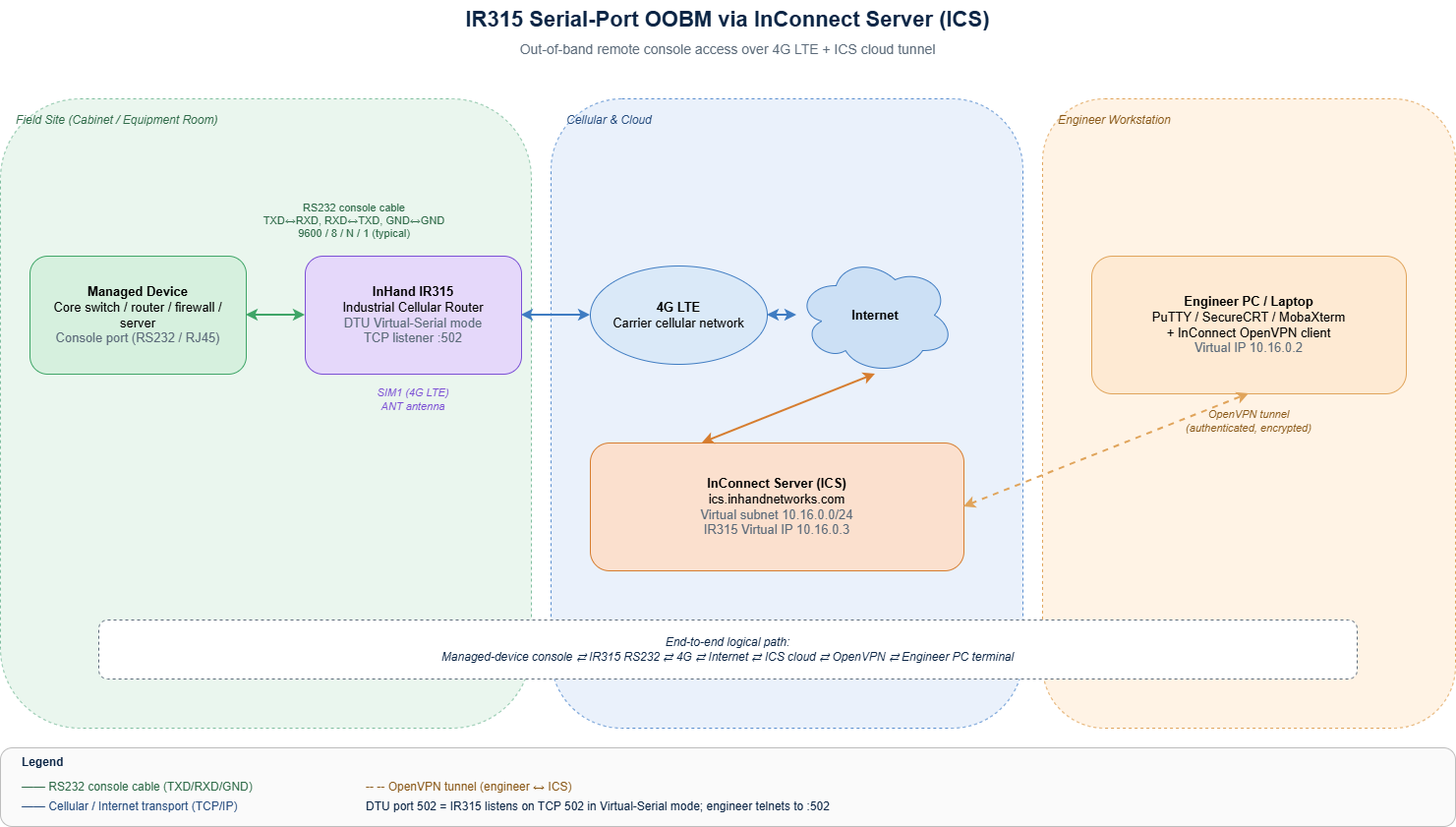
Managed device console → IR315 serial port (RS232) → 4G cellular → Internet → ICS cloud → Engineer PC (OpenVPN client + terminal)
3.2 Topology Diagram
The high-level OOBM topology is shown below.
3.3 Component Responsibilities
| Layer | Component | Role |
|---|---|---|
| Field device | Switch / router / server console | The target whose console output and CLI need to be reached remotely. |
| Access | IR315 industrial router | Provides cellular uplink, terminates the RS232 console cable, and runs the DTU (Data Transfer Unit) function to forward serial traffic over TCP. |
| Cloud | InConnect Server (ICS) | Hosts the secure rendezvous tunnel between the IR315 and the engineer; assigns each device a private virtual IP; manages users, permissions, and audit. |
| Management | Engineer PC / laptop | Runs the InConnect OpenVPN client and a serial terminal tool (PuTTY / SecureCRT / MobaXterm) to reach the managed device's console. |
3.4 Data Flow
- The IR315 establishes a permanent, encrypted control channel to ICS over 4G.
- ICS assigns the IR315 a private virtual IP inside the customer's ICS subnet (e.g.
10.16.0.3). - The IR315's RS232 port runs the DTU function in Virtual-Serial mode, listening on a TCP port (default
502). Serial bytes received from the managed device are encapsulated into TCP and forwarded; TCP bytes received from the engineer are written back to the serial port. - The engineer launches the InConnect OpenVPN client on their PC, which establishes an OpenVPN tunnel to ICS and pulls down the route for the ICS subnet.
- The engineer's terminal tool (PuTTY / SecureCRT / MobaXterm) opens a Telnet/Raw TCP session to the IR315's virtual IP on the DTU listening port. From this point on, every keystroke is delivered to the managed device's console as if a local console cable were connected.
4. Network and Access Design
4.1 Uplink Selection
The IR315 supports 4G LTE as the primary uplink for OOBM. Cellular is recommended over wired uplinks for OOBM because:
- It is electrically and logically independent from the production WAN.
- It survives ISP outages affecting the wired network.
- It can be deployed in cabinets that don't yet have wired connectivity.
A wired WAN can optionally be used as a backup uplink if available.
4.2 IR315 Selection Rationale
The IR315 was selected for this solution because it provides:
- 4G LTE cellular uplink with dual-SIM redundancy options.
- An industrial 3.5 mm pitch terminal block exposing RS232 (TXD/RXD) for console connections and RS485 (A/B) for industrial protocol use.
- A built-in DTU function for transparent serial-to-TCP forwarding.
- Native integration with the InConnect Server (ICS) management platform.
- Industrial-grade design (wide operating temperature, DC 9–36 V input, surge / ESD protection).
- Compact DIN-rail / wall-mount form factor.
4.3 ICS Cloud Platform
The InConnect Server (ICS) is InHand's cloud management platform. For this OOBM use case it provides:
- A secure cloud rendezvous between IR315 devices and engineers — neither side needs a public IP.
- A virtual subnet (
10.16.0.0/24in the example) where every IR315 gets a private virtual IP. - A multi-platform OpenVPN client (Windows 7 / 8 / 10, iPhone, Android) that engineers install once.
- Per-user accounts with VPN access permissions and audit logging.
- A web dashboard for device inventory, online status, traffic, and remote web management.
5. Protocol and Data Flow
5.1 Southbound (Managed Device ↔ IR315)
The IR315 connects to the managed device's console port over RS232. Serial parameters must match the managed device exactly:
- Baud rate: typically 9600 or 115200 (must match the managed device).
- Data bits: 8
- Stop bit: 1
- Parity: None
- Flow control: None
Wiring rule: IR315 TXD → managed device RXD, IR315 RXD → managed device TXD, common GND. Reversed TXD/RXD is the most common cause of a blank terminal.
5.2 Northbound (IR315 ↔ ICS)
The IR315 maintains an always-on encrypted tunnel to ICS at ics.inhandnetworks.com. The DTU function in Virtual-Serial mode encapsulates serial bytes into TCP and listens on a configurable port (default 502). This TCP listener is only reachable through the ICS tunnel — it is never exposed on the public internet.
5.3 User-Side (Engineer PC ↔ ICS)
The engineer's PC runs the InConnect OpenVPN client and uses a per-user .ovpn profile to authenticate to ICS. Once the tunnel is up, the engineer points any standard terminal tool (PuTTY / SecureCRT / MobaXterm) at the IR315's virtual IP on the DTU port.
6. Security Design
OOBM is, by definition, a privileged management plane and must be hardened accordingly. This solution applies the following controls:
- Encrypted transport end-to-end: IR315 ↔ ICS and Engineer ↔ ICS are both encrypted tunnels.
- No public exposure: neither the IR315 nor the managed device console is reachable from the public internet — all access is brokered through ICS.
- Per-user authentication: every engineer has their own ICS account and OpenVPN profile.
- Role-based access: ICS permissions can be scoped per device or per network tag.
- Default-password change: the IR315 web admin password must be changed from the factory default after deployment.
- Auditability: ICS logs user sessions, device online/offline events, and configuration changes.
7. Solution Highlights
- True out-of-band: the cellular management plane is completely independent from the production data network; the console stays reachable even when the production WAN/LAN is down.
- Zero on-site dispatch: initial bring-up, day-2 troubleshooting, and disaster recovery can all be performed from a desk.
- Plug-and-play with ICS: the IR315 auto-registers with ICS, gets a virtual IP, and is immediately reachable from any authorized engineer's PC.
- Universal console support: because the DTU presents a transparent TCP socket, any device whose console speaks standard RS232 is supported — switches, routers, firewalls, servers, industrial controllers.
- Industrial-grade reliability: wide operating temperature, DC 9–36 V power, surge/ESD protection — designed for unattended cabinets.
- Scales from one to thousands: ICS centralizes inventory, status, users, and audit across the entire fleet.