ISM5010D Ring Network Configuration Guide
1. Document Information
- Document name: Switch Ring Configuration Guide
- Product model: ISM5010D
- Applicable scenario: device networking
- Date of preparation: March 25, 2026
2. Device Overview
2.1 Product Introduction
The InHand Networks ISM5010D is a managed industrial Ethernet switch whose primary function is to build a reliable and manageable industrial data communication network. It features 8 gigabit electrical (copper) ports and 2 gigabit optical (fiber) ports, and supports redundant power supplies, wide-temperature operation (-40°C to +75°C), and fanless cooling, making it suitable for network connectivity in harsh environments such as wind power generation and smart manufacturing.
2.2 Main Functions
- Device ring networking
- Wide-temperature industrial-grade design
2.3 Typical Application Topology
Device → Ethernet → energy storage controller → Ethernet → server
3. Hardware Description
3.1 Appearance and Interfaces
- Power interface: DC 12–48V
- Interfaces: 2 optical + 8 electrical
- Indicator lights: PWR, RUN, network port indicators
- Reset button: restore factory settings
3.2 Wiring Instructions
3.2.1 Power Wiring
- Positive terminal: V+
- Negative terminal: V-
- Note: reverse-polarity protection, lightning protection, grounding
3.2.2 Ethernet Wiring
Auto-MDI/MDIX (straight-through/crossover auto-sensing). Cat5e or better cable is recommended.
4. Factory Default Parameters
- Default IP: 192.168.10.12
- Subnet mask: 255.255.255.0
- Web username: admin
- Web password: admin
5. Preparation
- Set the computer to an IP address on the same network segment as the gateway
- Connect the computer to the gateway LAN port with a network cable
- Power on the switch and wait for the RUN indicator to stay steadily lit
- Enter the device IP in a browser to access the configuration page
6. Network Configuration
6.1 Rapid Spanning Tree (RSTP) Configuration
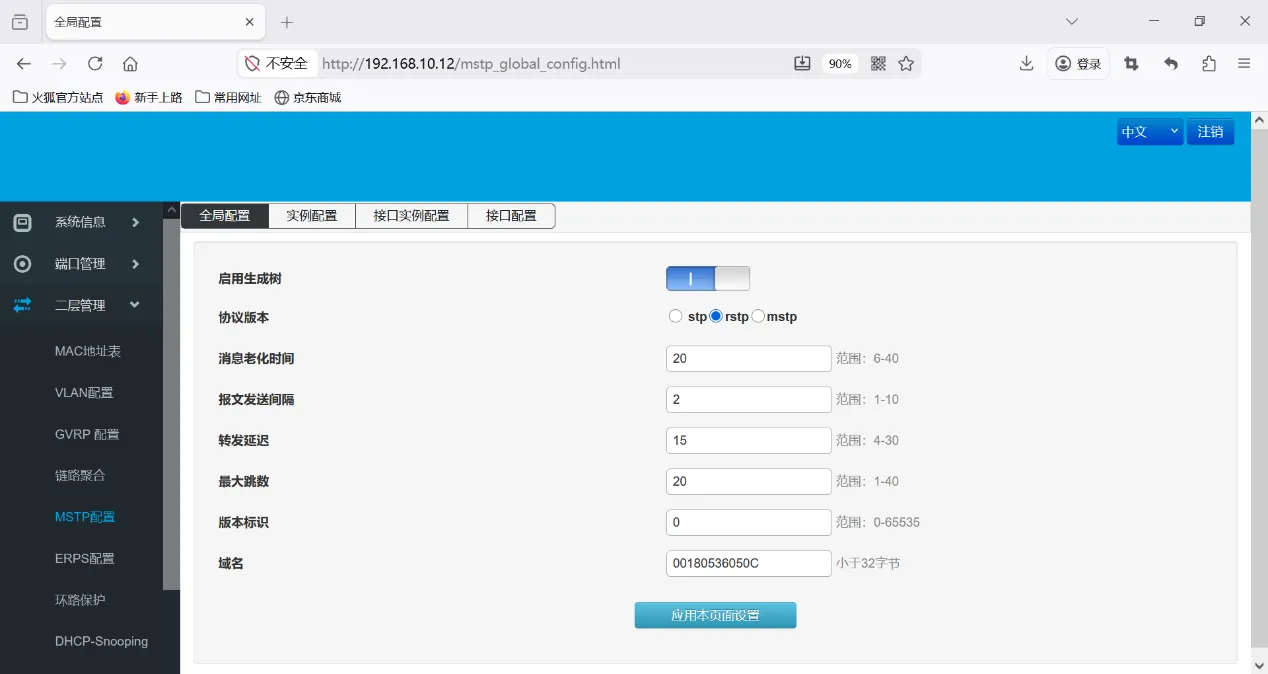
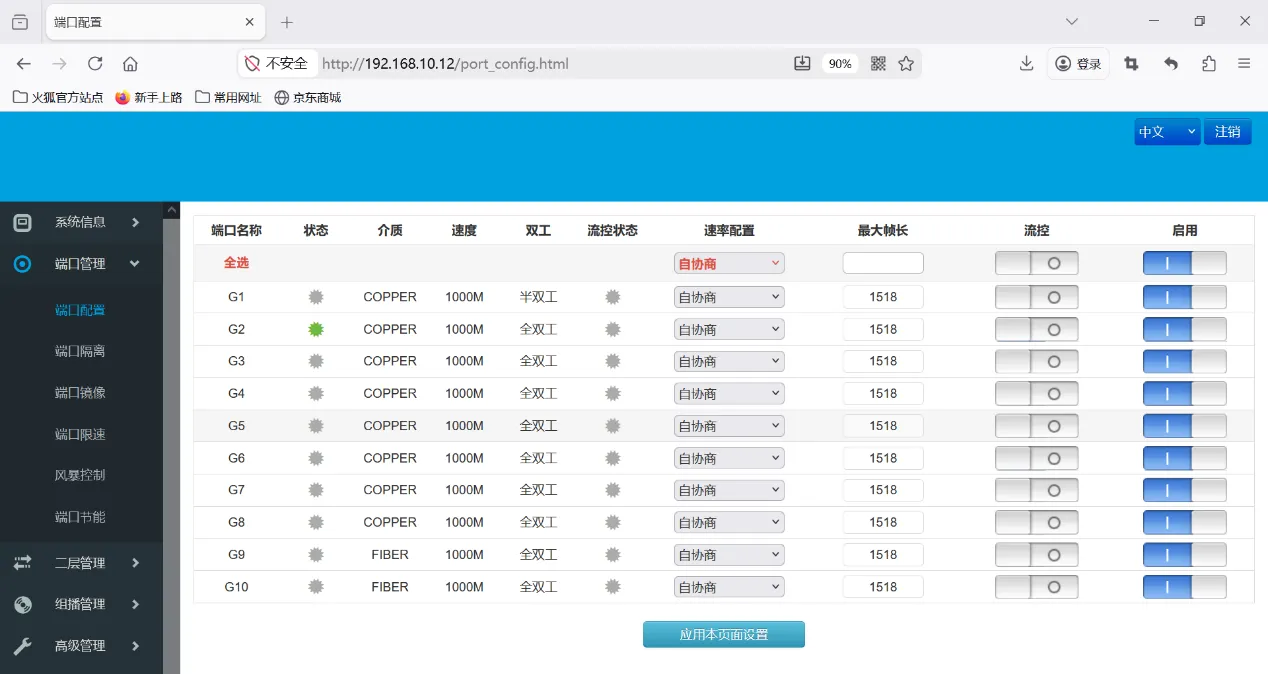
Port configuration
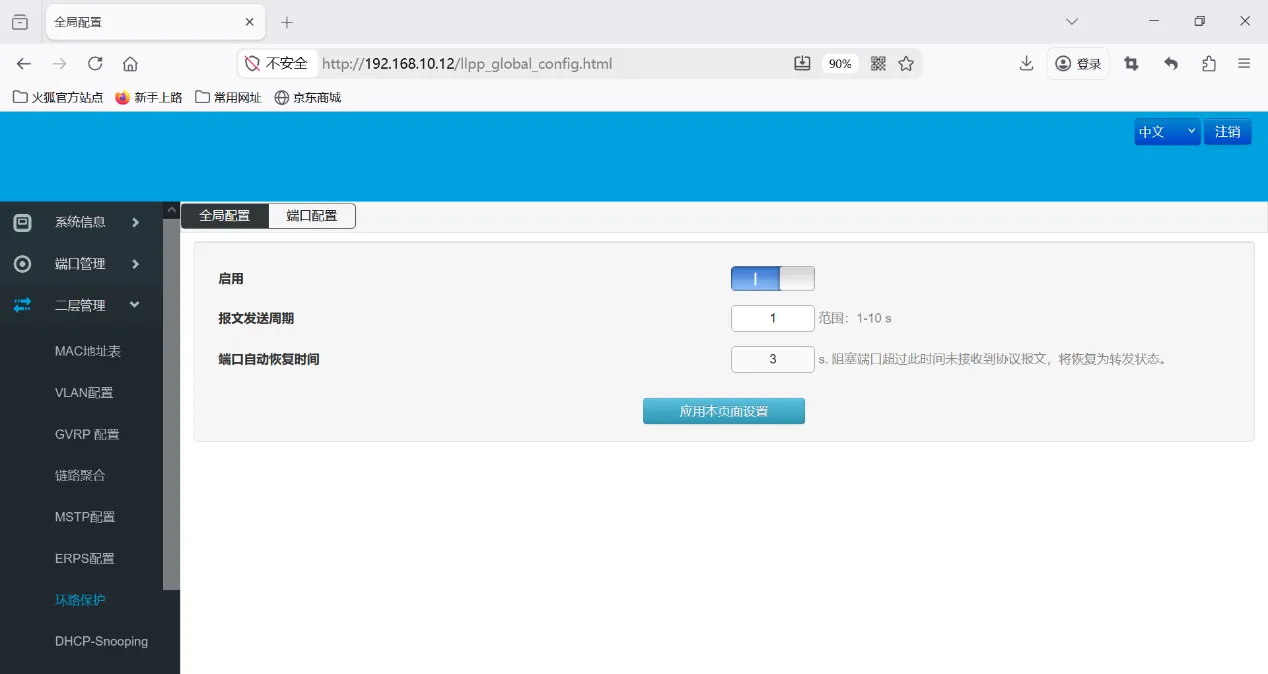
 Enable loop protection
7. Configuration Backup and Restoration
- Export the configuration file
- Restore factory configuration
8. Status Monitoring and Diagnostics
8.1 Operating Status
- Device online status
8.2 Log Viewing
- System logs
9. Common Issues and Troubleshooting
9.1 Unable to Open the Web Interface
- Unable to open the Web interface
- Check whether the network segment, network cable, and IP address conflict
- Reset the switch and try again
10. Safety Precautions
- Ensure reliable grounding at the industrial site
- Back up after completing the configuration
- Change the remote access password regularly
- Prohibit operation by unauthorized personnel