DSA API Documentation V1.0
1 fast function API reference
this section describes the Python API used inside the Gateway, which provides a set of feature-rich interfaces that enable you to write Python scripts to perform various operations and data processing on the Gateway. This section provides the necessary information and sample code to help you take full advantage of the features and performance of the product.
1.1 publishing data such as measuring points, alarms, and customizations to the cloud (publishing fast functions)
import the API for publishing data to the cloud:
parameter introduction:
topic: topic of the published data
payload: the published data payload.
qos: Message level of the published data
wizard_data: Failed to push the message for the first time. The message is stored in the offline cache according to the topic, payload, qos specified by wizard_data (if wizard_data is not specified, the sent topic, payload, qos is used). After the connection is restored, the message is uploaded to the MQTT server in chronological order. The format of wizard_data is as follows:{"topic": <topic>, "qos ": <qos>, "payload ": <payload>}
cloud_name: specifies the cloud to which the cloud is published. It is available for multi-cloud collaboration.
When configuring the "publish" fast function, there are two formats for the parameter message of the fast function (determined by whether to pass the wizard_api)
the entry function contains the wizard_api parameter. The script example is as follows (the default script)
Example of the format of the incoming message data:
the entry function does not contain the wizard_api parameter. The script example is as follows:
example of the format of the incoming message data:
1.2 update the measuring point value of the controller
1.2.1 write
this interface is a write value interface in synchronous mode. After being called, it will wait until the write value response message is returned.
message: write a measuring point message in the following format:
format 1:{"measures1": 12}. If the measuring point name is duplicated or does not exist, an exception will be thrown to indicate that the value has failed to be written.
Format 2:{"controller1": {"measures1": 12}}
format 3:[{"name": "controller1", "measures":[{"name": "measures1", "value": 12}]}]
timeout: write point response timeout, 60s by default
cloudName: indicates which cloud platform calls the write command (used to determine whether the measuring point under the current cloud platform is blocked or renamed), optional.
1.2.2 write_plc_values (recommend)
this interface is an asynchronous value write interface, and the value write response message will trigger the callback function interface.
message: write a measuring point message in the following format:
Format 1:{"measures1": 12}. If the measuring point name is duplicated or does not exist, an exception will be thrown to indicate that the value has failed to be written.
Format 2:{"controller1": {"measures1": 12}}
format 3:[{"name": "controller1", "measures":[{"name": "measures1", "value": 12}]}]
callback: the callback function executed when the PLC value is written and returned. In order to be compatible with DS1.0, the callback function also supports three parameters.
userdata: parameters passed to the callback function
timeout: write point response timeout, 60s by default
cloudName: indicates which cloud platform calls the write command (used to determine whether the measuring point under the current cloud platform is blocked or renamed). Optional
1.3 The measuring point data of the call-up Controller
1.3.1 recall
this interface is a synchronous call-to-read interface. After calling, it will wait until the response message is returned.
names: A list of recall names
recall_type: Recall data type
"measure": recall the data according to the measuring point (if names =[], that is, if no measuring point name is specified, all measuring point data on the equipment will be recalled)
"group": recall data according to the measuring point (this mode data is uploaded through the group data Message Channel)
When recall_type is "measure:
None or [], which means to obtain all measuring point data under all controllers
[{"name": "controller1", "measures": []}], representing the acquisition of all measurement point data under the controller (controller1)
[{"name": "controller1", "measures": ["measure1", "measure2"]}], representing the data of "measure1" and "measure2" under the controller (controller1)
when recall_type is "group:
["group1", "group2"], which means to obtain the data of groups "group1" and "group2"
timeout: recall timeout of the measurement point response. The default value is 10 seconds.
realTime: Whether to read real-time data. If it is set to True, the measuring point of recall will be re-read immediately and the newly read value will be returned. The default value is False, valid only when recall_type = "measure"
1.3.2 recall2 (recommend)
this interface is an asynchronous call-to-read interface, and the response message will trigger the callback function interface.
names: A list of recall names
recall_type: Recall data type
"measure": recall the data according to the measuring point (if names =[], that is, if no measuring point name is specified, all measuring point data on the equipment will be recalled)
"group": recall data according to the measuring point (this mode data is uploaded through the group data Message Channel)
when recall_type is "measure:
None or [], which means to obtain all measuring point data under all controllers
[{"name": "controller1", "measures": []}], representing the acquisition of all measurement point data under the controller (controller1)
[{"name": "controller1", "measures": ["measure1", "measure2"]}], representing the data of "measure1" and "measure2" under the controller (controller1)
when recall_type is "group:
["group1", "group2"], which means to obtain the data of groups "group1" and "group2"
callback: the callback function executed when data is recalled. To be compatible with DS1.0, the callback function also supports three parameters
userdata: parameters passed to the callback function
timeout: recall timeout of the measurement point response. The default value is 10 seconds.
realTime: Whether to read real-time data. If it is set to True, the measuring point of recall will be re-read immediately and the newly read value will be returned. The default value is False, valid only when recall_type = "measure"
1.4 to get global parameters
1.4.1 get
1.4.2 get_global_parameter
1.5 to get controller connection status
1.5.1 get_status
1.5.2 get_controller_status
get cloud connection status 1.6
import the API for obtaining the controller connection status:
return data content:
Returns True online
Return False offline
get global configuration 1.7
return data content:
Global profile information
1.8 Settings Global Configuration
return data content:
success returned: success
failed to return: failed
1.9 reading a file in a script
filePath: file path;
mode:mode determines the mode in which the file is opened: Read-only, write, append, etc. See the full list below for all possible values. This parameter is not mandatory, and the default file access mode is read-only (r). Same as the mode parameter in the open function interface in python
encode: The encoding format is the same as the encoding parameter in the open function interface in python. The default value is utf-8
size: The length of bytes read. If size is not specified, the entire file is returned, which is consistent with the size parameter in the read function interface in python.
Return data content:
The string of all the contents of the file; If there is an error, an exception will be thrown
1.10 writing a file in a script
filePath: file path;
mode:mode determines the mode in which the file is opened: Read-only, write, append, etc. See the full list below for all possible values. This parameter is not mandatory, and the default file access mode is write-only 'w '. Same as the mode parameter in the open function interface in python
data: the content (string) to be written to the file; The default is an empty string
encode: The encoding format is the same as the encoding parameter in the open function interface in python. The default value is utf-8
return data content: none; If an error occurs, an exception will be thrown.
1.11 compatible DS1 API description
1.11.1 get_group
1.11.2 update_group
1.12 History Database Universal API
1.12.1 Insert
parameter description:
table_name: Data table name
insert_data: Data to be inserted into the database
the format is::{"<timestamp>": {" controller1 ": {" measure1 ": [ \
noack: whether a response is required; 0: A response is required, 1: no response is required
callback: callback function for returning data; It can be None to indicate that the returned data is not received (this parameter is meaningful only when noack is 0)
prototype::def insert_callback(message, userdata)
userdata: parameter of the callback function (this parameter is meaningful only when noack is 0)
timeout: Request timeout (default 30 seconds)
1.12.2 Find
parameter description:
table_name: Data table name
start_time: Start time; Format:%Y-%m-%d %H:%M:%S, e.g., 12:00:00 2023-01-09
end_time: End Time; Format:%Y-%m-%d %H:%M:%S, e.g.: 16:00:00 2023-01-09
filter: filter rules for obtaining data (filter point names and set black and white lists); The format is as follows:
{"default": "accept_all", "black_list": {"controller1": ["measure1", "measure2"]}, "white_list": {}}
default:
"accept_all": returns all measuring points by default, except those in the blacklist;
"deny_all": By default, all measurement points are not returned, except those in the whitelist;
black_list: blacklist measuring point name list
white_list: whitelist test point name list
limit: limit the maximum number of entries to be recorded at one time;
offest: Skip the number of records that match the record, usually used in combination with limit;
callback: callback function to obtain data returned
prototype: def query_callback(message, userdata)
userdata: the parameter of the callback function
timeout: Request timeout (default 30 seconds)
remarks:
When the start_time field is None, it indicates that TIMESTAMP < end_time, which is sorted in descending order by default.
When the end_time field is None, TIMESTAMP >= start_time, which is in ascending order by default.
When both start_time and end_time are None, the entire data table is queried. By default, the data table is sorted in ascending order.
1.12.3 Delete
parameter description:
table_name: the name of the data table;
start_time: The start time of the time series data; When start_time is None, it indicates that TIMESTAMP < end_time
end_time: the deadline of the time series data; When end_time is None, TIMESTAMP > start_time
noack: whether a response is required; 0: A response is required, 1: no response is required
callback: callback function for returning data; It can be None to indicate that the returned data is not received (this parameter is meaningful only when noack is 0)
prototype: def remove_callback(message, userdata)
userdata: parameter of the callback function (this parameter is meaningful only when noack is 0)
timeout: Request timeout (default 30 seconds)
Note: When start_time and end_time are both None, the entire data table is cleared.
1.13 MQTT SparkPlug B cloud service API
1.13.1 Publish NBIRTH message: publish_node_online
parameter description:
cloud_name: name of the cloud service that is successfully connected
nbirth_pub_metrics: The custom metric to be published. The format must be as follows: {"Cloud service name": {"metric name": {"value": "specific value or None", "dataType": "metric data type" }}}
1.13.1 Publish NDATA message: SparkPlugB_publish_ndata
parameter description:
pub_metrics: the metrics to be published in the NDATA message. The format must be as follows [{"name": "metric name","value": None or the actual value to be uploaded}]. ( No "value" field is equivalent to "value": None )
cloud_name: name of the cloud service that publishes the NDATA message
1.13.2 Subscribe to NCMD message: node_cmd_handler
parameter description:
message: The NCMD message to be subscribed
cloud_name: cloud service name
file_path: Save the updated metric file path.
1.14 to get global variables
import the API for obtaining global variables:
from quickfaas.global_variables import get
return data content:
returns the values corresponding to all global variables when the parameter key is empty.
If the parameter key is not empty, return the value corresponding to the specified key.
1.15 setting global variables
import the API for obtaining global variables:
from quickfaas.global_variables import set
2 Internal MQTT message bus
this topic describes the important topics and payloads of the message bus inside the gateway. By reading this section, you can learn how to use specific topics and payloads to realize data transmission and processing, which will help you use the Gateway function more flexibly.
2.1 Connection internal MQTT Broker
2.1.1 EC Series Equipment
MQTT Server Address: 127.0.0.1
port number: 9105
user Name: inhand
password: inhand
create and add a controller and measuring point in measuring point monitoring. As shown in the figure:
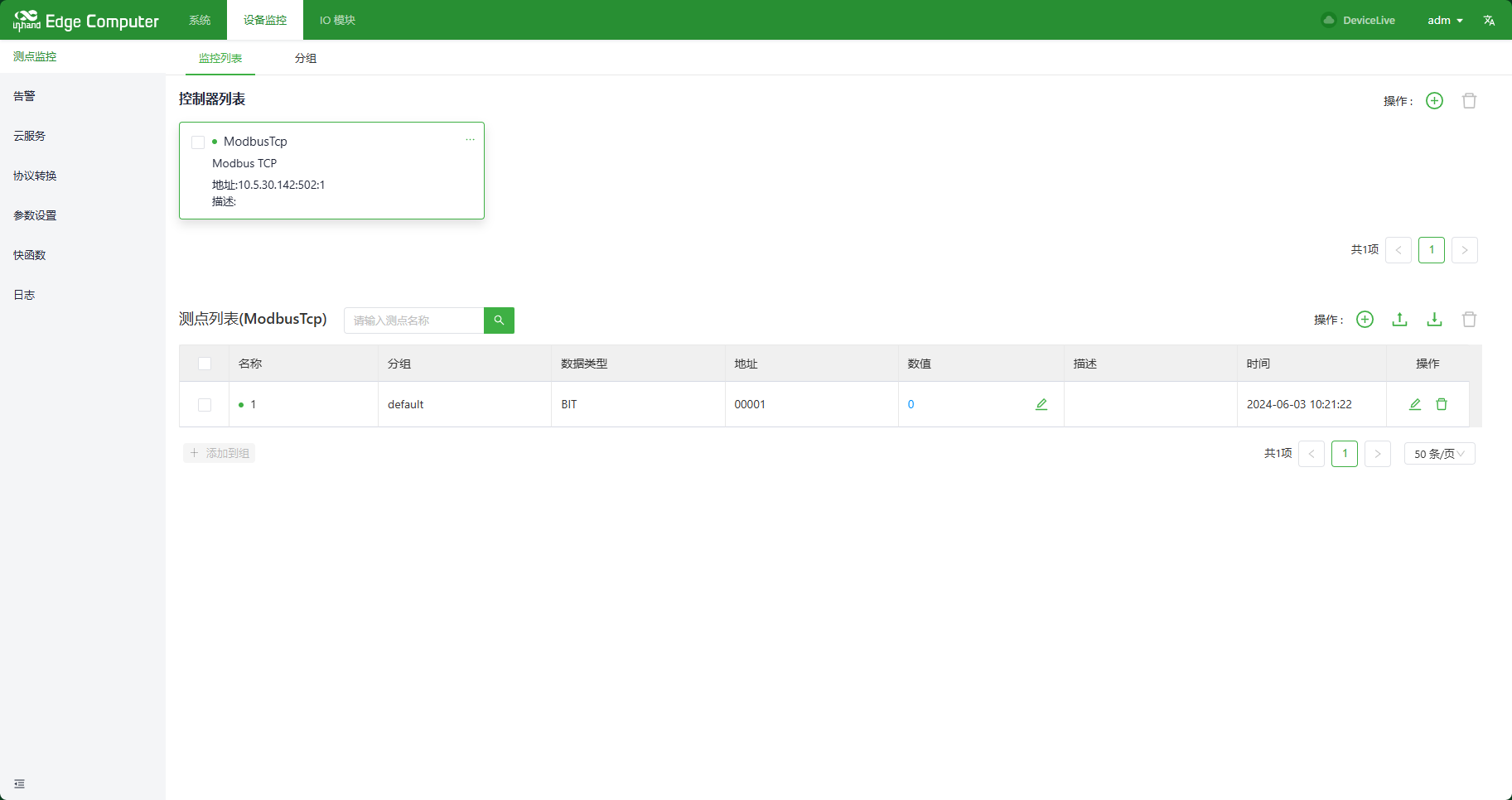
after adding the controller and measuring point, enter the background of EC equipment and install mosquitto in the background. Execute the command as shown:
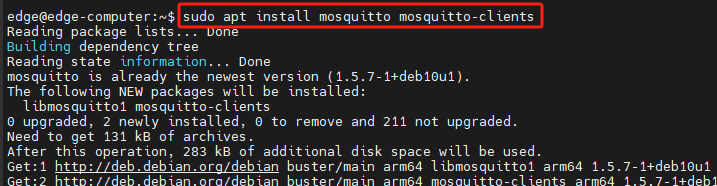
after installation, execute the command shown in the figure to subscribe to the point message published by the driver with driverServiceId 2000:

2.1.2 IG Series Equipment
MQTT Server Address: 127.0.0.1
port number: 9009
create a controller and measuring point in the measuring point monitoring, as shown in the figure:
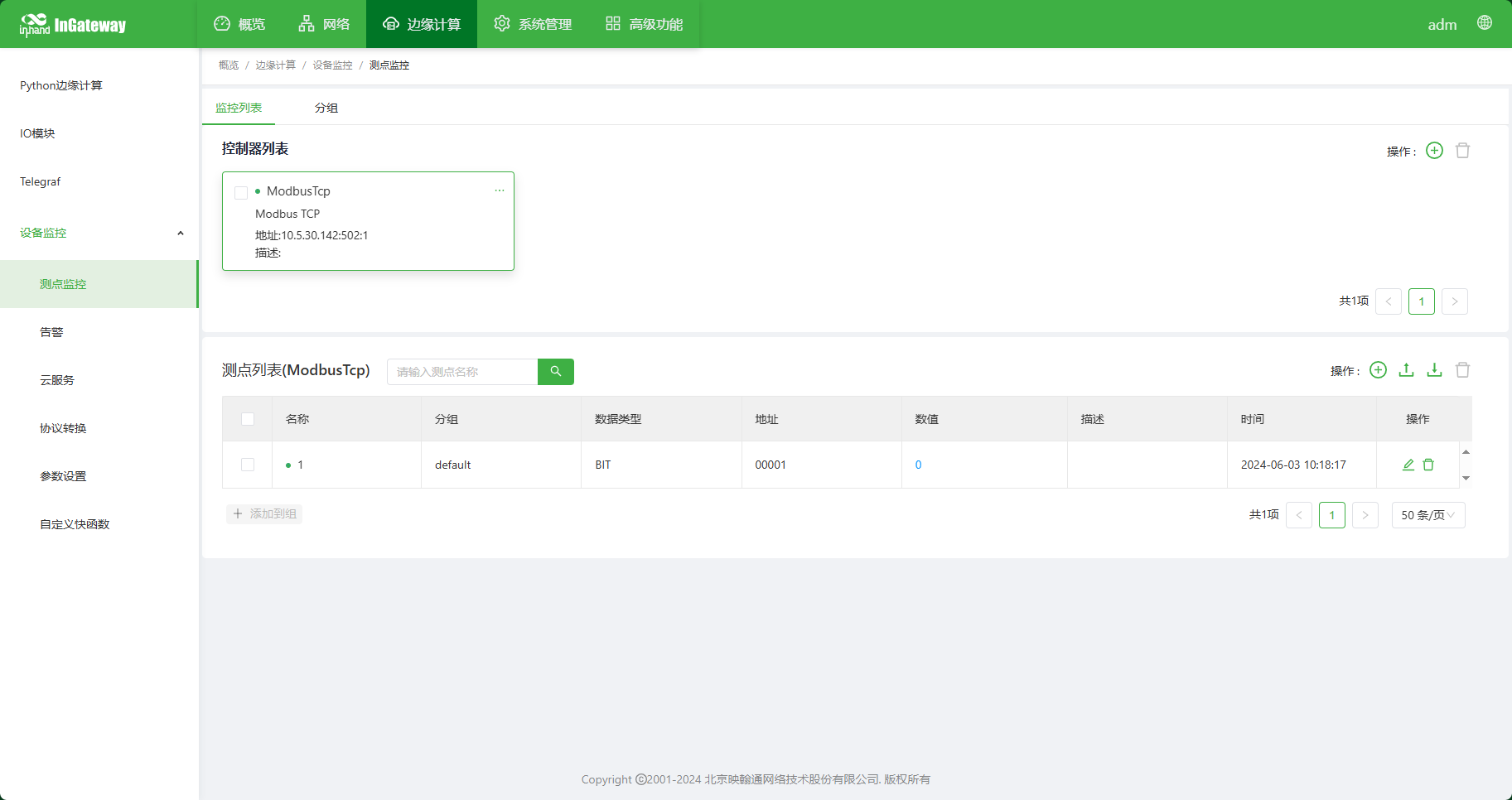
after entering the background of IG Series equipment and executing the following command, you can subscribe to the measuring point message published by the driver with driverServiceId of 2000

2.2 Southbound News
2.2.1 The driver releases the collected value of the measuring point of the controller
{driverServiceId}: the ServiceId of the current driver. You can view the ServiceId of the current driver in logs.
The following figure shows how the enabled ModbusDriver can view the ServiceId (note: ModbusDriver is not fixed or 2000, and the ServiceId varies according to the order in which the controller is enabled. The actual driverServiceId is based on the ServiceId displayed in the log):

name in controllers: Controller name
version: Controller configuration version information (virtual controller can not use this field)
health in controllers: Controller health status, 1 -- Normal, 0 -- abnormal
timestamp: the time in seconds to update the health status of the controller.
timestampMsec: the time in milliseconds for controller health updates
name in measures: the name of the measuring point
health in measures: measuring the health status of the point, 1-normal, 0-abnormal
timestamp: Unix timestamp of the query operation
value: measuring point value
2.2.2 driver releases millisecond-level data information
{controllerName}: the name of the controller that publishes data in milliseconds.
controller data: controller[0] represents the controller name, controller[1] represents the controller health status, and controller[2] represents the collection timestamp
measure data: key represents the name of the measuring point, measure[0] represents the health status of the measuring point, and measure[1] represents the value of the measuring point.
2.2.3 Write the measuring point value to the driver
{requestServiceId}: The message publisher. The ServiceId of DataHub is 1010.
msg_id: Message ID
timestamp: timestamp
name in payload: Controller name
name in measure: the name of the measuring point
value: measuring point value
2.2.4 The driver returns the result of writing the measuring point value
{requestServiceId}: The message publisher. The ServiceId of DataHub is 1010.
msg_id: Message ID
timestamp: timestamp
name in payload: Controller name
name in measure: the name of the measuring point
value: measuring point value
error_code: 0: success, 1: Write failed
error_reason: error cause description
2.2.5 Modbus Broadcast Write
protocol: communication protocol, Modbus-RTU/Modbus-TCP
endpoint: Serial port/IP address
slave: slave address
function: function Code
address: address
length: length
value: The value to be written to the register, encoded in base64
2.3 Northbound News
2.3.1 Release the grouping data of measuring points, including all measuring points in the grouping
{groupName}: group name
group: Upload message group
name: measuring point name
health:0 measuring point offline, 1 measuring point online
timestamp: The second timestamp of the time at which the data is reported.
timestampMsec: the millisecond timestamp of the data reporting moment.
value: measuring point value
2.3.2 Release the grouping data of measuring points, including only the measuring points with numerical changes in the grouping
{groupName}: group name
group: Upload message group
name: measuring point name
health:0 measuring point offline, 1 measuring point online
timestamp: The second timestamp of the time at which the data is reported.
timestampMsec: the millisecond timestamp of the data reporting moment.
value: measuring point value
2.3.3 Release alarm trigger/cancel event message
{alarmName}: alarm name
name: alarm name
ctrlName: Controller name
measureName: measuring point name
priority: Built-in alarm level, which can support the definition of 5 level value ranges [1,5]
timestamp: second-level timestamp
timestampMsec: millisecond timestamp
status:0: dismiss alarm 1: trigger alarm
value: current measuring point value
alarm_value: the value of the measuring point when the alarm is triggered
content: Description
2.3.4 Controller status update message reporting
name: Controller name
health:0 devices offline, 1 device online
timestamp: The Unix timestamp of the controller status update time.
2.3.5 Update controller measuring point value (write PLC value)
task_id: Task ID
name in controllers: Controller name
name in measures: the name of the measuring point
value: value
2.3.6 Response controller measuring point writing value
task_id: Task ID
name in controllers: Controller name
name in measures: the name of the measuring point
error_code:0: success, 1: Write failed
error_reason: error cause description
2.3.7 Data Call
actively obtain the measured point value (summoning data) of the controller.
task_id: The task ID. Only "recallType" = = "measure" is valid.
recallType: Support group, measure
when "recallType" = = "group", the measuring point data is uploaded through ds2/eventbus/north/measures/{groupName}. For details, see Measuring Point Grouping Report.
When "recallType" = = "measure", the measuring point data is uploaded through ds2/eventbus/north/recall/measures/response, at this time, the last polling point value will be obtained. , the content is as follows: if controllers = = [], the name of the measuring point is not specified
When "recallType" = = "realtime", the measuring point data is uploaded through ds2/eventbus/north/recall/measures/response, at this time, all called measuring points will be polled in real time. , the content is as follows: if controllers = = [], the name of the measuring point is not specified
groups: A list of measuring point groups. Only "recallType" = = "group" is valid.
controllers: a list of controllers. Only "recallType" = = "measure" is valid. The total number of measuring points needs to be limited, and the specific value is to be determined.
name: Controller name
measures: List of measuring points
2.3.8 Response Data Call
only when "recallType" = = "measure.
task_id: Task ID
recallType:measure
name in controllers: Device name
health in controllers: Device health status, 1 -- device normal, 0 -- device abnormal
timestamp in controllers: update time of device health status
name in measures: variable name
The health:0 -- measure query in measures failed (the rawbytes field is invalid), and the 1 -- measure query succeeded.
timestamp in measures: Unix timestamp of query operation
value: value
2.4 system messages
2.4.1 Cloud Connection Status Update
cloud_name: Upload message group
status: The status of the connection. 0 Not Enabled, 1 Connected, 2 Connected Successfully, 3 Unknown Error, 4 Registered, 5 Registered
timestamp: the timestamp of the state change time.
2.5 Historical Database
the historical database is a lightweight time series database on the edge computing gateway of the Yinghantong series. It contains the following functions:
- DSA can create data tables for measuring point grouping and store the grouped data in the database according to the specified saving strategy; (via Web configuration)
- fast functions or other data analysis programs that can query/insert/delete historical data through the MQTT message bus inside the gateway.
2.5.1 Insert Request
\
\
- \
ext-<MAC>-<pid>
\
noack:0 means that a response is required; 1 means that no response is required (when there is no noack field in the request payload, the default is 0)
data: data to be inserted. Multiple inserts are supported.
| Parameters | description |
|---|---|
| timestamp | timestamp (in seconds) when the data was inserted |
| controller1 | controller Name |
| measure1 | name of measuring point |
| measure1_health | health status of measuring points (0: offline, 1 online) |
| measure1_value | the value of the measuring point at this moment |
2.5.2 Insert Response
the insert response is received only when the noack of the insert request payload is 0.
Request Topic parameter description: the same as the request message definition.
2.5.3 Query request
request Topic parameter description: the same as the request message definition.
Parameter description:
| parameters | Data Type | parameter Description | examples |
|---|---|---|---|
| start_time | INTEGER |
INTEGER: The start time of the time series data, in seconds, including start_time. When the start_time field is negative or does not exist, it indicates TIMESTAMP < end_time, which is sorted in descending order by default. |
1669696164 |
| end_time | INTEGER |
deadline time of time series data, in seconds, excluding end_time. When the end_time field is negative or does not exist, TIMESTAMP >= start_time, which is in ascending order by default |
1669697264 |
| filter.default | ENUM | "accept_all": returns all measuring points by default, except those in the blacklist; "deny_all": By default, all measuring points are no return , except for the measuring points in the white list; |
"filter ": { "default": "deny_all ", "white_list": {"controller1": ["measure1", "measure2"]} } |
| filter.black_list | STRING ARRAY | blacklist measuring point name list | |
| filter.white_list | STRING ARRAY | name list of White List measuring points | |
| limit | INTEGER | if you need to read a specified number of data records in LwTSDB, you can use the Limit method of LwTSDB, which accepts a numeric parameter that specifies the number of records to read from LwTSDB. If you don't specify the parameter in the limit method (or limit is 0), all the data in the collection is displayed. LwTSDB itself limits the maximum number of reads to xxxx. When the number of prediction queries exceeds the limit, we recommend that the query application query by time period. |
limit:100 |
| offset | INTEGER | can be used offset method to skip a specified amount of data, offset method also accepts a numeric argument as the number of records skipped. offset usually used in combination with limit. |
offset: 10 |
note: When start_time and end_time are both negative, the entire data table is queried.
2.5.4 Query Response
request Topic parameter description: the same as the request message definition.
Parameter description:
| parameters | data Type | parameter Description | examples |
|---|---|---|---|
| total | INTEGER | regardless of the limit and skip methods, the total number of rows in the query result. | 1000 |
| offset | INTEGER | the offset position of the first line in this message in total, starting from 0. | 0 |
| size | INTEGER | number of data rows in this message | 100 |
| data[ I ].timestamp | INTEGER | data row timestamp | 1669696164 |
| data[ I ].value | dict object | controller collection of dictionary objects | {"controller1": {"measure1": [1,100], "measure2": [1, "test1"]}}} |
2.5.5 Delete Request
request Topic parameter description: the same as the request message definition.
Parameter description:
| parameters | data Type | parameter Description | examples |
|---|---|---|---|
| noack | INTEGER | 0 means a response is required; 1 means no response is required | 1 |
| start_time | INTEGER |
INTEGER: The start time of the time series data, in seconds, including start_time. When the start_time field is negative or does not exist, it indicates that TIMESTAMP < end_time |
1669696164 |
| end_time | INTEGER |
deadline time of time series data, in seconds, excluding end_time. When the end_time field is negative or does not exist, it means TIMESTAMP >= start_time |
1669697164 |
note: When both start_time and end_time are negative, the entire data table is cleared.
2.5.6 Delete Response
the deletion response is received only when the noack of the deletion request payload is 0.
Request Topic parameter description: the same as the request message definition.
2.5.7 Return Value Description
| return Value | return information | remarks |
|---|---|---|
| 0 | Okay | success |
| -1 | Request parameter error | request Parameter error |
| -2 | Table \ |
data table does not exist |
| -3 | SQL error | SQL statement execution error |
| -4 | Request timeout | request Timeout |
3 **Restful **API
DSA provides Restful APIs for obtaining status information. You can use APIs to obtain collection information and status information.
3.1 Login
request header parameters:
| name | value | description |
|---|---|---|
| Authorization | Basic YWRtOjEyMzQ1Ng== | login name and password need to be base64 encrypted and placed in http header; For example, login name: adm and Password: 123456 need to be spliced into "adm:123456" string for base64 encryption to obtain "YWRtOjEyMzQ1Ng = =" |
note: web_session is the token information after authentication. This information must be included in the request header for subsequent interface requests.
3.2 to get controller status
request header: Authorization: Bearer
parameter description:
| parameter Name | description |
|---|---|
| names | A list of controller names, separated by a number. |
Parameter description:
| parameter Name | description |
|---|---|
| name | controller Name |
| status | controller status. 0 means offline, 1 means online |
3.3 to obtain the value of the lower measuring point of the controller
request header: Authorization: Bearer
parameter description:
| parameter Name | description |
|---|---|
| ctrlName | controller Name |
| names | list of measuring point names, multiple names separated |
parameter description:
| parameter Name | description |
|---|---|
| ctrlName | controller Name |
| name | name of measuring point |
| status | measuring point acquisition status. 0 means offline, 1 means online |
| timestamp | acquisition timestamp, in seconds |
| value | acquisition value |
3.4 update the measurement point value under the controller
Request header: Authorization: Bearer
parameter description:
| parameter Name | description |
|---|---|
| name | controller Name |
| measures.name | name of measuring point |
| measures.value | measuring point value to be written |
parameter description:
| parameter Name | description |
|---|---|
| name | controller Name |
| measures.name | name of measuring point |
| measures.error_code | write value error code. 0 means success, non -0 means failure |
| measures.error_reason | error cause description |
| measures.value | get the latest value of the measuring point after writing the value |
3.5 to obtain real-time alarm information
request header: Authorization: Bearer
Request URL parameter description:
| parameter Name | description |
|---|---|
| cursor | real-time alarm start entry location |
| limit | maximum number of entries returned by real-time alarm request |
parameter description:
| parameter Name | description |
|---|---|
| cursor | real-time alarm start entry location |
| limit | maximum number of entries returned by real-time alarm request |
| total | number of entries currently returned by real-time alarm |
| result.name | alarm Name |
| result.ctrlName | name of the controller associated with the alarm |
| result.measureName | name of measuring point associated with alarm |
| result.priority | alarm level. 1 Reminder, 2 Warning, 3 Secondary, 4 Important, 5 Serious |
| result.cond1.op | alarm conditions. eq is equal to, neq is not equal to, gt is greater than, egt is greater than or equal to, lt is less than, elt is less than or equal |
| result.cond1.value | alarm Threshold |
| result.condOp | conditional combination logic. and,or,none |
| result.content | alarm description content |
| result.addr | address of alarm associated measuring point |
| result.value | collection value when alarm is generated/Released |
| result.timestamp | timestamp when the alarm is generated/canceled |
| result.status | alarm status. 0 deactivate alarm, 1 generate alarm |
get cloud connection status 3.6
request header: Authorization: Bearer
request URL parameter description:
| parameter Name | description |
|---|---|
| name | cloud Service Name |
parameter description:
| parameter Name | description |
|---|---|
| status | Cloud service status. 0 Not Enabled, 1 Connected, 2 Connected Successfully, 3 Unknown Error, 4 Registered, 5 Registered |
| connTime | connection duration, in seconds |
3.7 to get protocol transition state
request header: Authorization: Bearer
request URL parameter description:
| parameter Name | description |
|---|---|
| service | the protocol conversion type. modbustcp-slave:Modbus TCP Server iec104-server:IEC 104 Server opcua-server:OPCUA Server modbusrtu-slave:Modbus RTU Server iec101-server:IEC 101 Server sl651-client:SL651-2014 hj212-client:HJ212 Client bacnetbip-server:BACnet IP Server bacnetmstp-server:BACnet MS/TP Server dnp3-server:DNP3 Outstation iec61850Server:IEC 61850 Server snmp_agent:SNMP Agent |
parameter description:
| parameter Name | description |
|---|---|
| service_status.status | service status. 0 not started, 2 running |
| service_status.runtime | run time, in seconds |
| link_status.ip | IP address of connected device |
| link_status.port | connection device port number |
| link_status.status | connection status |
| link_status.linktime | connection duration |
4 Global Profile
1 2 3 4 5 6 7 8 9 10 11 12 13 14 15 16 17 18 19 20 21 22 23 24 25 26 27 28 29 30 31 32 33 34 35 36 37 38 39 40 41 42 43 44 45 46 47 48 49 50 51 52 53 54 55 56 57 58 59 60 61 62 63 64 65 66 67 68 69 70 71 72 73 74 75 76 77 78 79 80 81 82 83 84 85 86 87 88 89 90 91 92 93 94 95 96 97 98 99 100 101 102 103 104 105 106 107 108 109 110 111 112 113 114 115 116 117 118 119 120 121 122 123 124 125 126 127 128 129 130 131 132 133 134 135 136 137 138 139 140 141 142 143 144 145 146 147 148 149 150 151 152 153 154 155 156 157 158 159 160 161 162 163 164 165 166 167 168 169 170 171 172 173 174 175 176 177 178 179 180 181 182 183 184 185 186 187 188 189 190 191 192 193 194 195 196 197 198 199 200 201 202 203 204 205 206 207 208 209 210 211 212 213 214 215 216 217 218 219 220 221 222 223 224 225 226 227 228 229 230 231 232 233 234 235 236 237 238 239 240 241 242 243 244 245 246 247 248 249 250 251 252 253 254 255 256 257 258 259 260 261 262 263 264 265 266 267 268 269 270 271 272 273 274 275 276 277 278 279 280 281 282 283 284 285 286 287 288 289 290 291 292 293 294 295 296 297 298 299 300 301 302 303 304 305 306 307 308 309 310 311 312 313 314 315 316 317 318 319 320 321 322 323 324 325 | |
global profile parameter description:
| parameter Name | description |
|---|---|
| controllers | list of controllers monitored by measuring point |
| measures | List of measuring points monitored |
| alarms | alarm rule list |
| alarmLables | alarm label list |
| groups | grouping list of monitoring points |
| misc | parameter setting information |
| clouds | cloud Service List |
| labels | list of custom parameters for parameter settings |
| quickfaas | list of publish, subscribe, and custom fast functions |
| mindspheres | * MindSphere IoT cloud service |
| modbusSlave | Modbus TCP Slave protocol conversion configuration |
| modbusRTUSlave | Modbus RTU Slave protocol conversion configuration |
| iec104Server | IEC 104 Server Protocol Translation Configuration |
| iec101Server | IEC 101 Server Protocol Translation Configuration |
| iec104Client | White Eagle Energy Steward (IEC 104) cloud service configuration |
| opcuaServer | OPCUA Server protocol conversion configuration |
| iec61850Server | IEC 61850 Server Protocol Translation Configuration |
| sl651Slave | SL651-2014 Protocol Conversion Configuration |
| hj212Client | HJ212 Client protocol conversion configuration |
| bacnetServer | BACnet IP Server protocol conversion configuration |
| bacnetMSTPServer | BACnet MS/TP Server protocol conversion configuration |
| Dnp3Server | DNP3 Outstation protocol conversion configuration |
| snmpAgent | SNMP Agent protocol conversion configuration |