IR615 IPsec VPN Configuration Guide
1. Document Information
- Document name: VPN Configuration Guide
- Product model: IR615
- Firmware version: V1.0.95
- Applicable scenarios: device networking, remote maintenance, IPsec VPN applications
- Date of preparation: March 25, 2026
2. Gateway Overview
2.1 Product Introduction
The InHand Networks IR615 series is a 4G industrial wireless router designed for industrial IoT scenarios, featuring three core characteristics: "stability, ease of use, and security." It is mainly used to solve the networking problems of industrial field equipment (such as PLCs, sensors, and self-service terminals), and is suitable for distributed unattended scenarios such as charging piles, vending machines, smart parcel lockers, and advertising media.
2.2 Main Functions
- 4G Internet access
- VPN tunnel encryption
- Remote configuration, remote diagnosis, remote upgrade
- Wide-temperature industrial-grade design
2.3 Typical Application Topology
Device → Ethernet → VPN client → 4G / Ethernet → VPN server → cloud platform
3. Hardware Description
3.1 Appearance and Interfaces
- Power interface: DC 9–36V
- Network ports: LAN ×4 + 1 WAN
- Wireless: 4G
- Indicators: PWR, RUN, COM, NET, signal strength
- Reset button: restore factory settings
3.2 Wiring Instructions
3.2.1 Power Wiring
- Positive: V+
- Negative: V-
- Note: reverse-polarity protection, lightning protection, grounding
3.2.2 Ethernet Wiring
Auto MDI/MDIX (straight-through / crossover auto-sensing); Cat5e or better cable recommended.
4. Factory Default Parameters
- Default IP: 10.164.176.1
- Subnet mask: 255.255.255.0
- Web username: adm
- Web password: 123456
5. Preparation
- Set the computer to an IP in the same subnet as the gateway
- Connect the computer to the gateway LAN port with a network cable
- Power on the router and wait for the RUN indicator to stay solid
- Enter the device IP in a browser to access the configuration page
6. Network Configuration
6.1 LAN Port Configuration (Static / DHCP)
- Go to [Network Settings] → [WAN]
- Select static IP / DHCP
- Set the IP, subnet mask, gateway, and DNS
- Save and apply
6.2 4G Wireless Network Configuration
- Insert a 4G SIM card
- Enable the mobile network
- APN: automatic
- Check signal strength
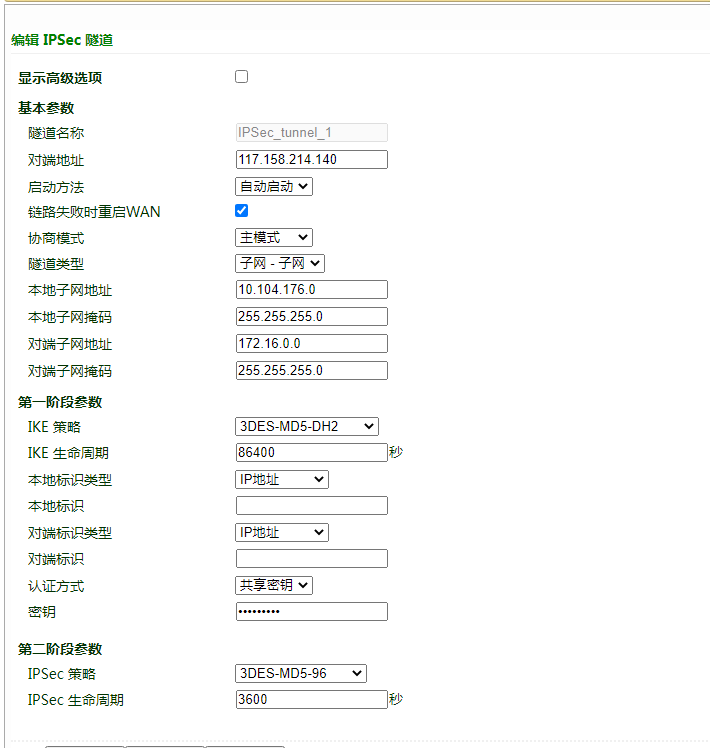
7. VPN Tunnel Configuration
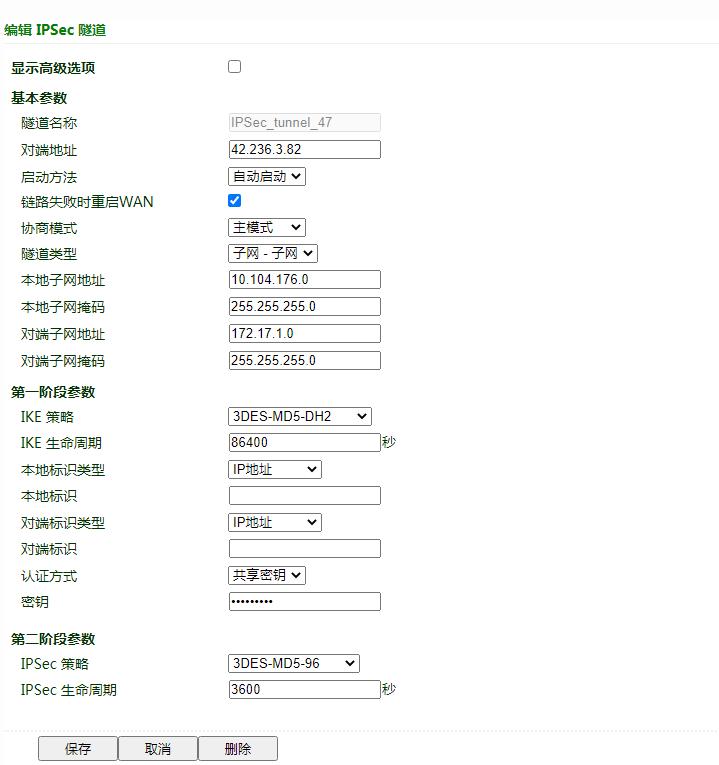 Pre-shared key: HWzhsw123
8. Configuration Backup and Recovery
- Export configuration file
- Restore factory configuration
9. Status Monitoring and Diagnosis
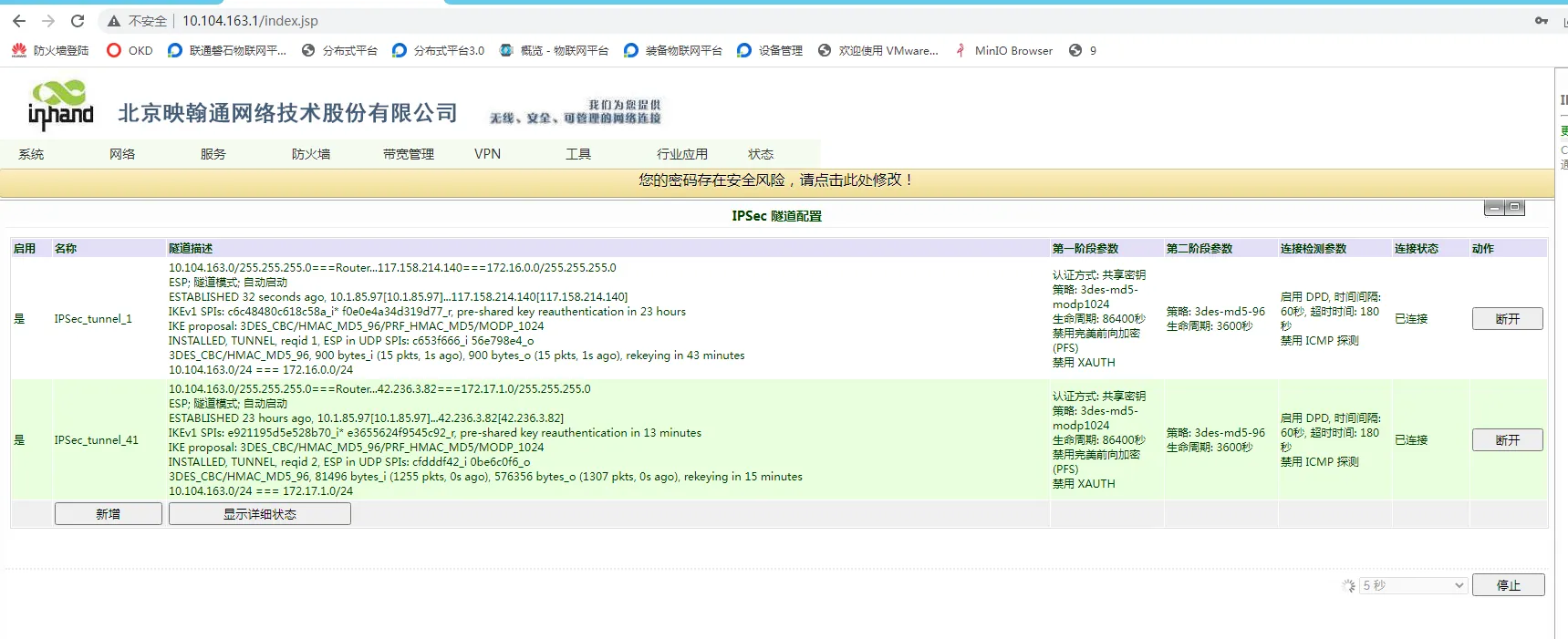
9.1 Operating Status
- Device online status
- Network traffic, signal strength
9.2 Log Viewing
- System logs
10. Common Problems and Troubleshooting
- Unable to open the Web page
- Check the subnet, network cable, and whether the IP conflicts
- Reset the gateway and retry
- Device online but no data
- Check the point addresses and data types
- Check the collection logs
- Check whether the device supports the protocol
- Check whether the firewall / ports are open
10. Safety Precautions
- Reliable grounding at industrial sites
- Change the LAN port address to the gateway of the local subnet
- Back up after configuration is complete
- Change remote passwords regularly
- Prohibit operation by unauthorized personnel