EC Series API Documentation V1.0
API usage instructions
- IEOS provides a set of HTTP APIs for network management and system management. Users can use tools such as curl and Postman or use code to build and send HTTP requests to manage devices.
- The API uses the HTTPS protocol. Because a self-signed certificate is used, the client does not need to verify the certificate. The method of not verifying the certificate is as follows:
- curl Command plus
-kparameters - Postman needs to close
SSL certificate verification 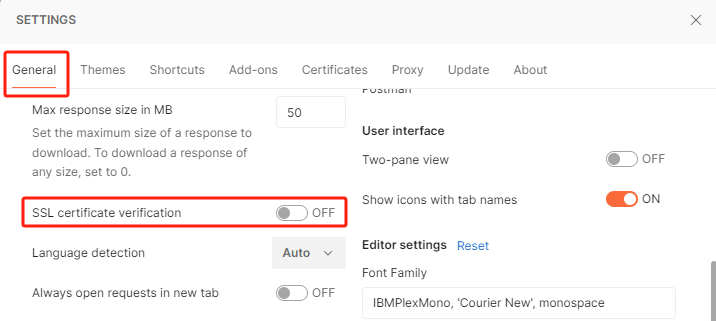
- HTTP API Port fixed
9100, the URL needs to be prefixed when used:https://<IP>:9100 - under Linux system, you can use curl Command to call API, for more curl Command usage: https://curl.se/docs/
- under Windows system, you can use Postman software to call API,Postman uses the document: https://learning.postman.com/docs/introduction/overview/
obtain authentication
- before using all APIs, you need to log on to the device by using the user name and password to obtain the authentication token.
- URL:
POST /api/v1/login - request parameter: Json string
- when calling the logon API outside the device, you need to perform RSA encryption on the user name and password, and then use base64 encoding after encryption.
- RSA public key:
| **Attribute ** | **In ** | **Type ** | **Required ** | **Description ** |
|---|---|---|---|---|
| username | body | string | true | user name for web login |
| password | body | string | true | password for web login |
- note: The following firmware versions use the original username and password when calling the login API:
- EC5000 Series Less Than V2.0.12
- EC3320 Less than V2.0.4
- EC312 Less Than V2.0.17
- EC954 is less V2.1.9
- EC942 is less than V2.0.15
- Response
- login succeeded
- example
- in the example, the device IP is 192.168.3.100, the user name is adm, and the password is 123456.
- Postman
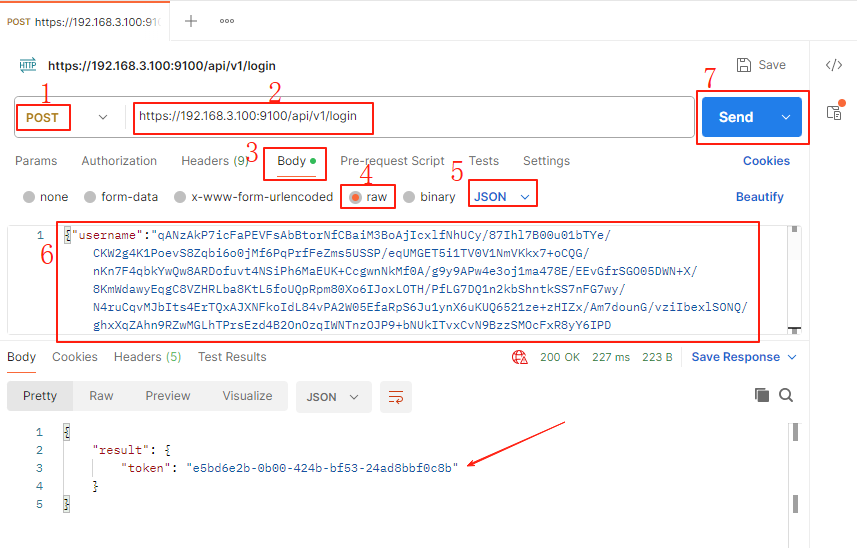
- open Postman and create a new request
- select POST mode and enter URL
https://192.168.3.100:9100/api/v1/login - click Body-raw-JSON, enter
{"username":"IR56j9l1jOwBwbTkqEnbYINSyF5cI9zAArBeYmtHgFyiYeD7lAr5ohG1IB+uUiShz1uYoEmS0tKnE7c0QMFkO60KTcHq02oSQy9rMBRF9gLP7lxL+Lg/RKL5dRtR7ZsT6CCi460TI1jFISA77wojlyRM4sd1ewlxnXiE/d6tfxqo9x0fk6sT6dFKsjLnEvJ81Rd8rPWTfhWqA54BL9S+Vmlr0UGrn3DBrBqmyGHgtt3GycaemJfbnhLjJ0NEyVuAz2JhAhzooaqRZtj7yTtC2ioD+keIfPH5SG2njDVI/elPy3BEVgbPO09EzyKP3+d/CGfxBvoYRWwlE3M5IRULQD2Sq0WChTK81OYA9wI8lwD4ymHXVPkJtqKk7IyDACot1j0ilH/7YVkRxC7wc0rUfsv1KCVp2En/ADr1iMCSl5rxH/vdJLG8FB+cTLnQdVM4T/T3XiD2tUwatIc1xrPczJ6W0dxHov+sxz+T/e1MC3WidgoIgS7J9lvfERKge4whXOEB3BkTfIkuLrFHlwn9KH7LP0IR3XslTPcxH6wT1W4wGPRcsaPleGiS58IBD+g3//dLkt84RExidMYCErgqHgUiB2Ja3Hn7SvySftop/OpWsub7/k0d8urh1yhvlhOf6XkA6IexsPbuTOGn6GwGPVDZ91Vslm69LwpXVmn8RDE=","password":"SIjEk3z8FG0YtgvzvB7Cs7ceDnR1YZiRYl3fVnB9b84gwTAKZ3GGK5Uqz2KA0AU8eT1qBNiyn2pTm48IQLUTg2Kz5DWDv6sFwvFara36iNJxlfxNLGW7XcbUuFHeP2zLnrRLUx+XDMvYNk4naCtF1hHNzBQqGQ9oUMAELChchZlfYJIBM9Du8OpjH7zKkA2wdIZsNtCN4Ld9LME7GeQufGWTTuSoP4FZb74qgmnvplv8/MO0fWlrtwj0j15BSY98GO8+b2teaJLpXdYoUiLwQj12apKMHNJEI7pEEE/0XJ1mee5Adag6tWEh+wfvBr0YEWr1jzT+R3McjvnqdMH7h5f7imRLaDvrxgNTm+ZJ3kb+14+Y4wZMqsI7sTpPO8T1bfCa3u/4ZvG8Q4HReXu74Li5Zk1qpHnXwQYoHSzZsSO0URByDE/jSqbPhsoMLEmJuuMK3xJZsY1msTR0PiKcp5oOKZhbkEGpuxe9xN8neZWDAp04aaMv69Kzm9mGixzqUeDDTt2DTiH8lOq1Fxd9GMxgkt7KYzRTQ9mNTd+fKnTl27fnrm7YgxPXJhlkd2iT0kZojL7RIVkWUnl4lqd5m4MEuVq8CGA2ZdN/KKnEPJRha0lr6FVAzc8HwZyAgarLUbhty9i2h5cfJfGdoWM89VNIGUEa/FjnutMJsRLumkg="} - Click Send, and if the token is displayed in the Response, the login is successful.
- curl
- authentication Usage
- save the token value in the response and add the request header to other HTTP API requests:
Authorization: Bearer <token> - curl add method: plus parameters
-H "Authorization: Bearer <token>" - how to add Postman:
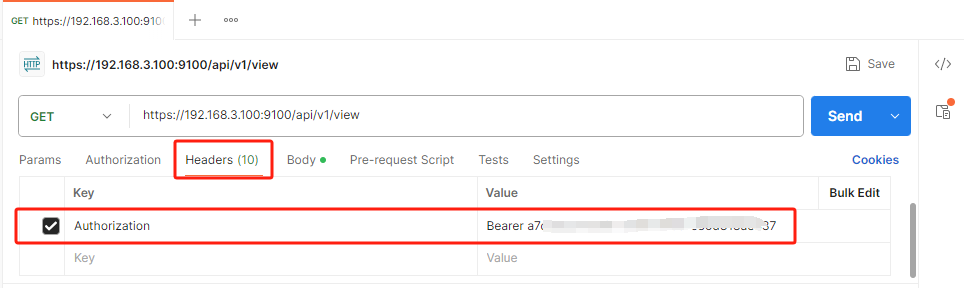
internal acquisition authentication
- if you access the API from within the device, you can directly log on to the API without a username and password:
GET http://127.0.0.1:9102/api/v1/internal/login
- note: the following firmware versions do not have this feature:
- EC5000 Series Less Than V2.0.15
- EC3320 Less than V2.0.7
- EC312 Less than V2.0.22
- EC954 is less V2.1.10
- EC942 is less than V2.0.16
**system Management **
response Description
- the following are some common response instructions for calling API
- Success will generally return result as OK, failure will return failure type
errorand failure detailsmessage - request successful
CODE_BLOCK_PLACEHOLDER7CODE_BLOCK_PLACEHOLDER
- Token failed, need to login again
CODE_BLOCK_PLACEHOLDER8CODE_BLOCK_PLACEHOLDER
- wrong input parameter for request
CODE_BLOCK_PLACEHOLDER9CODE_BLOCK_PLACEHOLDER
- server Error
CODE_BLOCK_PLACEHOLDER10CODE_BLOCK_PLACEHOLDER
change Password
change the password through API
CODE_BLOCK_PLACEHOLDER11CODE_BLOCK_PLACEHOLDER
- request parameters: Json
CODE_BLOCK_PLACEHOLDER12CODE_BLOCK_PLACEHOLDER
| **Attribute ** | **In ** | **Type ** | **Required ** | **Description ** |
|---|---|---|---|---|
| old | body | string | true | current password, encoded in base64 |
| new | body | string | true | the new password is encoded in base64. The password is 8 to 128 characters in length and contains at least three types of letters, lowercase letters, numbers, and symbols. |
CODE_BLOCK_PLACEHOLDER13CODE_BLOCK_PLACEHOLDER
| Model | version Number |
|---|---|
| EC5000 Series | V2.0.12 |
| EC3320 | V2.0.4 |
| EC312 | V2.0.17 |
| EC954 | V2.1.9 |
| EC942 | V2.0.15 |
- response
- success
CODE_BLOCK_PLACEHOLDER14CODE_BLOCK_PLACEHOLDER
- example
- Postman
- curl
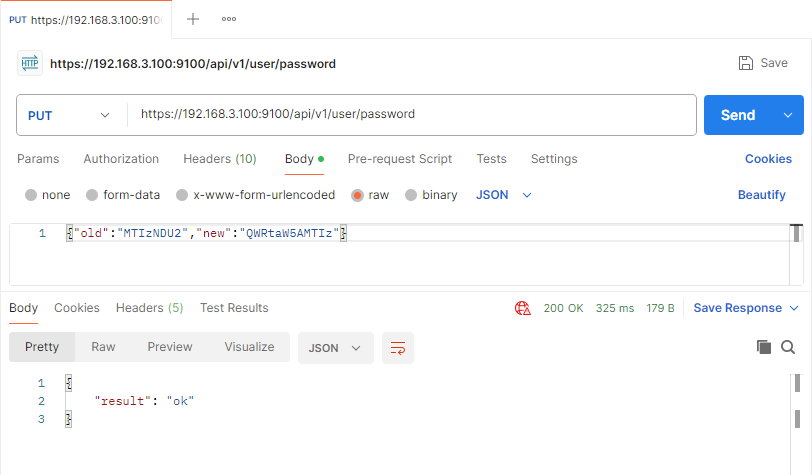
CODE_BLOCK_PLACEHOLDER15CODE_BLOCK_PLACEHOLDER
CODE_BLOCK_PLACEHOLDER16CODE_BLOCK_PLACEHOLDER
change password through configuration file
- export Configuration File
- generate password hash
- install the htpasswd tool:
apt install apache2-utils - generate password hash:
htpasswd -bnBC 10 "" "password" | tr -d ':' - replace
passwordparameters - import Configuration File
status Query
CODE_BLOCK_PLACEHOLDER17CODE_BLOCK_PLACEHOLDER
- request Parameters
- None
- **response **
CODE_BLOCK_PLACEHOLDER18CODE_BLOCK_PLACEHOLDER
- **response parameter description **
| parameter Name | type | description |
|---|---|---|
| hostname | String | host name of the system |
| model | String | equipment Model |
| sn | String | device Serial Number |
| bootLoader | String | bootLoader version number |
| kernel | String | kernel version number |
| version | String | software version number |
| cpuLoad | String | average of the available system load over the past 1, 5, and 15 minutes, respectively |
| startedAt | String | system startup time |
| time | String | System Time |
| rates | Array | resource Usage |
| rates.total | Number | total |
| rates.usage | Number | used |
| rates.rate | Number | utilization rate |
| rates.name | String | resource Name memory: memory cpu:CPU user: user Flash space |
| OS | String | system version number |
- **example **
CODE_BLOCK_PLACEHOLDER19CODE_BLOCK_PLACEHOLDER
CODE_BLOCK_PLACEHOLDER20CODE_BLOCK_PLACEHOLDER
restart device
CODE_BLOCK_PLACEHOLDER21CODE_BLOCK_PLACEHOLDER
- **request Parameters **
- none
- **response **
CODE_BLOCK_PLACEHOLDER22CODE_BLOCK_PLACEHOLDER
- **description **
- the device restarts immediately after the response data is returned
restore factory
CODE_BLOCK_PLACEHOLDER23CODE_BLOCK_PLACEHOLDER
- **request Parameters **
- **none **
- response
CODE_BLOCK_PLACEHOLDER24CODE_BLOCK_PLACEHOLDER
- **Description **
- restores parameters configured through IEOS, does not delete data such as software installed by the user
reset the system
CODE_BLOCK_PLACEHOLDER25CODE_BLOCK_PLACEHOLDER
- **request Parameters **
- **none **
- **response **
CODE_BLOCK_PLACEHOLDER26CODE_BLOCK_PLACEHOLDER
- **description **
- all user data will be deleted and the system will be restored to its initial state.
Export Configuration
CODE_BLOCK_PLACEHOLDER27CODE_BLOCK_PLACEHOLDER
- request parameters:
- none
- response
- profile Contents
- example
- get the configuration file and save it to config.json
CODE_BLOCK_PLACEHOLDER28CODE_BLOCK_PLACEHOLDER
CODE_BLOCK_PLACEHOLDER29CODE_BLOCK_PLACEHOLDER
- description
- export the parameters configured by the user through IEOS, in the format of json
import Configuration
CODE_BLOCK_PLACEHOLDER30CODE_BLOCK_PLACEHOLDER
- request parameters:
| **Attribute ** | **In ** | **Type ** | **Required ** | **Description ** |
|---|---|---|---|---|
| file | body | file | true | profile |
- response
CODE_BLOCK_PLACEHOLDER31CODE_BLOCK_PLACEHOLDER
- example
CODE_BLOCK_PLACEHOLDER32CODE_BLOCK_PLACEHOLDER
CODE_BLOCK_PLACEHOLDER33CODE_BLOCK_PLACEHOLDER
- description
- After the import configuration is successful, the device will automatically restart
get Configuration
CODE_BLOCK_PLACEHOLDER34CODE_BLOCK_PLACEHOLDER
- request Parameters
| **Attribute ** | **In ** | **Type ** | **Required ** | **Description ** |
|---|---|---|---|---|
| fields | query | string arrays | false | the field to be queried, supporting multiple fields, using the symbol "," supported formats: baseSystem baseSystem.setting networkServices.dhcp networkServices.wifi_config,networkServices.dhcp |
- response
CODE_BLOCK_PLACEHOLDER35CODE_BLOCK_PLACEHOLDER
- example
CODE_BLOCK_PLACEHOLDER36CODE_BLOCK_PLACEHOLDER
CODE_BLOCK_PLACEHOLDER37CODE_BLOCK_PLACEHOLDER
update Configuration
CODE_BLOCK_PLACEHOLDER38CODE_BLOCK_PLACEHOLDER
- request Parameters
- Json string, format reference Obtaining System Configuration Response Data
- response
CODE_BLOCK_PLACEHOLDER39CODE_BLOCK_PLACEHOLDER
- example
- take modifying hostname as an example
CODE_BLOCK_PLACEHOLDER40CODE_BLOCK_PLACEHOLDER
CODE_BLOCK_PLACEHOLDER41CODE_BLOCK_PLACEHOLDER
cloud Services
start Cloud Service
CODE_BLOCK_PLACEHOLDER42CODE_BLOCK_PLACEHOLDER
- Request Parameters
| **Attribute ** | **In ** | **Type ** | **Required ** | **Description ** |
|---|---|---|---|---|
| region | url | String | true | can only be cn or us cn: domestic platform us: Overseas Platform |
- response
CODE_BLOCK_PLACEHOLDER43CODE_BLOCK_PLACEHOLDER
stop Cloud Service
CODE_BLOCK_PLACEHOLDER44CODE_BLOCK_PLACEHOLDER
- request parameters:
- none
- response
CODE_BLOCK_PLACEHOLDER45CODE_BLOCK_PLACEHOLDER
querying Cloud Service Status
CODE_BLOCK_PLACEHOLDER46CODE_BLOCK_PLACEHOLDER
- request parameters:
- none
- response
CODE_BLOCK_PLACEHOLDER47CODE_BLOCK_PLACEHOLDER
- parameter Description
- enabled: function on state
- region: connected cloud platform
- status:online, offline: offline
plug-in Management
plug-in installation
CODE_BLOCK_PLACEHOLDER48CODE_BLOCK_PLACEHOLDER
- request parameters:
| **Attribute ** | **In ** | Type | **Required ** | **Description ** |
|---|---|---|---|---|
| file | body | file | true | plugin installation package, ending with .tar.gz |
- response
CODE_BLOCK_PLACEHOLDER49CODE_BLOCK_PLACEHOLDER
plugin Uninstall
CODE_BLOCK_PLACEHOLDER50CODE_BLOCK_PLACEHOLDER
- request parameters: Json
| **Attribute ** | **In ** | **Type ** | **Required ** | **Description ** |
|---|---|---|---|---|
| name | url | string | true | plug-in name |
| retain | body | boolen | true | whether to retain data, by default true-reserved false-do not reserve |
- response
CODE_BLOCK_PLACEHOLDER51CODE_BLOCK_PLACEHOLDER
plug-in List
CODE_BLOCK_PLACEHOLDER52CODE_BLOCK_PLACEHOLDER
- request parameters:
- none
- response
CODE_BLOCK_PLACEHOLDER53CODE_BLOCK_PLACEHOLDER
CODE_BLOCK_PLACEHOLDER54CODE_BLOCK_PLACEHOLDER
plugin running
CODE_BLOCK_PLACEHOLDER55CODE_BLOCK_PLACEHOLDER
- request parameters:
- name: plug-in name
- response
- success
CODE_BLOCK_PLACEHOLDER56CODE_BLOCK_PLACEHOLDER
CODE_BLOCK_PLACEHOLDER57CODE_BLOCK_PLACEHOLDER
CODE_BLOCK_PLACEHOLDER58CODE_BLOCK_PLACEHOLDER
plug-in Stop
CODE_BLOCK_PLACEHOLDER59CODE_BLOCK_PLACEHOLDER
- request parameters:
- name: plug-in name
- response
CODE_BLOCK_PLACEHOLDER60CODE_BLOCK_PLACEHOLDER
network Management
querying Network Port Configuration
CODE_BLOCK_PLACEHOLDER61CODE_BLOCK_PLACEHOLDER
- **response **
CODE_BLOCK_PLACEHOLDER62CODE_BLOCK_PLACEHOLDER
CODE_BLOCK_PLACEHOLDER63CODE_BLOCK_PLACEHOLDER
update network port configuration
CODE_BLOCK_PLACEHOLDER64CODE_BLOCK_PLACEHOLDER
- **request parameter example **
CODE_BLOCK_PLACEHOLDER65CODE_BLOCK_PLACEHOLDER
**parameter Description **
networkServices,network,interface,config_id (that is, the 0002000000000000 in the example),config-nameandifnameThey are fixed fields, and their values are maintained by the vendor. Before calling the update port configuration API, you need to call the query port configuration API to obtain the values of these fields.proto,ipaddrandnetmaskfields are maintained by the customer.
| **Attribute ** | **Type ** | **Required ** | **Range ** | **Description ** |
|---|---|---|---|---|
| proto | string | true | protocol Type; Available value: static, dhcp |
|
| ipaddr | string | true | interface IP address; When protofor dhcpwhen, will ipaddrset "" |
|
| netmask | string | true | network mask; When protofor dhcpwhen, will netmaskset "" |
query cellular configuration
CODE_BLOCK_PLACEHOLDER66CODE_BLOCK_PLACEHOLDER
- **response **
CODE_BLOCK_PLACEHOLDER67CODE_BLOCK_PLACEHOLDER
CODE_BLOCK_PLACEHOLDER68CODE_BLOCK_PLACEHOLDER
update cellular configuration
CODE_BLOCK_PLACEHOLDER69CODE_BLOCK_PLACEHOLDER
- **request parameter example **
CODE_BLOCK_PLACEHOLDER70CODE_BLOCK_PLACEHOLDER
- **parameter Description **
| **Attribute ** | **Type ** | **Required ** | **Range ** | **Description ** |
|---|---|---|---|---|
| enable | int | true | [0,1] | cellular function enable switch |
| sim_profiles | array | true | 10 | Cellular network configuration candidates, up to 10; Each candidate contains information such as apn/user/password; Select one when dialing; Non-private network environment can be configured, and the default configuration can be retained. Configure up to 10 group members |
| index | int | true | [1, 10] | configure the index value of the candidate |
| apn | string | true | [1,128] characters | apn configuration item |
| username | string | true | [1,128] characters | user name configuration item |
| password | string | true | [1,128] characters | password Configuration Item |
| auth_type | int | true | [0,3] | authentication method; 0: No authentication; 1:pap,2:chap;3:auto(pap or chap, device auto selection) |
| sim1_profile_id | int | true | [0,10] | the index value of the configuration candidate selected by the SIM1 card; 0 indicates that automatic configuration is used; Other values correspond to indexes in sim_profiles. |
| sim2_profile_id | int | true | [0,10] | the index value of the configuration candidate selected by the SIM2 card; 0 indicates that automatic configuration is used; Other values correspond to indexes in sim_profiles. |
| enable_infinitely_redial | int | true | [0,1] | infinite redial enable switch; Closed by default; When dialing fails 120 times in a row, the system will be restarted to try to solve the problem of dialing failure. For devices without SIM card, this option can be turned on. After it is turned on, the system will not be restarted no matter how many times dialing fails. |
| enable_dualsim | int | true | [0,1] | dual card enable switch; Off by default and use SIM1 card for dialing |
| main_sim | int | true | [0,1] | after the dual card is turned on, the SIM card selected for dialing is preferred; It is only valid when the dual card is turned on; 0:SIM1 card; 1:SIM2 |
| dualsim_config.retries | int | true | [1, 10] | after opening dual cards, switch to another SIM card for dialing when the current SIM card fails to dial for the number of times set by retires; Default value 3 |
| network_mode | int | true | [0, 13] | network system; 0: automatic; 1:GSM;2:WCDMA;3:LTE;4:TD-SCDMA;5:UMTS;6:CDMA;7:HDR;8:CDMA and HDR;9: reserved; 10: reserved; 11:5g; 12:5g SA;13:5g NSA; The network system here is for all modules supported by inhand, specific modules only support some of these options |
| enable_default_route | int | true | [0,1] | cellular Port default route enable switch; After opening, a default route based on cellular network will be automatically created after successful dialing |
| route_metric | int | true | [2, 255] | priority of default route for cellular network |
| dial_interval | int | true | [1, 3600]s | redial interval; When the current dialing fails, the interval of the next dialing automatically starts; The default is 10s. |
| signal_interval | int | true | [1, 3600]s | signal query interval; Default 120s |
| addr | array | false | 2 | imp detection address, that is, ICMP detection enable switch; Closed by default; Turning on detection helps to solve the problem of fake connection in cellular network, and it is recommended that customers turn it on. The opening method is to configure at least one address that can be reached by ICMP messages. However, only 2 probe addresses can be configured at most. The shutdown method is to delete all probe addresses; When two addresses are configured, the first address is detected first, will not detect the second address; |
| interval | int | true | [1, 86400]s | detection interval; Sending an ICMP detection packet every interval |
| timeout | int | true | [1, 60]s | the timeout time of the probe message; When the probe message is still not received after waiting for the timeout time, the next probe is triggered. |
| netwatcher.retries | int | true | [1, 5] | how many times after the probe fails, the redial is triggered; If two probe addresses are configured, each probe address needs to fail reattempts before The redial is triggered. |
| is_strict_detect | int | true | [0,1] | ICMP strictly detects the enable switch; The default is off; In order to save the user's cellular traffic, the program will regularly check whether the number of messages received by the cellular port has changed. When the message received by the cellular port changes, it means that there is no false connection in the network. ICMP detection is not triggered; However, if ICMP strict detection is turned on, ICMP detection will be carried out according to the detection strategy regardless of whether the Interface Message changes. |
Query cellular status
CODE_BLOCK_PLACEHOLDER71CODE_BLOCK_PLACEHOLDER
- **response **
CODE_BLOCK_PLACEHOLDER72CODE_BLOCK_PLACEHOLDER
- **parameter Description **
| **Attribute ** | **Type ** | **Description ** |
|---|---|---|
| asu | int | signal strength |
| band | int | band |
| carrierCode | int | plmn |
| carrierString | string | network Operator Name |
| cellid | string | cell ID |
| currentSim | int | the SIM card currently in use, 0 means to use sim1;1 means to use sim2 |
| dbm | int | power Information |
| generation | string | generation cellular technology, possible values are 2G,3G,4G and 5G |
| iccid | string | iccid |
| imei | string | imei |
| imsi | string | imsi |
| lac | string | location Area Code |
| modemVersion | string | the firmware version of the module |
| netType | string | network Type |
| pci | int | pci |
| regStatus | int | note network status; 0: unregistered, 1: Network registration successful, 2: Network registration being, 3: Network registration rejected, 4. Network registration failed, reason unknown, 5: roaming successful; 6: dial-up closed, do not display status |
| rsrp | int | rsrp |
| rsrq | int | rsrq |
| rssi | int | rssi |
| sigLevel | int | signal level, program Internal use |
| sigbar | int | number of signals; Minimum 0 signals, maximum 5 signals |
| sinr | int | sinr |
| connDuration | int | length of cellular connection; Unit s |
| connStatus | int | cellular Connection Status; 3: Connected; Other Values: Not Connected |
| dns | string | dns information of cellular network |
| ip | string | IP address of the cellular interface |
| netmask | string | network mask for the cellular interface |
| gateway | string | gateway for Cellular Interface |
| ifaceName | string | name of the cellular interface |
| mtu | int | mtu value for cellular interface |
query GPS configuration
CODE_BLOCK_PLACEHOLDER73CODE_BLOCK_PLACEHOLDER
- **response **
CODE_BLOCK_PLACEHOLDER74CODE_BLOCK_PLACEHOLDER
- parameter Description
| **Attribute ** | Type | **Description ** |
|---|---|---|
| enable | int | open GPS 1: Start 0: Close |
update GPS configuration
CODE_BLOCK_PLACEHOLDER75CODE_BLOCK_PLACEHOLDER
- request parameter example
CODE_BLOCK_PLACEHOLDER76CODE_BLOCK_PLACEHOLDER
- response
CODE_BLOCK_PLACEHOLDER77CODE_BLOCK_PLACEHOLDER
query GPS status
CODE_BLOCK_PLACEHOLDER78CODE_BLOCK_PLACEHOLDER
- response
CODE_BLOCK_PLACEHOLDER79CODE_BLOCK_PLACEHOLDER
querying Wi-Fi Configuration
CODE_BLOCK_PLACEHOLDER80CODE_BLOCK_PLACEHOLDER
- **response **
CODE_BLOCK_PLACEHOLDER81CODE_BLOCK_PLACEHOLDER
CODE_BLOCK_PLACEHOLDER82CODE_BLOCK_PLACEHOLDER
update Wi-Fi configuration
CODE_BLOCK_PLACEHOLDER83CODE_BLOCK_PLACEHOLDER
- **request parameter example **
- turn off WIFI:
CODE_BLOCK_PLACEHOLDER84CODE_BLOCK_PLACEHOLDER
CODE_BLOCK_PLACEHOLDER85CODE_BLOCK_PLACEHOLDER
CODE_BLOCK_PLACEHOLDER86CODE_BLOCK_PLACEHOLDER
CODE_BLOCK_PLACEHOLDER87CODE_BLOCK_PLACEHOLDER
CODE_BLOCK_PLACEHOLDER88CODE_BLOCK_PLACEHOLDER
- **request Parameters **
| **Attribute ** | **Type ** | **Required ** | **Range ** | **Description ** |
|---|---|---|---|---|
| enable | int | true | [0,1] | Wi-Fi Station enable switch |
| interface | string | true | wlan0 | interface Name |
| station_role | int | true | [0,1] | 0 means AP 1 for STA |
| ssid | string | true | SSID to be connected | |
| key_mgmt | int | true | [0,3] | encryption mode; 0: No authentication; 1:WPA-PSK;2:WPA2-PSK; 3. WPA-PSK/WPA2-PSK Mixed |
| algorithm | int | true | [0,2] | encryption algorithm; 0:CCMP;1:TKIP;2:CCMP and TKIP |
| psk | string | true | password of the SSID to be connected | |
| enable_default_route | int | true | [0,1] | Wi-Fi interface default route enable switch; When enabled, a default route based on the Wi-Fi interface is automatically created after the Wi-Fi is successfully connected. |
| route_metric | int | true | [2,255] | Wi-Fi the priority of the default route |
| ap_ssid_broadcast | int | true | [0,1] | whether SSID broadcast is enabled |
| ap_frequency | int | true | [0,1] | 0 2.4g 1 5.8g |
| ap_radio_type | int | true | 0/1/2/4/6/7/8/9 | 0 802.11B/G 1 802.11B 2 802.11A 4 802.11G 6 802.11N 7 802.11G/N 8 802.11GA/N/AC 9 802.11B/G/N |
| ap_channel | int | true | 2.4G:1-11 5.8G:36/40/44/48/149/153/157/161 | channel |
| ap_ssid | string | true | AP SSID | |
| wpa_psk_key | string | true | AP password | |
| auth_method | int | true | [0-3] | NONE: 0 WPA-PSK: 1 WPA2-PSK: 2 MIXED: 3 |
| encrypt_mode | int | true | [3,4] | 3: TKIP 4: AES |
| ap_bandwidth | int | true | [0-2] | 0: 20m 1:40 m 2: 80m |
| ap_max_associations | int | true | [1-128] | maximum number of client connections |
| ip_addr | string | true | xx.xx.xx.xx | AP IPV4 address |
| netmask | string | true | xx.xx.xx.xx | mask |
- response
CODE_BLOCK_PLACEHOLDER89CODE_BLOCK_PLACEHOLDER
set DHCP interface address
- DHCP information needs to be issued after opening AP
CODE_BLOCK_PLACEHOLDER90CODE_BLOCK_PLACEHOLDER
- request parameter example
CODE_BLOCK_PLACEHOLDER91CODE_BLOCK_PLACEHOLDER
- **request Parameters **
| **Attribute ** | Type | **Required ** | **Range ** | **Description ** |
|---|---|---|---|---|
| ipaddr | string | true | xx.xx.xx.xx | AP IPV4 address |
| netmask | string | true | xx.xx.xx.xx | mask |
- please send this interface after updating the WIFI configuration and returning OK. Only the ip and netmask parameters are modified, and the other parameters remain unchanged
- response
CODE_BLOCK_PLACEHOLDER92CODE_BLOCK_PLACEHOLDER
perform a Wi-Fi scan
CODE_BLOCK_PLACEHOLDER93CODE_BLOCK_PLACEHOLDER
- **response **
CODE_BLOCK_PLACEHOLDER94CODE_BLOCK_PLACEHOLDER
- **parameter Description **
| **Attribute ** | Type | **Description ** |
|---|---|---|
| bssid | string | bssid information |
| channel | int | channel information |
| encryption | string | encryption Method |
| signal | string | signal value |
| ssid | string | ssid information |
query Wi-Fi Status
CODE_BLOCK_PLACEHOLDER95CODE_BLOCK_PLACEHOLDER
- **response **
- STA:
CODE_BLOCK_PLACEHOLDER96CODE_BLOCK_PLACEHOLDER
CODE_BLOCK_PLACEHOLDER97CODE_BLOCK_PLACEHOLDER
CODE_BLOCK_PLACEHOLDER98CODE_BLOCK_PLACEHOLDER
- **parameter Description **
| **Attribute ** | Type | **Description ** |
|---|---|---|
| connDuration | int | Wi-Fi connection duration, unit s |
| connStatus | int | Wi-Fi status information; 3: connected; Other values: not connected |
| ifaceName | string | Wi-Fi interface name |
| ip | string | Wi-Fi interface IP address |
| netmask | string | Wi-Fi Interface Network Mask |
| gateway | string | Gateway Information |
| mtu | int | interface MTU value |
| signal | string | Wi-Fi signal strength |
- AP partial response see update WIFI configuration
query Routing configuration
CODE_BLOCK_PLACEHOLDER99CODE_BLOCK_PLACEHOLDER
- **response **
CODE_BLOCK_PLACEHOLDER100CODE_BLOCK_PLACEHOLDER
- please refer to the parameter description
update routing configuration
update routing configuration
CODE_BLOCK_PLACEHOLDER101CODE_BLOCK_PLACEHOLDER
- **request parameter example **
CODE_BLOCK_PLACEHOLDER102CODE_BLOCK_PLACEHOLDER
- **request Parameters **
- configuration id
0000657fa834ceaneeds to be generated based on the following rules: - 4-digit hexadecimal index value, 1-65535 increment. The hexadecimal character is expressed by writing
- 8-bit hexadecimal timestamp
- 4-digit hexadecimal random value
| **Attribute ** | **Type ** | **Required ** | **Range ** | **Description ** |
|---|---|---|---|---|
| interface | string | true | [0,1] | Wi-Fi Station enable switch |
| target | string | true | SSID to be connected | |
| netmask | string | true | [0,3] | encryption mode; 0: No authentication; 1:WPA-PSK;2:WPA2-PSK; 3. WPA-PSK/WPA2-PSK Mixed |
| gateway | string | true | [0,2] | encryption algorithm; 0:CCMP;1:TKIP;2:CCMP and TKIP |
| metric | int | true | password of the SSID to be connected |
querying Routing Status
CODE_BLOCK_PLACEHOLDER103CODE_BLOCK_PLACEHOLDER
- response
CODE_BLOCK_PLACEHOLDER104CODE_BLOCK_PLACEHOLDER
- **parameter Description **
| **Attribute ** | Type | **Description ** |
|---|---|---|
| kan | string | Which interface does the neighbor belong to in the IPv4 network neighbor information |
| kan | string | IP address of the neighbor device in the IPv4 network neighbor information |
| kan | string | MAC address of neighbor device in IPv4 network neighbor information |
| ipv4_route_table.interface | string | interface information in the IPv4 routing table |
| ipv4_route_table.target | string | target network in IPv4 routing table |
| ipv4_route_table.gateway | string | next hop IP address in IPv4 routing table |
| ipv4_route_table.protocol | string | routing protocol used by IPv4 routing table entries |
| ipv4_route_table.table | string | which routing table belongs to under the IPv4 routing table |
| ipv4_route_table.metric | string | IPv4 routing table metrics |
query DNS configuration
CODE_BLOCK_PLACEHOLDER105CODE_BLOCK_PLACEHOLDER
- **response **
CODE_BLOCK_PLACEHOLDER106CODE_BLOCK_PLACEHOLDER
- **parameter Description **
- you only need to configure the server. Other values are the default values and are not recommended to be modified.
| **Attribute ** | Type | **Description ** |
|---|---|---|
| server | array | DNS server address, configure up to 5 |
UPDATE DNS configuration
CODE_BLOCK_PLACEHOLDER107CODE_BLOCK_PLACEHOLDER
- **request parameter example **
CODE_BLOCK_PLACEHOLDER108CODE_BLOCK_PLACEHOLDER
- **parameter Description **
| **Attribute ** | **Type ** | **Required ** | **Range ** | **Description ** |
|---|---|---|---|---|
| server | array | true | DNS server address, configure up to 5 |
query domain name hijacking
CODE_BLOCK_PLACEHOLDER109CODE_BLOCK_PLACEHOLDER
- **response **
CODE_BLOCK_PLACEHOLDER110CODE_BLOCK_PLACEHOLDER
- **parameter Description **
0000657fb450e3cconfig-id is, the generation rules are as follows:- 4-digit hexadecimal index value, 1-65535 increment. The hexadecimal character is expressed by writing
- 8-bit hexadecimal timestamp
- 4-digit hexadecimal random value
| **Attribute ** | Type | **Description ** |
|---|---|---|
| name | string | domain name to be hijacked |
| ip | sring | hijack the domain name to this IP address |
update domain name hijacking
CODE_BLOCK_PLACEHOLDER111CODE_BLOCK_PLACEHOLDER
- **request parameter example **
CODE_BLOCK_PLACEHOLDER112CODE_BLOCK_PLACEHOLDER
- **parameter Description **
| **Attribute ** | **Type ** | **Required ** | **Range ** | **Description ** |
|---|---|---|---|---|
| name | string | true | domain name to be hijacked | |
| ip | string | true | hijacking domain names to IP addresses | |
| comments | string | false | remarks on domain name hijacking records |
query the DHCP Server configuration
CODE_BLOCK_PLACEHOLDER113CODE_BLOCK_PLACEHOLDER
- **Response **
CODE_BLOCK_PLACEHOLDER114CODE_BLOCK_PLACEHOLDER
- for parameter descriptions, see
update DHCP Server configuration
update DHCP Server configuration
CODE_BLOCK_PLACEHOLDER115CODE_BLOCK_PLACEHOLDER
- **request parameter example **
CODE_BLOCK_PLACEHOLDER116CODE_BLOCK_PLACEHOLDER
- **parameter Description **
config-idthe value0003000000000000generated by the vendor program. Before updating the DHCP Server configuration, query the current configuration. You can go toconfig-idvalue.
| **Attribute ** | **Type ** | **Required ** | **Range ** | **Description ** |
|---|---|---|---|---|
| config-name | string | true | the interface name does not need to be changed. | |
| interface | string | true | The corresponding physical interface under the interface name does not need to be changed. | |
| ignore | string | true | whether to enable the DHCP Server function; It is turned off when "1"; And it is turned on when. | |
| start | int | true | start allocation mechanism; Interface Network segment + start = start address of DHCP server address pool; | |
| limit | int | true | maximum number of addresses in the address pool | |
| leasetime | string | true | lease time; Support 1h,6h,12h and 24h. |
Querying Custom Firewall Configuration
CODE_BLOCK_PLACEHOLDER117CODE_BLOCK_PLACEHOLDER
- **response **
CODE_BLOCK_PLACEHOLDER118CODE_BLOCK_PLACEHOLDER
update custom firewall configuration
CODE_BLOCK_PLACEHOLDER119CODE_BLOCK_PLACEHOLDER
- **request parameter example **
CODE_BLOCK_PLACEHOLDER120CODE_BLOCK_PLACEHOLDER
- **request Parameters **
| **Attribute ** | **Type ** | **Required ** | **Range ** | **Description ** |
|---|---|---|---|---|
| rules | array | true | firewall Rules |
system Upgrade
upgrade Image Preprocessing
- use the md5sum command to calculate the md5 of a file:
md5sum EC312-V2.0.0.img
- split a file into chunks of 10m size using the split command
split -b 10M --numeric-suffixes --suffix-length=2 EC312-V2.0.0.img EC312.
Prepare to Upload
- URL:
POST /api/v1/upgrade/prepare/upload - request parameters:
| **Attribute ** | **In ** | **Type ** | **Required ** | **Description ** |
|---|---|---|---|---|
| md5 | body | string | true | upgrade package md5 |
| name | body | string | true | Upgrade package name |
| upgradeBoot | body | bool | true | whether to upgrade bootloader |
- response
CODE_BLOCK_PLACEHOLDER121CODE_BLOCK_PLACEHOLDER
- example:
curl -k -X POST -H "Authorization: Bearer 7327088e-c3c3-479d-b399-384f808d55d4" -H "Content-Type: application/json" -d '{"md5":"b252322b8d1700fcfb423094e3ed5b26","name":"EC312-V2.0.0.img","upgradeBoot":false}' https://10.5.30.191:9100/api/v1/upgrade/prepare/upload
chunked Upload
- URL:
POST /api/v1/upgrade/chunk/upload - request parameters:
| **Attribute ** | **In ** | **Type ** | **Required ** | **Description ** |
|---|---|---|---|---|
| md5 | query | string | true | upgrade package md5 |
| name | query | string | true | upgrade package name |
| chunks | query | int | true | total number of blocks |
| chunk | query | int | true | number of blocks |
| file | body | binary | ture | chunk content |
- response
CODE_BLOCK_PLACEHOLDER122CODE_BLOCK_PLACEHOLDER
- example:
curl -k -X POST -H "Authorization: Bearer 7327088e-c3c3-479d-b399-384f808d55d4" -F "[email protected]" "https://10.5.30.191:9100/api/v1/upgrade/chunk/upload? md5=b252322b8d1700fcfb423094e3ed5b26&name=EC312-V2.0.0.img&chunks=51&chunk=1"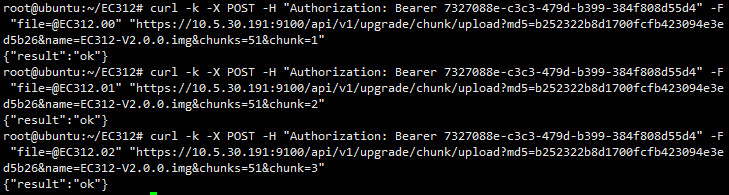
- note: All block files need to be transferred in sequence. Do not miss or repeat the upload. Otherwise, the upgrade will fail and you need to upgrade again.
Upload complete
- URL:
PUT /api/v1/upgrade/finish/upload - request parameters:
| **Attribute ** | **In ** | **Type ** | **Required ** | **Description ** |
|---|---|---|---|---|
| md5 | body | string | true | upgrade package md5 |
| name | body | string | true | Upgrade package name |
- response
CODE_BLOCK_PLACEHOLDER123CODE_BLOCK_PLACEHOLDER
- example:
curl -k -X PUT -H "Authorization: Bearer 7327088e-c3c3-479d-b399-384f808d55d4" -H "Content-Type: application/json" -d '{"md5":"b252322b8d1700fcfb423094e3ed5b26","name":"EC312-V2.0.0.img"}' "https://10.5.30.191:9100/api/v1/upgrade/finish/upload"
- note: The system will not restart automatically after the upgrade is completed. You need to call the restart API or execute the reboot command to restart.