IG Series API Documentation V1.0
API usage instructions
- IG Series products provide a set of HTTP APIs for network management and system management. Users can use tools such as curl and Postman or use code to build and send HTTP requests to manage devices.
- The API uses the HTTPS protocol. Because a self-signed certificate is used, the client does not need to verify the certificate. The method of not verifying the certificate is as follows:
- curl Command plus
-kparameters - Postman needs to close
SSL certificate verification
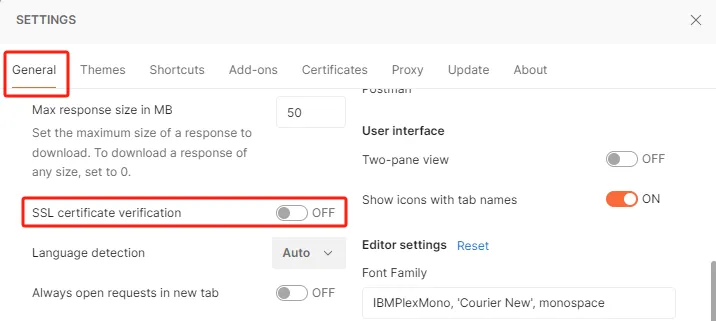
https://learning.postman.com/docs/introduction/overview/
obtain authentication
Calling the HTTP-related API interface requires obtaining the Authorization token. The method of obtaining is to base64 encode the user name and password in the form of username:password to obtain the initial token, and then use this token to call the login interface to obtain the final Authorization token.
**Request Example **
the token YWRtOjEyMzQ1Ng = = is obtained by base64 encoding the default username and password in the adm:123456 format.
**Return information **
**parameter Description **
| **parameter Name ** | **parameter Description ** | **parameter Type ** | **value range ** |
|---|---|---|---|
| web_session | string |
**return Example **
network Interface
cellular network
update Configuration
interface
load
parameters
| Attribute | Type | Range | Description |
|---|---|---|---|
| enable | integer | [0,1] | Dial enable switch, 0 off, 1 on |
| enable_dual_sim | integer | [0,1] | dual card enable switch, 0 off, 1 on |
| main_sim | integer | [1, 2] | main SIM card, 1 for sim1,2 for sim2 |
| max_dial_times | integer | [1, 10] | switch SIM cards after a number of SIM card dialing failures reaches the set number of times |
| min_dial_times | integer | 0 | legacy field, fixed at 0 |
| backup_sim_timeout | integer | [0, 8640000]s | the time spent on the standby card, when the time is reached, it will be switched back to the main card, in seconds. |
| network_type | integer | [0, 7] | 0: Automatic 1:2g 2:3g 3:4G 6:5g 7:4G5G there are differences in the network system supported by the settings of different models. |
| sim1_profile | integer | [0,10] | the dial parameters of the sim1 card and. 0 indicates the default dialing parameter set 1~10 corresponds to the index value in the profile array |
| sim2_profile | integer | [0,10] | the dial parameters of the sim2 card and. 0 indicates the default dialing parameter set 1~10 corresponds to the index value in the profile array |
| sim1_roaming | integer | [0,1] | does the sim1 card enable roaming, 0 off, 1 on |
| sim2_roaming | integer | [0,1] | does the sim2 card enable roaming, 0 off, 1 on |
| sim1_pincode | string | [1, 6] character | the pincode of the sim1 card |
| sim2_pincode | string | [1, 6] character | pincode of sim2 card |
| sim1_csq_threshold | integer | 0 | legacy field, fixed at 0 |
| sim2_csq_threshold | integer | 0 | legacy field, fixed at 0 |
| sim1_csq_detect_interval | integer | 0 | legacy field, fixed at 0 |
| sim2_csq_detect_interval | integer | 0 | legacy field, fixed at 0 |
| kan | integer | 0 | legacy field, fixed at 0 |
| kan | integer | 0 | Legacy field, fixed at 0 |
| static_ip | integer | [0,1] | whether to enable static IP, 0 off, 1 enabled, only ppp dial-up modules support this configuration |
| ip_addr | string | [1, 16] characters | local IP address when static IP is enabled |
| peer_addr | string | [1, 16] characters | peer IP address when static IP is enabled |
| connect_mode | integer | 0 | legacy field, fixed at 0 |
| trig_data | integer | 1 | legacy field, fixed at 1 |
| trig_sms | integer | 0 | legacy field, fixed at 0 |
| max_idle_time | integer | 60 | Legacy field, fixed at 60 |
| radial_interval | integer | [1, 3600]s | after dialing fails, it will dial again, but it will wait for a period of time before dialing again. The waiting time is set here. |
| init_command | string | [1, 32] characters | initialization command |
| rssi_poll_interval | integer | [1, 3600]s | signal detection interval |
| dial_timeout | integer | [10, 3600]s | dial Timeout |
| mtu | integer | [128, 1500] | MTU value for the dial-up Interface |
| mru | integer | [128, 1500] | MRU value of the dial-up Interface |
| use_default_asyncmap | integer | 0 | legacy field, fixed at 0 |
| use_peer_dns | integer | [0,1] | whether to use the DNS assigned by dial-up, 0 does not use, 1 uses |
| infinitely_dial_retry | integer | [0,1] | whether to turn on unlimited redial, after turning on, no matter how many times the dialing fails, the system will not restart; After turning off, when the dialing failure reaches a certain number of times, the system will automatically restart. |
| debug | integer | [0,1] | whether to enable debug log, 0 off, 1 on |
| expert_options | string | [1, 32] characters | expert Options |
| pdp_type | integer | [0,2] | 0: IPV4 1: IPV6 2: IPV4V6 |
| sms.enable | integer | [0,1] | Whether to enable SMS function, 0 off, 1 on |
| sms.mode | integer | 1 | SMS mode, fixed at 1, indicates SMS in text format |
| sms.enable_reply | integer | [0,1] | after configuring the gateway through SMS, whether to reply to the configuration result through SMS, 0 does not reply, 1 reply. |
| sms.interval | integer | cycle of processing SMS | |
| sms.phone_num_white_lists | array | maximum of 10 members | mobile phone number White List, only in the white list of mobile phone number to send text messages, the program will be processed. |
Query Configuration
interface
response
parameters
| Attribute | Type | Range | Description |
|---|---|---|---|
| enable | integer | [0,1] | Dial enable switch, 0 off, 1 on |
| enable_dual_sim | integer | [0,1] | dual card enable switch, 0 off, 1 on |
| main_sim | integer | [1, 2] | main SIM card, 1 for sim1,2 for sim2 |
| max_dial_times | integer | [1, 10] | switch SIM cards after a number of SIM card dialing failures reaches the set number of times |
| min_dial_times | integer | 0 | legacy field, fixed at 0 |
| backup_sim_timeout | integer | [0, 8640000]s | the time spent on the standby card, when the time is reached, it will be switched back to the main card, in seconds. |
| network_type | integer | [0, 7] | 0: Automatic 1:2g 2:3g 3:4G 6:5g 7:4G5G there are differences in the network system supported by the settings of different models. |
| sim1_profile | integer | [0,10] | the dial parameters of the sim1 card and. 0 indicates the default dialing parameter set 1~10 corresponds to the index value in the profile array |
| sim2_profile | integer | [0,10] | the dial parameters of the sim2 card and. 0 indicates the default dialing parameter set 1~10 corresponds to the index value in the profile array |
| sim1_roaming | integer | [0,1] | does the sim1 card enable roaming, 0 off, 1 on |
| sim2_roaming | integer | [0,1] | does the sim2 card enable roaming, 0 off, 1 on |
| sim1_pincode | string | [1, 6] character | the pincode of the sim1 card |
| sim2_pincode | string | [1, 6] character | pincode of sim2 card |
| sim1_csq_threshold | integer | 0 | legacy field, fixed at 0 |
| sim2_csq_threshold | integer | 0 | legacy field, fixed at 0 |
| sim1_csq_detect_interval | integer | 0 | legacy field, fixed at 0 |
| sim2_csq_detect_interval | integer | 0 | legacy field, fixed at 0 |
| kan | integer | 0 | legacy field, fixed at 0 |
| kan | integer | 0 | Legacy field, fixed at 0 |
| static_ip | integer | [0,1] | whether to enable static IP, 0 off, 1 enabled, only ppp dial-up modules support this configuration |
| ip_addr | string | [1, 16] characters | local IP address when static IP is enabled |
| peer_addr | string | [1, 16] characters | peer IP address when static IP is enabled |
| connect_mode | integer | 0 | legacy field, fixed at 0 |
| trig_data | integer | 1 | legacy field, fixed at 1 |
| trig_sms | integer | 0 | legacy field, fixed at 0 |
| max_idle_time | integer | 60 | Legacy field, fixed at 60 |
| radial_interval | integer | [1, 3600]s | after dialing fails, it will dial again, but it will wait for a period of time before dialing again. The waiting time is set here. |
| init_command | string | [1, 32] characters | initialization command |
| rssi_poll_interval | integer | [1, 3600]s | signal detection interval |
| dial_timeout | integer | [10, 3600]s | dial Timeout |
| mtu | integer | [128, 1500] | MTU value for the dial-up Interface |
| mru | integer | [128, 1500] | MRU value of the dial-up Interface |
| use_default_asyncmap | integer | 0 | legacy field, fixed at 0 |
| use_peer_dns | integer | [0,1] | whether to use the DNS assigned by dial-up, 0 does not use, 1 uses |
| infinitely_dial_retry | integer | [0,1] | whether to turn on unlimited redial, after turning on, no matter how many times the dialing fails, the system will not restart; After turning off, when the dialing failure reaches a certain number of times, the system will automatically restart. |
| debug | integer | [0,1] | whether to enable debug log, 0 off, 1 on |
| expert_options | string | [1, 32] characters | expert Options |
| pdp_type | integer | [0,2] | 0: IPV4 1: IPV6 2: IPV4V6 |
| sms.enable | integer | [0,1] | Whether to enable SMS function, 0 off, 1 on |
| sms.mode | integer | 1 | SMS mode, fixed at 1, indicates SMS in text format |
| sms.enable_reply | integer | [0,1] | after configuring the gateway through SMS, whether to reply to the configuration result through SMS, 0 does not reply, 1 reply. |
| sms.interval | integer | cycle of processing SMS | |
| sms.phone_num_white_lists | array | maximum of 10 members | mobile phone number White List, only in the white list of mobile phone number to send text messages, the program will be processed. |
Query Status
module Status
interface
response
parameters
| Attribute | Type | Range | Description |
|---|---|---|---|
| active_sim | string | [1, 16] characters | SIM card currently in use |
| imei_code | string | [1, 16] characters | IEMI information of cellular module |
| imsi_code | string | [1, 16] characters | IMSI information of SIM card |
| iccid_code | string | [1, 32] characters | ICCID information of SIM card |
| phone_number | string | [1, 16] characters | mobile phone number |
| signal_level | integer | [0, 31] | signal quality |
| rerp | integer | RERP | |
| rerq | integer | RERQ | |
| register_status | integer | [0, 7] | connection status: 0: Registering to the network 1: Register network successfully 2: Registering to the network 3: Registration network is denied 4: Failed to register network for unknown reason 5: Failed to register network for unknown reason 6: Not yet registered to the network 7: Turn off dialing, the registration status is not displayed at this time |
| operator | string | [1, 16] characters | operator |
| mcc_mnc | integer | PLMN | |
| apns | string | [1, 16] characters | APN Information |
| network_type | string | [1, 16] characters | network Type |
| lac | string | [1, 16] characters | location Area Code |
| cell_id | string | [1, 16] characters | cell ID |
connection status
interface
response
parameters
| Attribute | Type | Range | Description |
|---|---|---|---|
| status | integer | [0,1] | 0: not connected; 1: Connected |
| ip_addr | string | [1, 16] characters | cellular interface IP address |
| netmask | string | [1, 16] characters | cellular Interface Subnet Mask |
| gateway | string | [1, 16] characters | gateway |
| mtu | integer | [68, 1500] | interface MTU value |
| dns | string | [1, 32] | dns information |
| connect_time | integer | cellular interface connection duration |
WAN interface
update Configuration
interface
load
parameters
| Attribute | Type | Range | Description |
|---|---|---|---|
| iface_name | string | [1, 16] characters | interface Name |
| internet | integer | [0,1] | 0: interface is configured as static IP 1: The interface is configured as DHCP to obtain the address |
| primary_ip | string | [1, 16] characters | interface IP address |
| netmask | string | [1, 16] characters | Interface Subnet Mask |
| mtu | integer | [68, 1500] | interface MTU value |
| track_l2_state | integer | [0,1] | level 2 status linkage switch; 0 off, 1 on |
| shutdown | integer | [0,1] | interface status switch; 0 on, 1 off |
| description | string | [0,32] characters | interface Description Information |
| multi_ip | object | interface from IP information |
query Configuration
interface
response
parameters
| Attribute | Type | Range | Description |
|---|---|---|---|
| iface_name | string | [1, 16] characters | interface Name |
| internet | integer | [0,1] | 0: interface is configured as static IP 1: The interface is configured as DHCP to obtain the address |
| primary_ip | string | [1, 16] characters | interface IP address |
| netmask | string | [1, 16] characters | interface Subnet Mask |
| mtu | integer | [68, 1500] | interface MTU value |
| track_l2_state | integer | [0,1] | level 2 status linkage switch; 0 off, 1 on |
| shutdown | integer | [0,1] | interface status switch; 0 on, 1 off |
| description | string | [0,32] characters | interface Description Information |
| multi_ip | object | interface from IP information |
query Status
interface
response
parameters
| Attribute | Type | Range | Description |
|---|---|---|---|
| iface_name | string | [1, 16] characters | interface Name |
| connect_type | integer | [0,1] | 0: interface is configured as static IP 1: The interface is configured as DHCP to obtain the address |
| ip_addr | string | [1, 16] characters | interface IP address |
| netmask | string | [1, 16] characters | interface Subnet Mask |
| mtu | integer | [68, 1500] | interface MTU value |
| gateway | string | [1, 16] characters | IP address of the Gateway |
| status | integer | [0,1] | interface status; 0 means interface down,1 means interface up |
| dns | string | [0,32] characters | dns information |
| connect_time | integer | [1, n] | duration of interface up |
| remaining_lease | integer | [0, 10080] | the remaining lease period when the interface obtains the address through DHCP, in minutes. |
LAN interface
update Configuration
interface
load
parameters
| Attribute | Type | Range | Description |
|---|---|---|---|
| iface_name | string | [1, 16] characters | interface Name |
| primary_ip | string | [1, 16] characters | interface IP address |
| netmask | string | [1, 16] characters | interface Subnet Mask |
| shutdown | bool | true/false | interface status switch; false on, true off |
| bridge_interfaces | array | LAN is a bridge interface. Here is a list of the physical interfaces that the bridge interface contains. | |
| description | string | [0,32] characters | interface Description Information |
| multi_ip | object | interface from IP information |
query Configuration
Interface
response
parameters
| Attribute | Type | Range | Description |
|---|---|---|---|
| iface_name | string | [1, 16] characters | interface Name |
| primary_ip | string | [1, 16] characters | interface IP address |
| netmask | string | [1, 16] characters | interface Subnet Mask |
| shutdown | bool | true/false | interface status switch; false on, true off |
| bridge_interfaces | array | LAN is a bridge interface. Here is a list of the physical interfaces that the bridge interface contains. | |
| description | string | [0,32] characters | Interface Description Information |
| multi_ip | object | interface from IP information |
query Status
interface
response
parameters
| Attribute | Type | Range | Description |
|---|---|---|---|
| iface_name | string | [1, 16] characters | interface Name |
| connect_type | integer | [0,1] | 0: interface is configured as static IP 1: The interface is configured as DHCP to obtain the address |
| ip_addr | string | [1, 16] characters | interface IP address |
| netmask | string | [1, 16] characters | interface Subnet Mask |
| mtu | integer | [68, 1500] | interface MTU value |
| gateway | string | [1, 16] characters | IP address of the Gateway |
| dns | string | [0,32] characters | dns information |
| connect_time | integer | [1, n] | duration of interface up |
| description | string | [0,32] characters | interface Description Information |
| status | integer | [0,1] | interface status; 0 means interface down,1 means interface up |
| remaining_lease | integer | [0, 10080] | the remaining lease period when the interface obtains the address through DHCP, in minutes. |
WLAN
Update Station configuration
interface
load
Parameters
| Attribute | Type | Range | Description |
|---|---|---|---|
| enable | integer | [0,1] | WLAN switch, 0 off, 1 on |
| station_role | integer | [0,1] | Wi-Fi working mode 0:AP 1:Station |
| ap_ssid | string | [1, 32] characters | ssid name in AP mode |
| ap_ssid_broadcast | integer | [0,1] | SSID broadcast switch, 0 is off, 1 is on |
| auth_method | integer | [0, 8] | authentication Method 0: No certification 1: Shared authentication 2: Reserved Fields 3:WPA-PSK 4: WPA 5: WPA2-PSK 6: WPA2 7: WPA/WPA2 8: WPAPSK/WPA2PSK |
| wpa_psk_key | string | [8,63] Characters | WPA/WPA2 PSK key. This option is valid only when the authentication method is WPA-PSK,WPA2-PSK,WPAPSK/WPA2PSK |
| ap_max_associations | integer | [1, 128] | maximum number of clients |
| ap_wpa_group_rekey | integer | [600, 86400] | group Password Negotiation Time |
| ap_isolate | integer | [0,1] | AP isolating switch, 0 off, 1 on |
| ap_band | integer | [0,1] | Radio band, 0 is 2.4G,1 is 5G |
| ap_radio_type | integer | 0: 802.11b/g, 1: 802.11b 2: 802.11a 4: 802.11g 6: 802.11n 7: 802.11g/n 8: 802.11an/ac 9: 802.11b/g/n, 11: 802.11na |
when the wireless frequency band is 2.4G, the drop-down options are: 0,1, 4,6, 7,9; When the wireless frequency band is 5G, the drop-down options are: 2,8, 11 |
| ap_channel | integer | [1, 11] | channel |
| encrypt_mode | integer | [0,4] | encryption Method 0: Do not encrypt 1: WEP40 2: WEP104 3: TKIP 4: AES |
| wep_key | string | [0,16] character | network Key |
| ap_radius_ip | string | [1, 16] characters | IP address of the radius server |
| ap_radius_port | integer | [1, 65535] | port number of the radius server |
| ap_radius_key | string | [1, 32] characters | shared key for radius server |
| ap_radius_srcif | string | [1, 16] characters | name of the interface connected to the radius server |
| ap_bandwidth | integer | 0,1,3 | wireless bandwidth 0:20MHz 1:40MHz 3:80MHz |
| sta_default_route | integer | [0,1] | when the mode is station, add the default route based on WLAN, 0 does not add, 1 adds |
| sta_ssid | string | [1, 64] characters | ssid name to be connected when the mode is station |
| sta_auth_method | integer | [0,6] | authentication Method 0: No certification 1: Shared Certification 2: Reserved Unused 3: WPA-PSK certification 4: WPA certification 5: WPA2-PSK certification 6: WPA2 certification |
| sta_auth_mode | integer | 1 | authentication mode (WPA/WPA2 mode needs to be configured) 1: EAP-PEAP |
| sta_iner_auth | integer | [1, 2] | Internal authentication (WPA/WPA2 mode needs to be configured) 1:mschapv2 2: md5 |
| sta_username | string | user name (to be configured in WPA/WPA2 mode) | |
| sta_password | string | password (to be configured in WPA/WPA2 mode) | |
| sta_dhcp | integer | [0,1] | whether to enable static IP: 0: use static IP 1: Do not use static IP, use DHCP to obtain IP address |
| ip_addr | string | [0,16] character | static IP address set when static IP is enabled |
| netmask | string | [0,16] character | subnet mask set when static IP is enabled |
query Station configuration
interface
response
| Attribute | Type | Range | Description |
|---|---|---|---|
| enable | integer | [0,1] | WLAN switch, 0 off, 1 on |
| station_role | integer | [0,1] | Wi-Fi working mode 0:AP 1:Station |
| ap_ssid | string | [1, 32] characters | ssid name in AP mode |
| ap_ssid_broadcast | integer | [0,1] | SSID broadcast switch, 0 is off, 1 is on |
| auth_method | integer | [0, 8] | authentication Method 0: No certification 1: Shared authentication 2: Reserved Fields 3:WPA-PSK 4: WPA 5: WPA2-PSK 6: WPA2 7: WPA/WPA2 8: WPAPSK/WPA2PSK |
| wpa_psk_key | string | [8,63] Characters | WPA/WPA2 PSK key. This option is valid only when the authentication method is WPA-PSK,WPA2-PSK,WPAPSK/WPA2PSK |
| ap_max_associations | integer | [1, 128] | maximum number of clients |
| ap_wpa_group_rekey | integer | [600, 86400] | group Password Negotiation Time |
| ap_isolate | integer | [0,1] | AP isolating switch, 0 off, 1 on |
| ap_band | integer | [0,1] | radio band, 0 is 2.4G,1 is 5G |
| ap_radio_type | integer | 0: 802.11b/g, 1: 802.11b 2: 802.11a 4: 802.11g 6: 802.11n 7: 802.11g/n 8: 802.11an/ac 9: 802.11b/g/n, 11: 802.11na |
when the wireless frequency band is 2.4G, the drop-down options are: 0,1, 4,6, 7,9; When the wireless frequency band is 5G, the drop-down options are: 2,8, 11 |
| ap_channel | integer | [1, 11] | channel |
| encrypt_mode | integer | [0,4] | encryption Method 0: Do not encrypt 1: WEP40 2: WEP104 3: TKIP 4: AES |
| wep_key | string | [0,16] character | network Key |
| ap_radius_ip | string | [1, 16] characters | IP address of the radius server |
| ap_radius_port | integer | [1, 65535] | port number of the radius server |
| ap_radius_key | string | [1, 32] characters | shared key for radius server |
| ap_radius_srcif | string | [1, 16] characters | name of the interface connected to the radius server |
| ap_bandwidth | integer | 0,1,3 | wireless bandwidth 0:20MHz 1:40MHz 3:80MHz |
| sta_default_route | integer | [0,1] | when the mode is station, add the default route based on WLAN, 0 does not add, 1 adds |
| sta_ssid | string | [1, 64] characters | ssid name to be connected when the mode is station |
| sta_auth_method | integer | [0,6] | authentication Method 0: No certification 1: Shared Certification 2: Reserved Unused 3: WPA-PSK certification 4: WPA certification 5: WPA2-PSK certification 6: WPA2 certification |
| sta_auth_mode | integer | 1 | authentication mode (WPA/WPA2 mode needs to be configured) 1: EAP-PEAP |
| sta_iner_auth | integer | [1, 2] | internal authentication (WPA/WPA2 mode needs to be configured) 1:mschapv2 2: md5 |
| sta_username | string | user name (to be configured in WPA/WPA2 mode) | |
| sta_password | string | password (to be configured in WPA/WPA2 mode) | |
| sta_dhcp | integer | [0,1] | whether to enable static IP: 0: use static IP 1: Do not use static IP, use DHCP to obtain IP address |
| ip_addr | string | [0,16] character | static IP address set when static IP is enabled |
| netmask | string | [0,16] character | subnet mask set when static IP is enabled |
query Station status
interface
response
| Attribute | Type | Range | Description |
|---|---|---|---|
| station_role | string | [0,1] | Wi-Fi mode 0: AP 1: Station |
| status | integer | [0,1] | Wi-Fi Status 0: Closed 1: Open |
| mac_addr | string | 17 characters | MAC address of the Wi-Fi interface |
| encrypt_method | integer | [0,4] | encryption Method 0: Do not encrypt 1: WEP40 2: WEP104 3: TKIP 4: AES |
| sta_ssid | integer | [1, 32] | SSID name of the connection |
| sta_connection | integer | [0,1] | connection status: 0: Not connected 1: Connected |
| sta_auth_method | integer | [0,6] | authentication Method 0: No certification 1: Shared Certification 2: Reserved Unused 3: WPA-PSK certification 4: WPA certification 5: WPA2-PSK certification 6: WPA2 certification |
| sta_gateway | string | [1, 16] characters | the Gateway address of the Wi-Fi interface, that is, the IP address of the AP. |
| sta_dns | string | [1, 16] characters | dns address obtained from the Wi-Fi interface |
| sta_connect_time | integer | [0, 4294967296] | Wi-Fi connection duration |
| ip_addr | string | [1, 16] characters | IP address of the Wi-Fi interface |
| netmask | string | [1, 16] characters | subnet mask of the Wi-Fi interface |
update AP configuration
interface
load
parameters
| Attribute | Type | Range | Description |
|---|---|---|---|
| enable | integer | [0,1] | WLAN switch, 0 off, 1 on |
| station_role | integer | [0,1] | Wi-Fi working mode 0:AP 1:Station |
| ap_ssid | string | [1, 32] characters | ssid name in AP mode |
| ap_ssid_broadcast | integer | [0,1] | SSID broadcast switch, 0 is off, 1 is on |
| auth_method | integer | [0, 8] | authentication Method 0: No certification 1: Shared authentication 2: Reserved Fields 3:WPA-PSK 4: WPA 5: WPA2-PSK 6: WPA2 7: WPA/WPA2 8: WPAPSK/WPA2PSK |
| wpa_psk_key | string | [8,63] Characters | WPA/WPA2 PSK key. This option is valid only when the authentication method is WPA-PSK,WPA2-PSK,WPAPSK/WPA2PSK |
| ap_max_associations | integer | [1, 128] | maximum number of clients |
| ap_wpa_group_rekey | integer | [600, 86400] | group Password Negotiation Time |
| ap_isolate | integer | [0,1] | AP isolating switch, 0 off, 1 on |
| ap_band | integer | [0,1] | radio band, 0 is 2.4G,1 is 5G |
| ap_radio_type | integer | 0: 802.11b/g, 1: 802.11b 2: 802.11a 4: 802.11g 6: 802.11n 7: 802.11g/n 8: 802.11an/ac 9: 802.11b/g/n, 11: 802.11na |
when the wireless frequency band is 2.4G, the drop-down options are: 0,1, 4,6, 7,9; When the wireless frequency band is 5G, the drop-down options are: 2,8, 11 |
| ap_channel | integer | [1, 11] | channel |
| encrypt_mode | integer | [0,4] | encryption Method 0: Do not encrypt 1: WEP40 2: WEP104 3: TKIP 4: AES |
| wep_key | string | [0,16] character | network Key |
| ap_radius_ip | string | [1, 16] characters | IP address of the radius server |
| ap_radius_port | integer | [1, 65535] | port number of the radius server |
| ap_radius_key | string | [1, 32] characters | shared key for radius server |
| ap_radius_srcif | string | [1, 16] characters | name of the interface connected to the radius server |
| ap_bandwidth | integer | 0,1,3 | wireless bandwidth 0:20MHz 1:40MHz 3:80MHz |
| sta_default_route | integer | [0,1] | when the mode is station, add the default route based on WLAN, 0 does not add, 1 adds |
| sta_ssid | string | [1, 64] characters | ssid name to be connected when the mode is station |
| sta_auth_method | integer | [0,6] | authentication Method 0: No certification 1: Shared Certification 2: Reserved Unused 3: WPA-PSK certification 4: WPA certification 5: WPA2-PSK certification 6: WPA2 certification |
| sta_auth_mode | integer | 1 | authentication mode (WPA/WPA2 mode needs to be configured) 1: EAP-PEAP |
| sta_iner_auth | integer | [1, 2] | internal authentication (WPA/WPA2 mode needs to be configured) 1: mschapv2 2: md5 |
| sta_username | string | user name (to be configured in WPA/WPA2 mode) | |
| sta_password | string | password (to be configured in WPA/WPA2 mode) | |
| sta_dhcp | integer | [0,1] | whether to enable static IP: 0: use static IP 1: Do not use static IP, use DHCP to obtain IP address |
| ip_addr | string | [0,16] character | static IP address set when static IP is enabled |
| netmask | string | [0,16] character | subnet mask set when static IP is enabled |
query AP configuration
interface
response
| Attribute | Type | Range | Description |
|---|---|---|---|
| enable | integer | [0,1] | WLAN switch, 0 off, 1 on |
| station_role | integer | [0,1] | Wi-Fi working mode 0:AP 1:Station |
| ap_ssid | string | [1, 32] characters | ssid name in AP mode |
| ap_ssid_broadcast | integer | [0,1] | SSID broadcast switch, 0 is off, 1 is on |
| auth_method | integer | [0, 8] | authentication Method 0: No certification 1: Shared authentication 2: Reserved Fields 3:WPA-PSK 4: WPA 5: WPA2-PSK 6: WPA2 7: WPA/WPA2 8: WPAPSK/WPA2PSK |
| wpa_psk_key | string | [8,63] Characters | WPA/WPA2 PSK key. This option is valid only when the authentication method is WPA-PSK,WPA2-PSK,WPAPSK/WPA2PSK |
| ap_max_associations | integer | [1, 128] | maximum number of clients |
| ap_wpa_group_rekey | integer | [600, 86400] | group Password Negotiation Time |
| ap_isolate | integer | [0,1] | AP isolating switch, 0 off, 1 on |
| ap_band | integer | [0,1] | radio band, 0 is 2.4G,1 is 5G |
| ap_radio_type | integer | 0: 802.11b/g, 1: 802.11b 2: 802.11a 4: 802.11g 6: 802.11n 7: 802.11g/n 8: 802.11an/ac 9: 802.11b/g/n, 11: 802.11na |
when the wireless frequency band is 2.4G, the drop-down options are: 0,1, 4,6, 7,9; When the wireless frequency band is 5G, the drop-down options are: 2,8, 11 |
| ap_channel | integer | [1, 11] | Channel |
| encrypt_mode | integer | [0,4] | encryption Method 0: Do not encrypt 1: WEP40 2: WEP104 3: TKIP 4: AES |
| wep_key | string | [0,16] character | network Key |
| ap_radius_ip | string | [1, 16] characters | IP address of the radius server |
| ap_radius_port | integer | [1, 65535] | port number of the radius server |
| ap_radius_key | string | [1, 32] characters | shared key for radius server |
| ap_radius_srcif | string | [1, 16] characters | Name of the interface connected to the radius server |
| ap_bandwidth | integer | 0,1,3 | wireless bandwidth 0:20MHz 1:40MHz 3:80MHz |
| sta_default_route | integer | [0,1] | when the mode is station, add the default route based on WLAN, 0 does not add, 1 adds |
| sta_ssid | string | [1, 64] characters | ssid name to be connected when the mode is station |
| sta_auth_method | integer | [0,6] | authentication Method 0: No certification 1: Shared Certification 2: Reserved Unused 3: WPA-PSK certification 4: WPA certification 5: WPA2-PSK certification 6: WPA2 certification |
| sta_auth_mode | integer | 1 | authentication mode (WPA/WPA2 mode needs to be configured) 1: EAP-PEAP |
| sta_iner_auth | integer | [1, 2] | internal authentication (WPA/WPA2 mode needs to be configured) 1: mschapv2 2: md5 |
| sta_username | string | user name (to be configured in WPA/WPA2 mode) | |
| sta_password | string | password (to be configured in WPA/WPA2 mode) | |
| sta_dhcp | integer | [0,1] | whether to enable static IP: 0: use static IP 1: Do not use static IP, use DHCP to obtain IP address |
| ip_addr | string | [0,16] character | Static IP address set when static IP is enabled |
| netmask | string | [0,16] character | subnet mask set when static IP is enabled |
query AP status
interface
response
| Attribute | Type | Range | Description |
|---|---|---|---|
| station_role | string | [0,1] | Wi-Fi mode 0: AP 1: Station |
| status | integer | [0,1] | Wi-Fi Status 0: Closed 1: Open |
| mac_addr | string | 17 characters | MAC address of the Wi-Fi interface |
| ap_ssid | string | [1,32] characters | name of AP SSID |
| ap_channel | integer | [1, 11] | channel |
Loopback
Loopback
update Configuration
interface
load
parameters
| Attribute | Type | Range | Description |
|---|---|---|---|
| ip_addr | string | [1, 16] characters | loopback port IP address |
| netmask | string | [1, 16] characters | interface Subnet Mask |
| description | string | [0,32] characters | interface Description Information |
| multi_ip | object | call back information from IP |
query Configuration
interface
response
parameters
| Attribute | Type | Range | Description |
|---|---|---|---|
| ip_addr | string | [1, 16] characters | loopback port IP address |
| netmask | string | [1, 16] characters | interface Subnet Mask |
| description | string | [0,32] characters | interface Description Information |
| multi_ip | object | call back information from IP |
network Services
DHCP server
Update Configuration
interface
load
parameters
| Attribute | Type | Range | Description |
|---|---|---|---|
| dhcp_services | object | DHCP Server configuration | |
| enable | integer | [0,1] | DHCP Server switch, 0 off, 1 on |
| start_addr | string | [1, 16] characters | start address of DHCP address pool |
| end_addr | string | [1, 16] characters | end address of DHCP address pool |
| lease | integer | [30, 10080] minutes | lease Duration |
| windows_name_server | string | [1, 16] characters | Windows name server |
| macip_bind_config | object | MAC and IP binding configuration | |
| mac_addr | string | [1,18] character | MAC address to be bound |
| ip_addr | string | [1, 16] characters | IP address to be bound |
| dhcp_relay_enable | integer | [0,1] | whether to enable DHCP Relay, 0 off, 1 on |
| isChecked | interger | [0,1] | whether to enable IP address conflict detection, fixed at 1 |
query Configuration
interface
response
parameters
| Attribute | Type | Range | Description |
|---|---|---|---|
| dhcp_services | object | DHCP Server configuration | |
| enable | integer | [0,1] | DHCP Server switch, 0 off, 1 on |
| start_addr | string | [1, 16] characters | start address of DHCP address pool |
| end_addr | string | [1, 16] characters | end address of DHCP address pool |
| lease | integer | [30, 10080] minutes | lease Duration |
| windows_name_server | string | [1, 16] characters | Windows name server |
| macip_bind_config | object | MAC and IP binding configuration | |
| mac_addr | string | [1,18] character | MAC address to be bound |
| ip_addr | string | [1, 16] characters | IP address to be bound |
| dhcp_relay_enable | integer | [0,1] | whether to enable DHCP Relay, 0 off, 1 on |
DNS service
the DNS service page is divided into domain name service and relay service.
Domain Name Service
update Configuration
interface
load
parameters
| Attribute | Type | Range | Description |
|---|---|---|---|
| primary_dns | string | [1, 16] characters | preferred Domain Name Server |
| secondary_dns | string | [1, 16] characters | alternate Domain Name Server |
query Configuration
Interface
response
parameters
| Attribute | Type | Range | Description |
|---|---|---|---|
| primary_dns | string | [1, 16] characters | preferred Domain Name Server |
| secondary_dns | string | [1, 16] characters | alternate Domain Name Server |
relay Service
update Configuration
interface
load
parameters
| Attribute | Type | Range | Description |
|---|---|---|---|
| enable | integer | [0,1] | DNS relay service switch, 0 off, 1 on |
| dhcp_enable | integer | [0,1] | DHCP Server switch, 0 is turned off and 1 is turned on. Before calling this interface, query the status of DHCP Server. The values passed here remain the same. |
| host_ip_relation | object | domain name and IP mapping | |
| host | string | [1, 64] characters | |
| ip_addr1 | string | [1, 16] characters | the first IP address corresponding to the domain name |
| ip_addr2 | string | [1, 16] characters | the second IP address corresponding to the domain name |
query Configuration
interface
response
parameters
| Attribute | Type | Range | Description |
|---|---|---|---|
| enable | integer | [0,1] | DNS relay service switch, 0 off, 1 on |
| dhcp_enable | integer | [0,1] | DHCP Server switch, 0 is turned off and 1 is turned on. Before calling this interface, query the status of DHCP Server. The values passed here remain the same. |
| host_ip_relation | object | domain name and IP mapping | |
| host | string | [1, 64] characters | |
| ip_addr1 | string | [1, 16] characters | the first IP address corresponding to the domain name |
| ip_addr2 | string | [1, 16] characters | the second IP address corresponding to the domain name |
host List
query Status
interface
response
parameters
| Attribute | Type | Range | Description |
|---|---|---|---|
| interface | string | [1, 32] characters | Name of the interface connected to the host |
| mac_addr | string | [1,18] character | host mac address |
| ip_addr | string | [1, 16] characters | host IP address |
| host_addr | string | [1, 64] characters | host Name |
| lease | string | [0, 10080] character | the duration of the lease period when the host obtains the address through DHCP |
routing
the routing menu is divided into routing status and static routing configuration.
Routing Status
query Status
response
parameters
| Attribute | Type | Range | Description |
|---|---|---|---|
| type | string | [1, 16] characters | static: static route connected: Directly connected route |
| interface | string | [1, 16] characters | name of the interface corresponding to the route |
| destination | string | [1, 16] characters | the destination address of the route |
| netmask | string | [1, 16] characters | subnet mask of the destination address of the route |
| distance_metric | string | [1, 16] characters | route distance and metric information |
| gateway | string | [1, 16] characters | the IP address of the next hop. |
| time | string | [0,32] characters |
static Routing
update Configuration
interface
load
parameters
| Attribute | Type | Range | Description |
|---|---|---|---|
| destination | string | [1, 16] characters | the destination address of the route |
| netmask | string | [1, 16] characters | subnet mask of the destination address of the route |
| interface | string | [1, 16] characters | interface information corresponding to the route |
| gateway | string | [1, 16] characters | the IP address of the next hop. |
| distance | integer | [2, 255] | distance information of the route |
| track | integer | [1, 10] | the track identifier of the route. |
Query Configuration
interface
Response
parameters
| Attribute | Type | Range | Description |
|---|---|---|---|
| destination | string | [1, 16] characters | the destination address of the route |
| netmask | string | [1, 16] characters | subnet mask of the destination address of the route |
| interface | string | [1, 16] characters | interface information corresponding to the route |
| gateway | string | [1, 16] characters | the IP address of the next hop. |
| distance | integer | [2, 255] | distance information of the route |
| track | integer | [1, 10] | the track identifier of the route. |
Firewall
firewall contains access control list and network address translation two sub-functions
access Control List
update Configuration
interface
load
1 2 3 4 5 6 7 8 9 10 11 12 13 14 15 16 17 18 19 20 21 22 23 24 25 26 27 28 29 30 31 32 33 34 35 36 37 38 39 40 41 42 43 44 45 46 47 48 49 50 51 52 53 54 55 56 57 58 59 60 61 62 63 64 65 66 67 68 69 70 71 72 73 74 75 76 77 78 79 80 81 82 83 84 85 86 87 88 89 90 91 92 93 94 95 96 97 98 99 100 101 102 103 104 105 106 107 108 109 110 111 112 113 114 115 116 117 118 119 120 121 122 123 124 125 126 127 128 129 130 131 132 133 134 135 136 137 138 139 140 141 142 143 144 145 146 147 148 149 150 151 152 153 154 155 156 157 158 159 160 161 162 163 164 165 166 167 168 169 170 171 172 173 174 175 176 177 178 179 180 181 182 183 184 185 186 187 188 189 190 191 192 193 194 195 196 197 198 199 200 201 202 203 204 205 206 207 208 209 210 211 212 213 214 215 216 217 218 219 220 221 222 223 224 225 226 227 228 229 230 231 232 233 234 235 236 237 238 239 240 241 242 243 244 245 246 247 248 249 250 251 252 253 254 255 256 257 258 259 260 261 262 263 264 265 | |
parameters
| Attribute | Type | Range | Description |
|---|---|---|---|
| destination | string | [1, 16] characters | the destination address of the route |
| netmask | string | [1, 16] characters | subnet mask of the destination address of the route |
| interface | string | [1, 16] characters | interface information corresponding to the route |
| gateway | string | [1, 16] characters | the IP address of the next hop. |
| distance | integer | [2, 255] | Distance information of the route |
| track | integer | [1, 10] | the track identifier of the route. |
Query Configuration
interface
response
1 2 3 4 5 6 7 8 9 10 11 12 13 14 15 16 17 18 19 20 21 22 23 24 25 26 27 28 29 30 31 32 33 34 35 36 37 38 39 40 41 42 43 44 45 46 47 48 49 50 51 52 53 54 55 56 57 58 59 60 61 62 63 64 65 66 67 68 69 70 71 72 73 74 75 76 77 78 79 80 81 82 83 84 85 86 87 88 89 90 91 92 93 94 95 96 97 98 99 100 101 102 103 104 105 106 107 108 109 110 111 112 113 114 115 116 117 118 119 120 121 122 123 124 125 126 127 128 129 130 131 132 133 134 135 136 137 138 139 140 141 142 143 144 145 146 147 148 149 150 151 152 153 154 155 156 157 158 159 160 161 162 163 164 165 166 167 168 169 170 171 172 173 174 175 176 177 178 179 180 181 182 183 184 185 | |
network Address Translation
update Configuration
interface
load
query Configuration
interface
response
edge Computing
Python APP
install the Python APP
Since the Python APP installation package may be relatively large, the installation process needs to transmit the APP installation package in blocks. In this process, three types of interfaces need to be called:
- block Transfer Start Interface
**parameter Description **
| **parameter Name ** | **parameter Description ** | **parameter Type ** | **value range ** |
|---|---|---|---|
| name | name of the app installation package | string | |
| md5 | md5 value of the app installation package | string |
- Block transfer interface
it is recommended to block the app installation package with a size of 510241024 bytes.
| **Parameter Name ** | **parameter Description ** | **parameter Type ** | **value range ** |
|---|---|---|---|
| type | the type of the imported file. When installing python app, the value is app. | ||
| sub_type | the subtype of the import file. When installing python app, the value is app. | ||
| fileName | name of the app installation package | ||
| chunks | total number of blocks | ||
| chunk | what chunk is the current package | ||
| size | the total size of the app installation package, in bytes | ||
| md5 | md5 value of the app installation package |
- merging blocks into app whole package interface
**request Example **
parameter Description
| parameter Name | parameter Description | parameter Type | value range |
|---|---|---|---|
| name | name of the app installation package | ||
| total | the size of the app installation package, in bytes |
delete Python APP
**parameter Description **
| parameter Name | parameter Description | parameter Type | value range |
|---|---|---|---|
| app_name | name of the app to be deleted | string |
obtain the configuration of the Python APP
**return Example **
**parameter Description **
| parameter Name | parameter Description | parameter Type | value range |
|---|---|---|---|
| python_engine | configure the python engine on/off status | numerical | [0,1];0 indicates that the python engine is disabled; 1 indicates that the python engine is enabled. |
| enable | python app on/off status | numerical | [0,1];0 means to close the python app,1 means to open the python app. |
| app_name | The name of python app; The program will be automatically set after app installation; | string | |
| app_version | version of python app; The program will be set automatically after app installation. | String | |
| sdk_version | the python sdk version that the python app depends on; The program is automatically set after the app is installed | string | |
| start_args | startup parameters of python app; The default is empty after app installation. | String | |
| log_size | log size of python app; The default is 1m after app installation. | Numerical | [1,100], unit is M. |
| microfrontend_app | whether python app is a micro front-end program, fixed to 1 after app installation; | numerical | fixed to 1 |
| log_file_num | number of logs of python app; Fixed to 2 after app installation | numerical | [1, 2] |
update the configuration of a Python APP
**Request Example **
**parameter Description **
| parameter Name | parameter Description | parameter Type | value range |
|---|---|---|---|
| python_engine | configure the python engine to enable/disable. Because the python app depends on the python engine, this configuration item needs to be configured as 1 to enable the python engine. | Numerical | [0,1];0 indicates that the python engine is disabled; 1 indicates that the python engine is enabled. |
| enable | python app on/off; | numerical | [0,1];0 means to close the python app,1 means to open the python app. |
| app_name | configure the name of the python app; | string | this information is generated by the program after app installation and needs to be obtained from the interface for obtaining configuration. Cannot be configured as other values; |
| app_version | configure the version of the python app; | string | this information is generated by the program after app installation and needs to be obtained from the interface for obtaining configuration. Cannot be configured as other values; |
| sdk_version | configure the python sdk version that the python app depends on; | string | this information is generated by the program after app installation and needs to be obtained from the interface for obtaining configuration. Cannot be configured as other values; |
| start_args | python app startup parameters | string | |
| log_size | python app log size | numerical | [1,100], unit is M. |
| microfrontend_app | whether the flag is a micro front end; When configuring, the value of this parameter needs to be fixed to 1 | numerical | fixed to 1 |
| log_file_num | number of log files, fixed at 2 | numerical | fixed to 2 |
**response example **
start/stop Python APP
**parameter Description **
| parameter Name | parameter Description | parameter Type | value range |
|---|---|---|---|
| app_name | Name of the app that needs to be launched | string | |
| action | python app on/off; | string | start means to start the app;stop means to close the app |
query the running status of a Python APP
**response example **
**parameter Description **
| parameter Name | parameter Description | parameter Type | value range |
|---|---|---|---|
| state | running status of python app | string |
system Management
system Time
set Time Zone
interface
load
parameters
| Attribute | Type | Range | Description |
|---|---|---|---|
| timezone | string | [1, 32] characters | time Zone Encoding |
query Time Zone
interface
In addition to time zone information, this interface also returns device time information.
Response
parameters
| Attribute | Type | Range | Description |
|---|---|---|---|
| timezone | string | [1, 32] characters | time Zone Encoding |
| device_time | string | [1, 32] characters | equipment Time |
set time
interface
load
SNTP client
update Configuration
interface
load
parameters
| Attribute | Type | Range | Description |
|---|---|---|---|
| enable | integer | [0,1] | SNTP switch, 0 off, 1 on |
| update_interval | integer | [60, 2592000 ] seconds | SNTP The period of the synchronization time between the client and the server, unit s |
| source_ip | string | [1, 16] characters | the source IP address of the request message, which can be left blank, is automatically selected by the system. |
| server_addr | string | [1, 64] characters | address of the sntp server |
| port | port | [1, 65535] | port of the sntp server |
query Configuration
interface
response
parameters
| Attribute | Type | Range | Description |
|---|---|---|---|
| enable | integer | [0,1] | SNTP switch, 0 off, 1 on |
| update_interval | integer | [60, 2592000 ] seconds | SNTP The period of the synchronization time between the client and the server, unit s |
| source_ip | string | [1, 16] characters | the source IP address of the request message, which can be left blank, is automatically selected by the system. |
| server_addr | string | [1, 64] characters | address of the sntp server |
| port | port | [1, 65535] | port of the sntp server |
NTP server
update Configuration
interface
load
parameters
| Attribute | Type | Range | Description |
|---|---|---|---|
| enable | integer | [0,1] | NTP server switch, 0 off, 1 on |
| master | integer | [2, 15] | NTP server hierarchy |
| source_interface | string | [1, 16] characters | the interface of the NTP server source listening, and source_ip are selected, one is configured, and the other needs to be empty. |
| source_ip | string | [1, 16] characters | the IP address that the NTP server listens to, and source_interface, one is configured, and the other needs to be empty. |
| server_addr | string | [1, 64] characters | NTP server address |
| prefer_ntp_server | integer | [0,1] | primary server, 0 No, 1 Yes |
query Configuration
interface
response
| Attribute | Type | Range | Description |
|---|---|---|---|
| enable | integer | [0,1] | NTP server switch, 0 off, 1 on |
| master | integer | [2, 15] | NTP server hierarchy |
| source_interface | string | [1, 16] characters | the interface of the NTP server source listening, and source_ip are selected, one is configured, and the other needs to be empty. |
| source_ip | string | [1, 16] characters | the IP address that the NTP server listens to, and source_interface, one is configured, and the other needs to be empty. |
| server_addr | string | [1, 64] characters | NTP server address |
| prefer_ntp_server | integer | [0,1] | primary server, 0 No, 1 Yes |
system Log
query Log
interface
lines = 20 indicates that the latest 20 logs are returned. If all logs are returned, lines = all
response
1 2 3 4 5 6 7 8 9 10 11 12 13 14 15 16 17 18 19 20 21 22 23 24 25 26 27 28 29 30 31 32 33 34 35 36 37 38 39 40 41 42 43 44 45 46 47 48 49 50 51 52 53 54 55 56 57 58 59 60 61 62 63 64 65 66 67 68 69 70 71 72 73 74 75 76 77 78 79 80 81 82 83 84 85 86 87 88 89 90 91 92 93 94 95 96 97 98 99 100 101 102 103 104 | |
each array Member contains three elements, the first is the log level, the second is the time when the log is generated, and the third is the specific log content.
Update Configuration
interface
load
parameters
| Attribute | Type | Range | Description |
|---|---|---|---|
| log_to_remote_enable | integer | [0,1] | send to remote log server switch, 0 off, 1 on |
| history_log_size | integer | [64,2048]KB | history Log Size |
| history_log_severity | integer | [0, 7] | History Log Level 0: Urgent 1: The alarm 2: Serious 3: Error 4: Warning 5: Notice 6: The Information 7: Debugging |
| server_addr | string | [1, 16] characters | IP address of the remote log server |
| server_port | integer | [1, 65535] | port number of the remote log server |
| log_to_console | integer | [0,1] | fixed to 0 |
system Upgrade
import Firmware
interface
example
response
device restart
after the firmware is upgraded to the device, you need to restart the device to switch the version. For the device restart api, see restart-> manual restartchapter.
Configuration Management
configure Auto Save
interface
load
parameters
| Attribute | Type | Range | Description |
|---|---|---|---|
| auto_save | integer | [0,1] | auto save switch, 0 off, 1 on |
configure an encryption password
interface
load
parameters
| Attribute | Type | Range | Description |
|---|---|---|---|
| encrypt_passwd | integer | [0,1] | encrypt plaintext password switch, 0 off, 1 on |
querying System Configuration
interface
response
parameters
| Attribute | Type | Range | Description |
|---|---|---|---|
| auto_save | integer | [0,1] | auto save switch, 0 off, 1 on |
| encrypt_passwd | integer | [0,1] | encrypt plaintext password switch, 0 off, 1 on |
restore factory settings
interface
load
parameters
| Attribute | Type | Range | Description |
|---|---|---|---|
| restore_all_data | integer | [0,1] | whether to clear personal data, installed app;0 keep, 1 clear |
device Cloud Platform
Inhand Inconect Service
update Configuration
interface
load
|
parameters
| Attribute | Type | Range | Description |
|---|---|---|---|
| enable | integer | [0,1] | whether to enable the docking Inhand Connect platform function, 0 off, 1 on |
| server_addr | string | [1, 64] characters | platform Address |
| register_account | string | [1, 64] characters | the account connected to the platform, usually a mailbox, needs to be registered with the platform in advance. |
| https_proxy | string | [1, 64] characters | legacy field, blank |
| http_proxy | string | [1, 64] characters | legacy field, blank |
| site_name | string | [1, 64] characters | legacy field, blank |
| asset_number | string | [1, 64] characters | legacy field, blank |
| location_type | integer | [0,1] | device location method, 0 using GPS,1 using cellular. Requires the device model to support cellular, GPS can be used. |
| lbs_upload_interval | integer | [60, 86400] seconds | period of reporting the equipment location to the platform, unit second |
| channel_keepalive | integer | [30, 3600] seconds | the heartbeat period of the connection between the device and the platform, in seconds. |
| dataflow_upload_interval | integer | [3600, 86400] seconds | period of reporting platform for cellular traffic information of equipment |
query Configuration
interface
response
|
parameters
| Attribute | Type | Range | Description |
|---|---|---|---|
| enable | integer | [0,1] | whether to enable the docking Inhand Connect platform function, 0 off, 1 on |
| server_addr | string | [1, 64] characters | platform Address |
| register_account | string | [1, 64] characters | the account connected to the platform, usually a mailbox, needs to be registered with the platform in advance. |
| https_proxy | string | [1, 64] characters | legacy field, blank |
| http_proxy | string | [1, 64] characters | legacy field, blank |
| site_name | string | [1, 64] characters | legacy field, blank |
| asset_number | string | [1, 64] characters | Legacy field, blank |
| location_type | integer | [0,1] | device location method, 0 using GPS,1 using cellular. Requires the device model to support cellular, GPS can be used. |
| lbs_upload_interval | integer | [60, 86400] seconds | period of reporting the equipment location to the platform, unit second |
| channel_keepalive | integer | [30, 3600] seconds | the heartbeat period of the connection between the device and the platform, in seconds. |
| dataflow_upload_interval | integer | [3600, 86400] seconds | period of reporting platform for cellular traffic information of equipment |
query Status
interface
response
parameters
| Attribute | Type | Range | Description |
|---|---|---|---|
| status | string | [1, 32] characters | connection status |
Inhand Device Manager
update Configuration
interface
load
|
| Attribute | Type | Range | Description |
|---|---|---|---|
| enable | integer | [0,1] | whether to enable the docking Inhand Device Manager platform function, 0 off, 1 on |
| server_addr | string | [1, 64] characters | platform Address |
| register_account | string | [1, 64] characters | the account connected to the platform, usually a mailbox, needs to be registered with the platform in advance. |
| https_proxy | string | [1, 64] characters | legacy field, blank |
| http_proxy | string | [1, 64] characters | legacy field, blank |
| site_name | string | [1, 64] characters | legacy field, blank |
| asset_number | string | [1, 64] characters | legacy field, blank |
| location_type | integer | [0,1] | device location method, 0 using GPS,1 using cellular. Requires the device model to support cellular, GPS can be used. |
| lbs_upload_interval | integer | [60, 86400] seconds | period of reporting the equipment location to the platform, unit second |
| channel_keepalive | integer | [30, 3600] seconds | the heartbeat period of the connection between the device and the platform, in seconds. |
| dataflow_upload_interval | integer | [3600, 86400] seconds | period of reporting platform for cellular traffic information of equipment |
| conn_mode | integer | legacy field, set to 0 |
query Configuration
interface
response
|
parameters
| Attribute | Type | Range | Description |
|---|---|---|---|
| enable | integer | [0,1] | whether to enable the docking Inhand Device Manager platform function, 0 off, 1 on |
| server_addr | string | [1, 64] characters | platform Address |
| register_account | string | [1, 64] characters | the account connected to the platform, usually a mailbox, needs to be registered with the platform in advance. |
| https_proxy | string | [1, 64] characters | Legacy field, blank |
| http_proxy | string | [1, 64] characters | legacy field, blank |
| site_name | string | [1, 64] characters | legacy field, blank |
| asset_number | string | [1, 64] characters | legacy field, blank |
| location_type | integer | [0,1] | device location method, 0 using GPS,1 using cellular. Requires the device model to support cellular, GPS can be used. |
| lbs_upload_interval | integer | [60, 86400] seconds | period of reporting the equipment location to the platform, unit second |
| channel_keepalive | integer | [30, 3600] seconds | the heartbeat period of the connection between the device and the platform, in seconds. |
| dataflow_upload_interval | integer | [3600, 86400] seconds | period of reporting platform for cellular traffic information of equipment |
| conn_mode | integer | legacy field, set to 0 |
query Status
interface
response
parameters
| Attribute | Type | Range | Description |
|---|---|---|---|
| status | string | [1, 32] characters | connection status |
Inhand Cloud Service
update Configuration
interface
load
parameters
| Attribute | Type | Range | Description |
|---|---|---|---|
| mode | integer | [0,1] | switch to Inhand iSCADE Cloud, 0 off, 1 on |
| server_addr | string | [1, 64] characters | address of the platform |
| channel_keepalive | integer | [30, 1200] seconds | the heartbeat period of the connection between the device and the platform, in seconds. |
| config_source | integer | [0,1] | fixed to 0 |
query Configuration
interface
response
parameters
| Attribute | Type | Range | Description |
|---|---|---|---|
| mode | integer | [0,1] | switch to Inhand iSCADE Cloud, 0 off, 1 on |
| server_addr | string | [1, 64] characters | address of the platform |
| channel_keepalive | integer | [30, 1200] seconds | the heartbeat period of the connection between the device and the platform, in seconds. |
| config_source | integer | [0,1] | fixed to 0 |
query Status
interface
response
parameters
| Attribute | Type | Range | Description |
|---|---|---|---|
| status | integer | [0,1] | status of the connected platform 0: Not connected 1: Connecting 2: Connected |
management Tools
web/ssh/telnet update configuration
interface
load
parameters
| Attribute | Type | Range | Description |
|---|---|---|---|
| https.enable | integer | [0,1] | Web Server switch, 0 off, 1 on |
| https.listen_ip_addr | string | [1, 16] characters | the address that the Web Server listens to. You can pass any or the IP address of the interface. |
| https.port | integer | [1, 65535] | port number on which the Web Server listens |
| https.remote_access | integer | [0,1] | on remote control switch, 0 off, 1 on |
| web_login_timeout | integer | [100, 3600] | the web idle timeout period, after idle reaches this value, will automatically exit the login. |
| telnet.enable | integer | [0,1] | Telnet Server switch, 0 off, 1 on |
| telnet.listen_ip_addr | string | [1, 16] characters | the address that the Telnet Server listens to. You can pass any or the IP address of the interface. |
| telnet.port | integer | [1, 65535] | Telnet Server listening port number |
| telnet.remote_access | integer | [0,1] | on remote control switch, 0 off, 1 on |
| ssh.enable | integer | [0,1] | SSH Server switch, 0 off, 1 on |
| ssh.listen_ip_addr | string | [1, 16] characters | SSH Server listening address, which can be transmitted to any or the IP address of the interface. |
| ssh.port | integer | [1, 65535] | SSH Server listening port number |
| ssh.timeout | integer | [1, 120] | SSH connection timeout, after idle reaches this value, the connection will be automatically disconnected |
| ssh.key_mode | integer | [0,0] | key mode, fixed not 0, representing RSA |
| ssh.key_length | integer | 512, 1024, 2048, 4096 | key Length |
| ssh.remote_access | integer | [0,1] | on remote control switch, 0 off, 1 on |
web/ssh/telnet query configuration
interface
response
parameters
| Attribute | Type | Range | Description |
|---|---|---|---|
| https.enable | integer | [0,1] | Web Server switch, 0 off, 1 on |
| https.listen_ip_addr | string | [1, 16] characters | the address that the Web Server listens to. You can pass any or the IP address of the interface. |
| https.port | integer | [1, 65535] | port number on which the Web Server listens |
| https.remote_access | integer | [0,1] | on remote control switch, 0 off, 1 on |
| web_login_timeout | integer | [100, 3600] | the web idle timeout period, after idle reaches this value, will automatically exit the login. |
| telnet.enable | integer | [0,1] | Telnet Server switch, 0 off, 1 on |
| telnet.listen_ip_addr | string | [1, 16] characters | the address that the Telnet Server listens to. You can pass any or the IP address of the interface. |
| telnet.port | integer | [1, 65535] | Telnet Server listening port number |
| telnet.remote_access | integer | [0,1] | on remote control switch, 0 off, 1 on |
| ssh.enable | integer | [0,1] | SSH Server switch, 0 off, 1 on |
| ssh.listen_ip_addr | string | [1, 16] characters | SSH Server listening address, which can be transmitted to any or the IP address of the interface. |
| ssh.port | integer | [1, 65535] | SSH Server listening port number |
| ssh.timeout | integer | [1, 120] | SSH connection timeout, after idle reaches this value, the connection will be automatically disconnected |
| ssh.key_mode | integer | [0,0] | key mode, fixed not 0, representing RSA |
| ssh.key_length | integer | 512, 1024, 2048, 4096 | key Length |
| ssh.remote_access | integer | [0,1] | on remote control switch, 0 off, 1 on |
developer Mode Update Configuration
interface
load
parameters
| Attribute | Type | Range | Description |
|---|---|---|---|
| debug_enable | integer | [0,1] | whether to enable developer mode, 0 off, 1 on |
| debug_user | string | [1, 16] characters | developer Mode User Name |
| debug_password | string | [1, 32] characters | developer Mode Password |
| fixed_passwd | integer | [0,1] | whether the firmware password is enabled, 0 off, 1 on |
developer mode query configuration
interface
response
parameters
| Attribute | Type | Range | Description |
|---|---|---|---|
| debug_enable | integer | [0,1] | whether to enable developer mode, 0 off, 1 on |
| debug_user | string | [1, 16] characters | developer Mode User Name |
| debug_password | string | [1, 32] characters | Developer Mode Password |
| fixed_passwd | integer | [0,1] | whether the firmware password is enabled, 0 off, 1 on |
User Management
add User
interface
load
parameters
| Attribute | Type | Range | Description |
|---|---|---|---|
| username | string | [1, 16] | user name of the new user |
| password | string | [1, 32] characters | password for new user |
| privilege | integer | [1, 15] | the permissions of the new user. The larger the value, the higher the permissions. |
delete User
interface
query User
interface
response
parameters
| Attribute | Type | Range | Description |
|---|---|---|---|
| username | string | [1, 16] | user Name |
| password | string | [1, 32] characters | password |
| privilege | integer | [1, 15] | permissions for the user |
| administrator | integer | [0,1] | administrator account, 0 No, 1 Yes |
restart
timed restart
interface
load
parameters
| Attribute | Type | Range | Description |
|---|---|---|---|
| enable | integer | [0,1] | Whether to enable timing restart, 0 off, 1 on |
| cron_job | string | [1, 16] | fixed as reboot |
| month | integer | fixed to 0 | |
| week | integer | fixed to 0 | |
| day | integer | fixed to 0 | |
| hour | integer | [0, 23] | timed restart corresponding Hour |
| minutes | integer | [0, 59] | minutes corresponding to the timing restart |
manual restart
interface
tools
ping
performing a ping operation
interface
load
parameters
| Attribute | Type | Range | Description |
|---|---|---|---|
| host | string | [1, 64] characters | the destination address of the ping probe |
| ping_count | integer | [1, 50] | number of ping messages sent |
| packet_size | integer | [8, 1472] Byte | the size of the ping message, in bytes |
| expert_options | string | [1, 64] | advanced Options |
query ping results
interface
response
traceroute
performing a traceroute operation
interface
load
parameters
| Attribute | Type | Range | Description |
|---|---|---|---|
| host | string | [1, 64] characters | the target address of the traceroute probe. |
| maximum_hops | integer | [2, 40] | max Hops |
| timeout | integer | [2, 10] seconds | timeout, in seconds |
| transmit_protocol | string | UDP or ICMP | agreement |
| expert_options | string | [1, 64] | advanced Options |
query traceroute results
interface
response
tcpdump packets capture
execute tcpdump to capture packets
interface
load
parameters
| Attribute | Type | Range | Description |
|---|---|---|---|
| interface | string | [1, 16] characters | based on which interface to capture packets |
| capture_number | integer | [10, 1000] | number of bag grabbing |
| action | string | [1, 16] characters | fixed as capture |
| expert_options | string | [1, 64] | advanced Options |