Configuration Guide for the Remote Management System of Secondary Water Supply Facilities
1. Document Information
- Document name: IG902 Gateway Configuration Guide
- Product model: IG902
- Firmware version: V2.1.13
- APP version: 2.6.1
- Applicable scenarios: industrial data collection, device networking, edge collection to the cloud
- Date of preparation: March 25, 2026
2. Gateway Overview
2.1 Product Introduction
This data acquisition gateway is used for data collection from PLCs, instruments, sensors, variable frequency drives (VFDs), servos, and other devices in industrial sites. It supports multi-protocol parsing, edge computing, resumable transmission after network interruption, remote management, and data upload to the cloud.
2.2 Main Functions
- Network port collection
- Mainstream industrial protocol parsing
- MQTT data upload
- Edge computing, local caching
- Remote configuration, remote diagnosis, remote upgrade
- Wide-temperature industrial-grade design
2.3 Typical Application Topology
Device → Ethernet → data acquisition gateway → 4G / Ethernet → cloud platform
3. Hardware Description
3.1 Appearance and Interfaces
- Power interface: DC 12–48V
- Serial ports: RS232 ×1 + RS485 ×1 channel
- Network ports: LAN ×2 channels (or 1WAN + 1LAN, configurable)
- Wireless: 4G/5G/Wi-Fi (optional)
- Indicators: PWR, RUN, COM, NET, signal strength
- Reset button: restore factory settings
3.2 Wiring Instructions
3.2.1 Power Wiring
- Positive pole: V+
- Negative pole: V-
- Note: reverse-connection protection, lightning protection, grounding
3.2.2 RS485 Wiring
- A → 485+
- B → 485-
- Shield grounded at one end
- Termination resistor: 120Ω (required for long distances)
3.2.3 Ethernet Wiring
Straight-through / crossover auto-adaptive; Category 5e or higher network cable is recommended.
4. Factory Default Parameters
- Default IP: 192.168.2.1
- Subnet mask: 255.255.255.0
- Web username: adm
- Web password: 123456
- Serial port default parameters: 9600,8,N,1
5. Preparations
- Set the computer to an IP in the same network segment as the gateway
- Connect the computer to the gateway's LAN port with a network cable
- Power on the gateway and wait for the RUN indicator to stay steadily lit
- Enter the gateway's IP in the browser to access the configuration page
6. Network Configuration
6.1 LAN Port Configuration (Static / DHCP)
- Go to [Network Settings] → [LAN]
- Select static IP / DHCP
- Set IP, subnet mask, gateway, DNS
- Save and apply
6.2 4G Wireless Network Configuration (Optional)
- Insert the SIM card
- Enable the mobile network
- APN: automatic / manual entry
- View signal strength
- Enable network backup (wired preferred, 4G backup)
7. Serial Port Configuration
7.1 Serial Port Parameter Settings
- Go to [Serial Port Configuration] → [COM1/COM2…]
- Mode selection: collection mode
- Baud rate: 9600
- Data bits: 8
- Parity bit: None
- Stop bit: 1
- Flow control: None
- Save to take effect
8. Device and Protocol Configuration
8.1 Supported Protocol List
- Modbus RTU / TCP
- PLC protocols: Siemens, Mitsubishi, Omron, Schneider, Delta, Xinje, etc.
- Instrument protocols: DL/T645, CJ/T188, etc.
- Custom protocols
8.2 Adding a Collection Device
- Go to [Data Collection Configuration] → [Add Device]
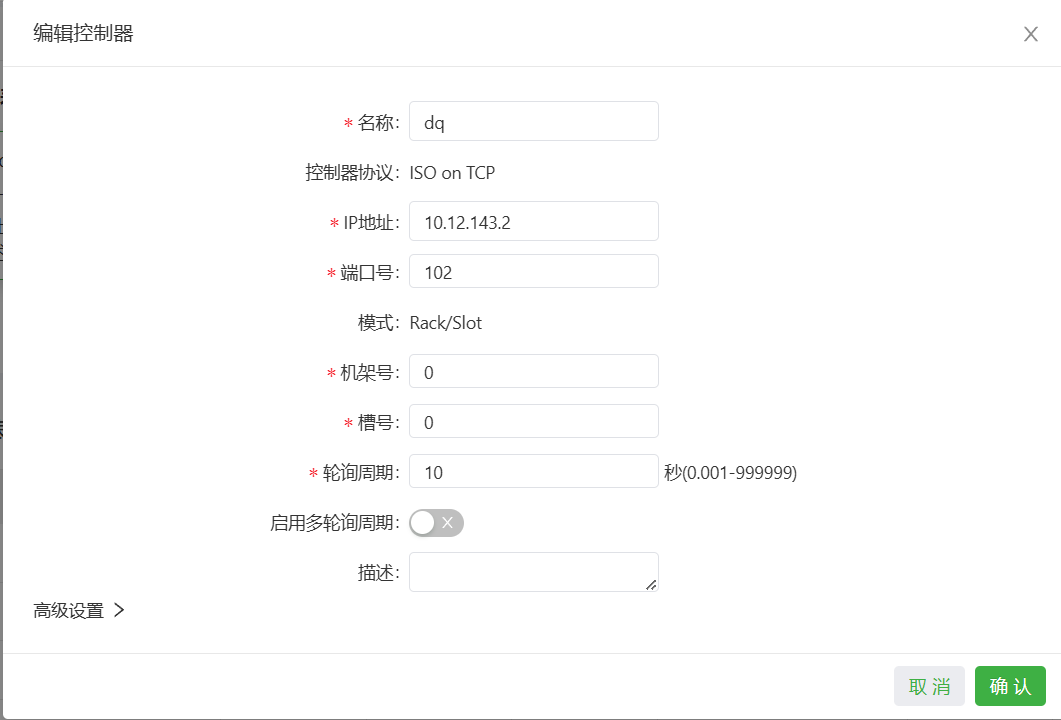
8.3 Adding Collection Data Points
- Go to [Data Point Configuration] → [Add Data Point]
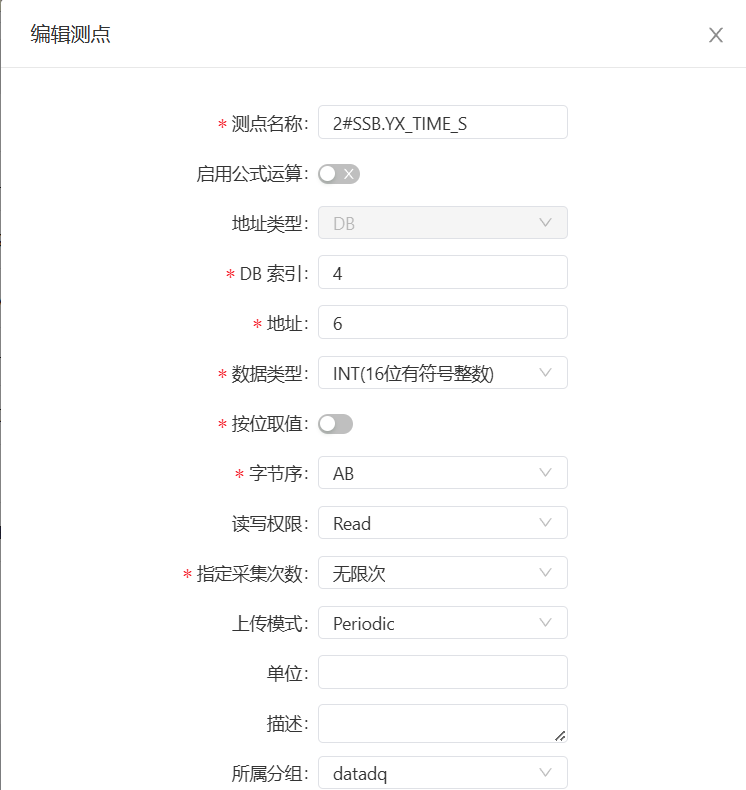
8.4 Data Point Table Import/Export
Supports Excel batch import and export backup.
9. Data Upload Configuration
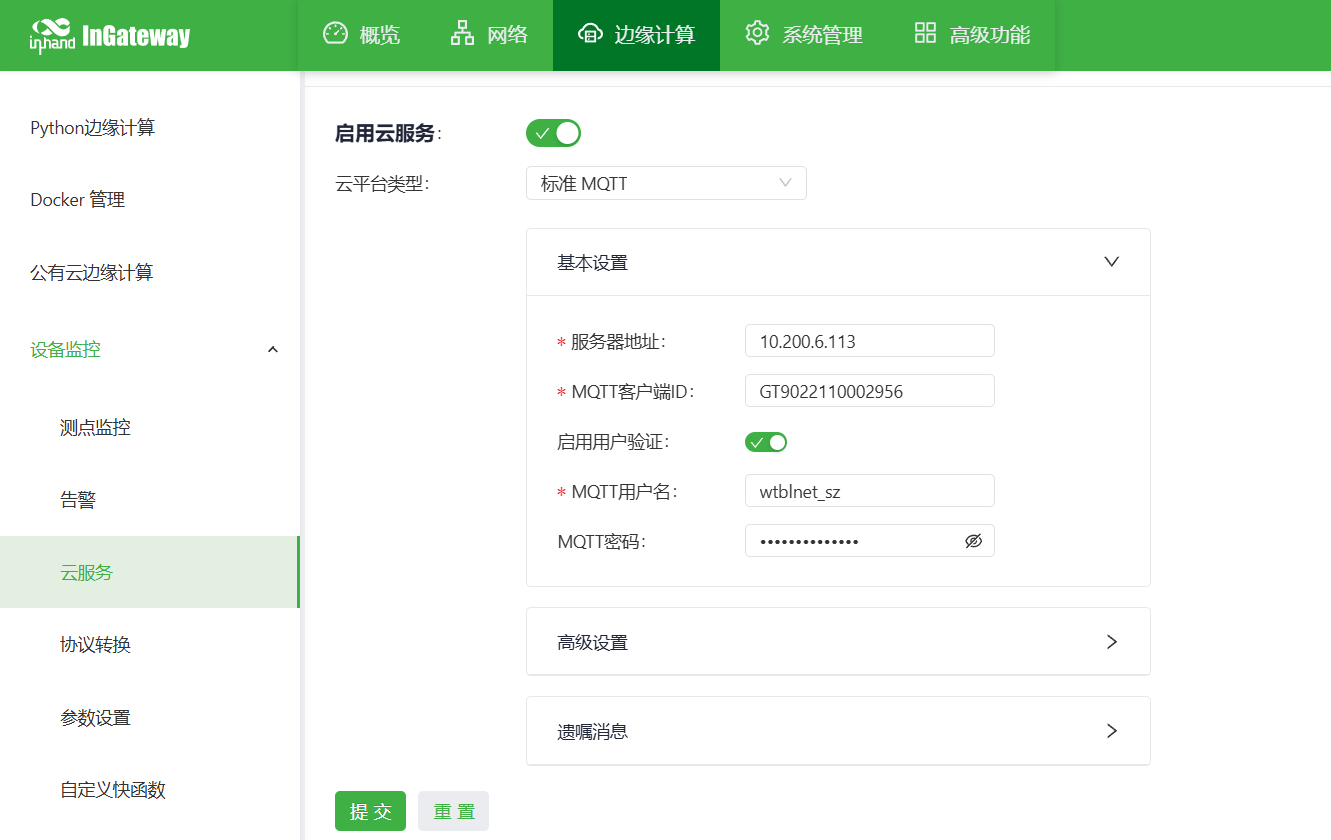
9.1 MQTT Upload (Common Cloud Connection Method)
- Go to [Upload Configuration] → [MQTT]
- Enable MQTT
- Server address: 10.200.6.113:1883
- Client ID: GT9022110002956 (gateway SN)
- Username: wtblnet_sz
- Password: sas@SZ#kj_we3e
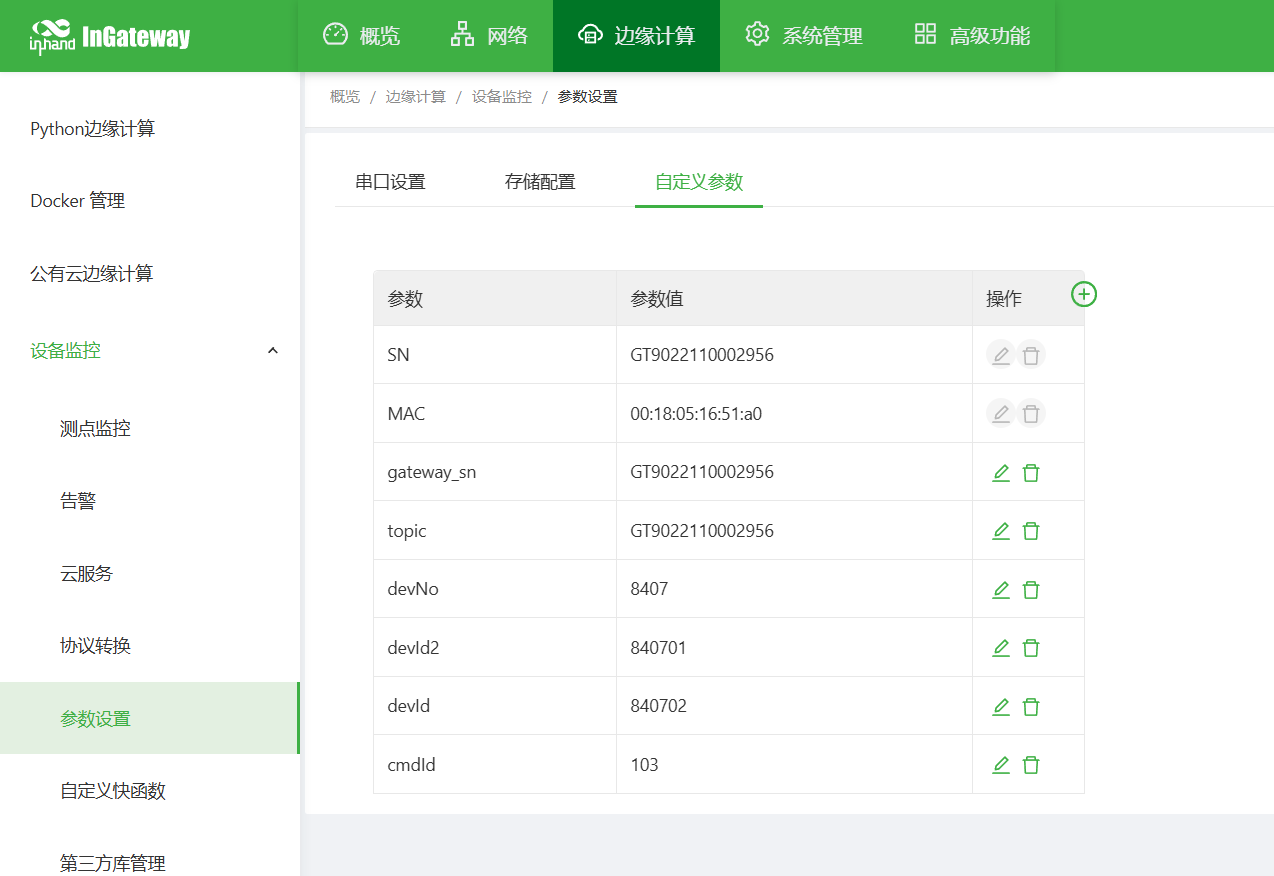
- Data format: JSON / custom.
1 2 3 4 5 6 7 8 9 10 11 12 13 14 15 16 17 18 19 20 21 22 23 24 25 26 27 28 29 30 31 32 33 34 35 36 37 38 39 40 41 42 43 44 45 46 47 48 49 50 51 52 53 54 55 56 57 58 59 60 61 62 63 64 65 66 67 68 69 70 71 72 73 74 75 76 77 78 79 80 81 82 83 84 85 86 87 88 89 90 91 92 93 94 95 96 97 98 99 100 101 102 103 104 105 106 107 108 109 110 111 112 113 114 115 116 117 118 119 120 121 122 123 124 125 | |
Test connection → Save
9.2 Configuration Backup and Recovery
- Export the configuration file
10. Status Monitoring and Diagnosis
10.1 Running Status
- Device online status
- Real-time values of collection data points
- Serial port transmit/receive packet statistics
- Network traffic, signal strength
- CPU, memory, temperature
10.2 Log Viewing
- System logs
- Collection logs
- Upload logs
- Alarm logs
11. Common Issues and Troubleshooting
- Unable to open the Web
- Check whether the network segment, network cable, and IP conflict
- Reset the gateway and retry
- Device online but no data
- Check the data point address and data type
- View the collection logs
- Check whether the device supports the protocol
- MQTT connection failure
- Whether the network is reachable
- Server address, port, username, password
- Whether the firewall / port is open
12. Safety Precautions
- Reliable grounding at the industrial site
- Avoid hot-plugging serial ports while powered
- Back up after configuration is complete
- Change the remote password regularly
- Unauthorized personnel are prohibited from operating
13. Appendix
13.1 Glossary
- RTU, TCP, MQTT, edge computing, data point, register, station number, collection interval