Always-Online Connectivity Solution
Product: InHand IR302 Industrial Cellular Router Use Case: Dual-link (WAN / Cellular / Wi-Fi) Internet Redundancy for Always-Online Field Sites
1. Solution Overview
1.1 Background
In Industrial IoT, smart retail, unattended terminals, smart vending, transportation and remote monitoring scenarios, the field router is the only path between local equipment (POS, kiosks, PLCs, cameras, sensors, edge controllers) and the central platform. A single uplink — whether wired broadband, cellular, or Wi-Fi — is a single point of failure: a cut fibre, a base-station outage, an ISP maintenance window, or a temporarily unstable cellular cell is enough to take the whole site offline. For services that depend on real-time data, payment authorization, remote control or alarm reporting, even a few minutes of downtime translates directly into lost revenue and emergency truck-rolls.
The InHand IR302 industrial cellular router solves this by combining multiple uplinks (Ethernet WAN, 4G/LTE cellular, Wi-Fi STA) in a single device and providing a built-in Link Backup feature. With Link Backup enabled, the router continuously monitors the health of each uplink using ICMP probes and automatically switches the default route to the healthy link the moment the primary path fails — and switches back as soon as the primary path is restored, with no manual intervention required.
1.2 Objectives
- Eliminate single-uplink outage as a cause of site downtime.
- Provide automatic, sub-minute failover between primary and backup uplinks.
- Provide automatic fallback to the preferred (usually cheaper / faster) link once it recovers.
- Keep cellular data consumption controlled by allowing cold-failover mode, where the backup link only dials up when needed.
- Support active/active operation (load balance) for sites that need extra throughput rather than pure redundancy.
- Be deployable without any field staff after first commissioning — fully remotely manageable via InHand Device Manager.
1.3 Application Scenarios
The IR302 + Link Backup pattern fits any site where Internet uptime is business-critical:
- Retail/chain stores — POS terminals, payment gateways, electronic shelf labels; broadband as primary, 4G as backup.
- Self-service & unattended terminals — ATMs, ticket kiosks, EV chargers, vending machines; cellular primary with a second SIM or Wi-Fi backup.
- Healthcare equipment — connected medical devices and remote diagnostic terminals where data delivery cannot be interrupted.
- Industrial sites & smart manufacturing — PLC / SCADA upload links, MES connectivity.
- Smart city & traffic — signal controllers, surveillance cameras, environmental monitoring.
- Branch offices & remote locations — backup uplink for VPN tunnels back to HQ.
- Mobile assets — vehicles and pop-up sites using two carriers for nationwide coverage.
Reference field example (this manual): A site with Ethernet WAN as the main link and 4G cellular as the backup link. ICMP probe target
8.8.8.8. Backup mode: Hot failover.
2. Requirements Analysis
2.1 Field-side situation
| Item | Typical value |
|---|---|
| Site type | Retail / kiosk / industrial / branch office / vehicle |
| Local devices | POS / PLC / IPC / camera / kiosk / medical device |
| LAN interface | RJ45 Ethernet (LAN2) |
| Available uplinks | Ethernet WAN, 4G/LTE, Wi-Fi STA |
| Power | DC 9–36 V (matches IR302 input range) |
| Deployment | Indoor cabinet, outdoor enclosure, in-vehicle |
| Manageability | Local Web UI + remote Device Manager cloud |
2.2 Core requirements
- High availability — at least two independent uplinks; one must take over automatically when the other fails.
- Detection — link health must be detected from a real Internet target, not just the local interface state.
- Predictable failover — clearly defined main link and backup link; deterministic failover and fallback.
- Bandwidth/cost control — option to keep the cellular SIM idle until the wired link is actually down.
- Throughput option — for some sites, traffic should be load-balanced across both uplinks instead of being held in standby.
- Remote O&M — remote configuration, remote diagnosis and remote firmware upgrade via InHand Device Manager.
- Security — encrypted Web UI, role-based local access, ability to change default credentials, configuration backup / restore.
3. Overall Architecture
3.1 Logical architecture (four layers)
- Perception layer — field equipment behind the router (POS, PLC, camera, medical device, kiosk).
- Network layer — IR302 with multiple uplinks (Ethernet WAN, 4G/LTE, Wi-Fi STA) and Link Backup running on the device.
- Transport layer — public Internet via the currently active uplink; VPN tunnel (OpenVPN / IPsec / L2TP) optional.
- Application / Cloud layer — business platform, IoT cloud, payment gateway, video platform, or InHand Device Manager.
3.2 Solution topology
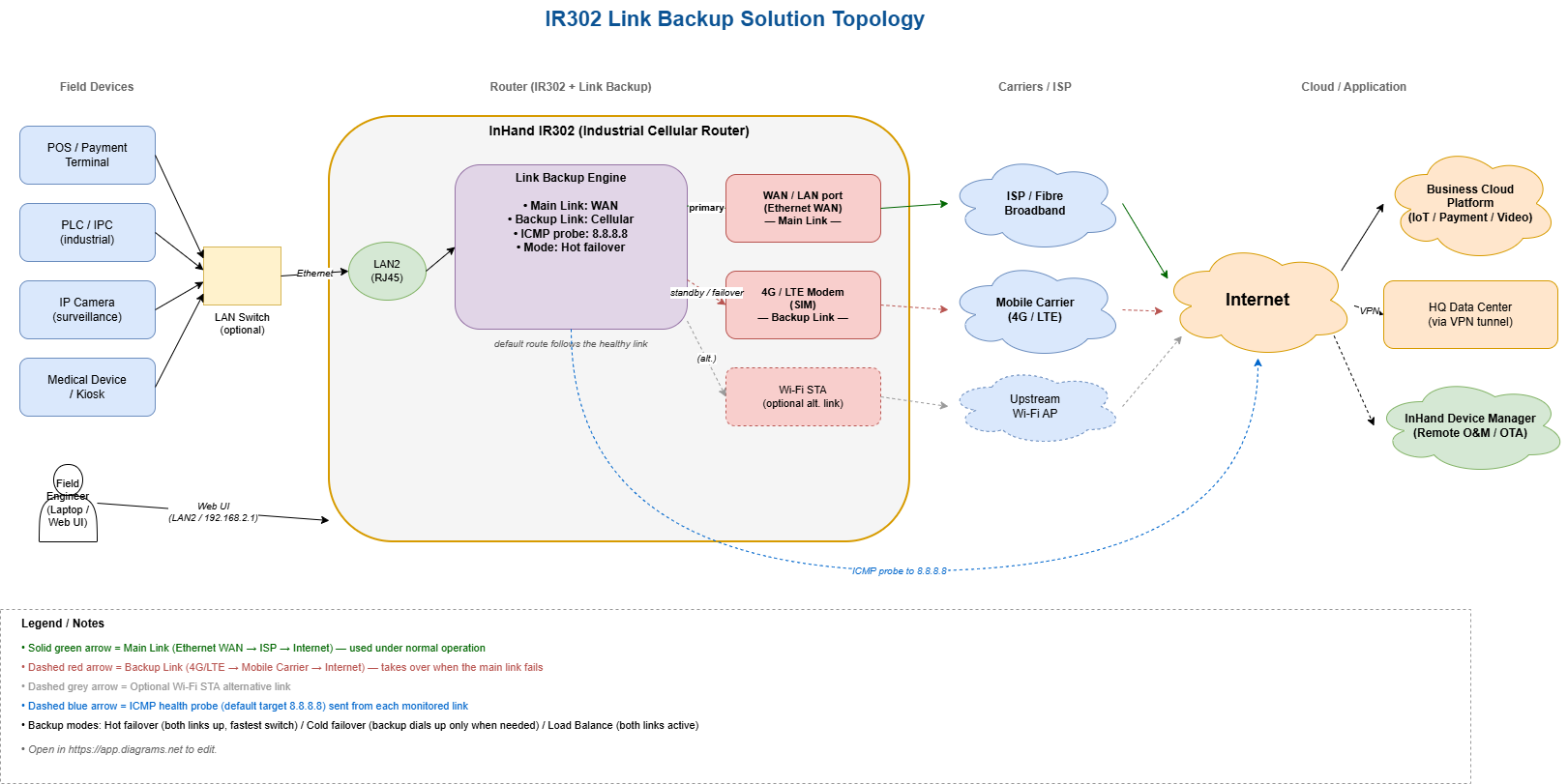
3.3 Data flow (south → north)
- The local device sends traffic to its default gateway, which is the IR302 LAN IP.
- The IR302 forwards the traffic over the currently active default route, which is the main link under normal operation.
- The Link Backup engine sends ICMP probes (default target
8.8.8.8) over each configured link to verify Internet reachability. - If the main link fails the probe (link down, no carrier, ISP outage), the router switches the default route to the backup link.
- While the main link is down, the backup link carries all production traffic.
- As soon as the main link recovers and passes the probe again, the router restores the default route back to the main link.
- Optionally, when Load Balance mode is selected, the router distributes outbound sessions across both links instead of standby.
4. Network & Connectivity Design
4.1 Uplink selection
| Option | Recommended for |
|---|---|
| Ethernet WAN (broadband / fibre) | Fixed sites with existing wired Internet — typical main link |
| 4G/LTE cellular | Mobile assets, remote sites, or typical backup link for fixed sites |
| Wi-Fi STA | Sites with reliable upstream Wi-Fi (e.g. tenant Wi-Fi) used as primary or backup |
| Dual SIM (model-dependent) | Mission-critical sites needing carrier redundancy |
4.2 Backup modes
The IR302 Link Backup feature supports three modes; pick the one that matches your operational priority:
| Mode | Behavior | Best for |
|---|---|---|
| Hot failover | Both links are kept up at all times. If the main link fails, traffic switches immediately to the already-online backup link. Consumes a small amount of data on the backup link to keep it alive. | Sites where the fastest possible failover matters more than cellular data cost (payments, medical, alarms). |
| Cold failover | Only the main link is connected. The backup link is dialled up only when the main link is down. Zero cellular usage during normal operation. | Sites that care about minimizing SIM data charges; failover takes a few seconds longer because the backup needs to dial up. |
| Load Balance | Outbound traffic is split across both links simultaneously. | Dual-SIM throughput aggregation, or sites that need to use both pipes at once. |
4.3 Why IR302
- Multiple native uplinks — 4G/LTE, Ethernet WAN, Wi-Fi in a single industrial-grade device.
- Built-in Link Backup — no extra license, no extra hardware: WAN + cellular failover out of the box.
- ICMP-based health check — real end-to-end Internet test, not just interface up/down.
- Industrial design — DC 9–36 V wide voltage, wide temperature, reverse-polarity / surge protection, watchdog.
- VPN-ready — OpenVPN, IPsec, L2TP, GRE supported on either link.
- Remote O&M — InHand Device Manager cloud for fleet-scale configuration and OTA.
5. Protocols & Detection
5.1 South-bound (LAN side)
- Ethernet (RJ45
LAN2) to the local device or LAN switch. - DHCP server on the LAN side (optional, configurable).
- Any IP-based device behind the router is supported (POS, PLC, IPC, kiosk, medical device, etc.).
5.2 North-bound (WAN side)
- Ethernet WAN —
WAN/LANport configured as WAN, DHCP / static / PPPoE. - Cellular — 4G/LTE SIM, public APN or private APN.
- Wi-Fi STA — connect the IR302 as a client to an upstream Wi-Fi network.
5.3 Link health detection
The IR302 sends periodic ICMP echo requests to a configurable target IP from each monitored link. A link is considered healthy as long as echo replies are received within the timeout window. Default target: 8.8.8.8 (Google public DNS). The target can be changed to any always-on public IP, or to the customer's own HQ/server endpoint.
6. Security
- Local Web UI — protected by username/password (factory default
adm/123456or find it on the label of the device — must be changed at first login). - Remote management — disabled by default; enable HTTPS / SSH on the WAN side only if needed.
- Configuration backup — full configuration can be exported and re-imported via the Web UI; recommended after every change.
- Device Manager — secure, centralized remote management, audit and OTA upgrade.
7. Solution Highlights
- Always online — automatic, sub-minute failover between any two of WAN / cellular / Wi-Fi.
- Three modes, one product — Hot failover for speed, Cold failover for cost, Load Balance for throughput; pick per site without changing hardware.
- Real Internet check — ICMP probe to a public target avoids the classic "interface is up, but Internet is down" problem.
- Zero-touch fallback — when the main link recovers, the router silently switches back; no field visit, no operator action.
- Industrial-grade — wide voltage, wide temperature, watchdog, surge protection — designed for unattended deployment.
- Fleet-ready — remote O&M via InHand Device Manager for hundreds or thousands of IR302s.
8. Bill of Materials (per site)
| # | Item | Notes |
|---|---|---|
| 1 | InHand IR302 Industrial Cellular Router | With 4G/LTE, Ethernet WAN, optional Wi-Fi |
| 2 | SIM card | Carrier per region; APN as required for private cards |
| 3 | 4G antennas | MAIN (+ AUX where applicable, North America models) |
| 4 | Wi-Fi antenna | If Wi-Fi STA is used as one of the links |
| 5 | Power supply | DC 9–36 V |
| 6 | Ethernet cables | One for WAN uplink, one for LAN device |
| 7 | InHand Device Manager account | For remote O&M (optional but recommended) |