


InPAD070S
7" All-in-One
Interaktives Terminal
Das InPAD070S ist ein 4G-fähiges Smart-Terminal für den gewerblichen und industriellen Selbstbedienungsbereich. Es verfügt über ein helles Touchdisplay mit stabiler Konnektivität, bietet Schnittstellen wie RS232, RS485, USB und Ethernet und unterstützt verschiedene Android-Versionen für eine schnelle Anwendungsentwicklung.
InPAD070S
7" All-in-One
Interaktives Terminal
Das InPAD070S ist ein 4G-fähiges Smart-Terminal für den gewerblichen und industriellen Selbstbedienungsbereich. Es verfügt über ein helles Touchdisplay mit stabiler Konnektivität, bietet Schnittstellen wie RS232, RS485, USB und Ethernet und unterstützt verschiedene Android-Versionen für eine schnelle Anwendungsentwicklung.
FOTO

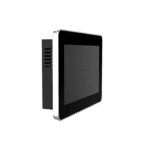
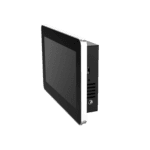
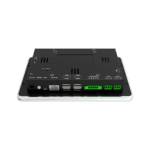
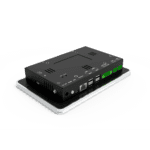

7-Zoll-All-in-One-Android-Tablet






-
Kernspezifikationen
Bluetooth Bluetooth 4.2CPU RK3288 Quad-Core Cortex-A17, 1,6 GHzAbmessungen 195.0 × 128.8 × 36.0 mm (7.68 × 5.07 × 1.42 in)Anzeige 7 Zoll, 1024 × 600 Pixel, 450 cd/m², kapazitiver TouchscreenEthernet 1 × 10/100 Mbit/sFrontschutz IP65Betriebssystem Android 7.1 / Android 12RAM / Speicher 2 GB / 8 GBSeriennummer 2 × RS-232, 2 × RS-485USB 4 × USB 2.0W-lan 802.11b/g/n, Client/AP-ModusBetriebstemperatur -10 °C ~ 60 °C (14 °F ~ 140 °F)
-
Prozessor
CPU RK3288 Quad-Core Cortex-A17, 1,6 GHzBLITZ 8 GBRAM 2 GB
-
Anzeige
Helligkeit 450 cd/m² (typ.)Kontrast 800:1Auflösung 1024 × 600Größe 7"Touch-Screen Kapazitiver TouchscreenBetrachtungswinkel Voller Betrachtungswinkel
-
Schnittstellen
Antenne 1 × SMA (4G); 1 × RP-SMA (WLAN)Audio 1 × SPK, 2-Kanal 8-Ohm 5W Lautsprecherausgang (2,0 mm 4-Pin)Tasten 1 × Ein-/Ausschalter (langes Drücken startet neu, kurzes Drücken startet die Benutzeroberfläche neu); 1 × ModustasteDebuggen 1 × ADBEthernet 1 × 10/100 Mbit/s, WAN/LANSeriennummer 2 × RS-232 (3-pin terminal, 3.5mm pitch, no flange, ttyS1/ttyS3) 2 × RS-485 (5-pin terminal, 3.5mm pitch, with flange, ttyS2/ttyS4)SIM 1 × Standard-SIMUSB 4 × USB 2.0
-
Konnektivität
Bluetooth Bluetooth 4.2Mobilfunk 4G LTEW-lan 802.11b/g/n, Client/AP-Modus
-
Leistung
Stromverbrauch < 10 WStromzufuhr 12 V Gleichstrom (Rundsteckdose), automatischer Start bei Stromzufuhr
-
Mechanisch
Kühlung LüfterlosAbmessungen (B × T × H) 195.0 × 128.8 × 36.0 mm (7.68 × 5.07 × 1.42 in)Gehäuse MetallInstallation WandmontageSchutzklasse IP65 (Frontscheibe)
-
Umwelt
Luftfeuchtigkeit 5 ~ 95% (nicht kondensierend)Lagertemperatur -40 °C ~ 85 °C (-40 °F ~ 185 °F)Betriebstemperatur -10 °C ~ 60 °C (14 °F ~ 140 °F)
-
Zuverlässigkeit
RTC Eingebaute Echtzeituhr (RTC)Wachhund Unterstützt
-
EMV
EFT Stufe 2ESD Stufe 2Anstieg Stufe 2
-
Indikatoren
Betriebsanzeige-LED Leuchtet dauerhaft nach dem EinschaltenStatus-LED Blinkt im Normalbetrieb
-
Zertifizierung
Zertifizierung CE
-
Betriebssystem
Betriebssystem Android 7.1 / Android 12
-
Netzwerk
Bluetooth Bluetooth 4.2Netzwerk 4GW-lan 802.11b/g/n, Client/AP-Modus
-
Grafikverarbeitung
Multimedia 4K 10-Bit H.265/H.264-Videodekodierung; 1080p-Multiformat-Dekodierung (VC-1, MPEG-1/2/4, VP8); 1080p-Videokodierung (H.264, VP8); Videonachbearbeitung: Deinterlacing, Rauschunterdrückung, Kanten-/Detail-/Farboptimierung
-
Anwendungen
Anwendungssoftware Kompatibel mit Android-Betriebssystemanwendungen
-
Konfigurationsverwaltung
Upgrade Lokales USB-Upgrade
Standardpaket*
- InPAD070S Edge Tablet-Computer *1
- Optionales Zubehör
- 4G-Antenne *1
- Wi-Fi-Antenne *1
- Netzteil *1
* Der Standardpaketinhalt variiert je nach Standardbestellcode.
Kontaktieren Sie uns Um mehr über unsere Verpackungsoptionen zu erfahren, wenden Sie sich bitte direkt an uns.
Spezifikationen
-
Kernspezifikationen
Bluetooth Bluetooth 4.2CPU RK3288 Quad-Core Cortex-A17, 1,6 GHzAbmessungen 195.0 × 128.8 × 36.0 mm (7.68 × 5.07 × 1.42 in)Anzeige 7 Zoll, 1024 × 600 Pixel, 450 cd/m², kapazitiver TouchscreenEthernet 1 × 10/100 Mbit/sFrontschutz IP65Betriebssystem Android 7.1 / Android 12RAM / Speicher 2 GB / 8 GBSeriennummer 2 × RS-232, 2 × RS-485USB 4 × USB 2.0W-lan 802.11b/g/n, Client/AP-ModusBetriebstemperatur -10 °C ~ 60 °C (14 °F ~ 140 °F)
-
Prozessor
CPU RK3288 Quad-Core Cortex-A17, 1,6 GHzBLITZ 8 GBRAM 2 GB
-
Anzeige
Helligkeit 450 cd/m² (typ.)Kontrast 800:1Auflösung 1024 × 600Größe 7"Touch-Screen Kapazitiver TouchscreenBetrachtungswinkel Voller Betrachtungswinkel
-
Schnittstellen
Antenne 1 × SMA (4G); 1 × RP-SMA (WLAN)Audio 1 × SPK, 2-Kanal 8-Ohm 5W Lautsprecherausgang (2,0 mm 4-Pin)Tasten 1 × Ein-/Ausschalter (langes Drücken startet neu, kurzes Drücken startet die Benutzeroberfläche neu); 1 × ModustasteDebuggen 1 × ADBEthernet 1 × 10/100 Mbit/s, WAN/LANSeriennummer 2 × RS-232 (3-pin terminal, 3.5mm pitch, no flange, ttyS1/ttyS3) 2 × RS-485 (5-pin terminal, 3.5mm pitch, with flange, ttyS2/ttyS4)SIM 1 × Standard-SIMUSB 4 × USB 2.0
-
Konnektivität
Bluetooth Bluetooth 4.2Mobilfunk 4G LTEW-lan 802.11b/g/n, Client/AP-Modus
-
Leistung
Stromverbrauch < 10 WStromzufuhr 12 V Gleichstrom (Rundsteckdose), automatischer Start bei Stromzufuhr
-
Mechanisch
Kühlung LüfterlosAbmessungen (B × T × H) 195.0 × 128.8 × 36.0 mm (7.68 × 5.07 × 1.42 in)Gehäuse MetallInstallation WandmontageSchutzklasse IP65 (Frontscheibe)
-
Umwelt
Luftfeuchtigkeit 5 ~ 95% (nicht kondensierend)Lagertemperatur -40 °C ~ 85 °C (-40 °F ~ 185 °F)Betriebstemperatur -10 °C ~ 60 °C (14 °F ~ 140 °F)
-
Zuverlässigkeit
RTC Eingebaute Echtzeituhr (RTC)Wachhund Unterstützt
-
EMV
EFT Stufe 2ESD Stufe 2Anstieg Stufe 2
-
Indikatoren
Betriebsanzeige-LED Leuchtet dauerhaft nach dem EinschaltenStatus-LED Blinkt im Normalbetrieb
-
Zertifizierung
Zertifizierung CE
-
Betriebssystem
Betriebssystem Android 7.1 / Android 12
-
Netzwerk
Bluetooth Bluetooth 4.2Netzwerk 4GW-lan 802.11b/g/n, Client/AP-Modus
-
Grafikverarbeitung
Multimedia 4K 10-Bit H.265/H.264-Videodekodierung; 1080p-Multiformat-Dekodierung (VC-1, MPEG-1/2/4, VP8); 1080p-Videokodierung (H.264, VP8); Videonachbearbeitung: Deinterlacing, Rauschunterdrückung, Kanten-/Detail-/Farboptimierung
-
Anwendungen
Anwendungssoftware Kompatibel mit Android-Betriebssystemanwendungen
-
Konfigurationsverwaltung
Upgrade Lokales USB-Upgrade
Downloads
Bestellung
Standardpaket*
- InPAD070S Edge Tablet-Computer *1
- Optionales Zubehör
- 4G-Antenne *1
- Wi-Fi-Antenne *1
- Netzteil *1
* Der Standardpaketinhalt variiert je nach Standardbestellcode.
Kontaktieren Sie uns Um mehr über unsere Verpackungsoptionen zu erfahren, wenden Sie sich bitte direkt an uns.
KI-gestützte Cloud
Plattform für den unbemannten Einzelhandelsbetrieb
Technologie verändert das Leben
Und der Einzelhandel mit Verkaufsautomaten macht das Einkaufen bequemer.
KI-gestützte Cloud
Ähnliche Fälle

Intelligente Cloud- und Edge-Lösung für Verkaufsautomaten
Anwendungen und Anwendungsfälle von Smart-Vending-Cloud- und Edge-Lösungen – Wichtigste Erkenntnisse…
Mehr erfahren →
Intelligente Ladestationen für Elektrofahrzeuge
Intelligente Ladekioske für Elektrofahrzeuge: Anwendungsbeispiele und wichtige Erkenntnisse…
Mehr erfahren →Häufig gestellte Fragen
Was bietet das InPAD070S?
Das InPAD070S ist ein industrielles 4G-Android-Terminal mit einem 7-Zoll-kapazitiver Touchscreen mit 1024 × 600 PixelnEntwickelt für Selbstbedienungskioske, intelligente Schaltschränke und HMI-Anwendungen. Wichtigste Spezifikationen:
| — | — |
| Anzeige | 7 Zoll, 1024 × 600, kapazitiver Touchscreen, 450 cd/m² typ., 800:1, IP65 Frontscheibe |
| Berechnen | RK3288 Quad-Core Cortex-A17 mit 1,6 GHz, 2 GB RAM, 8 GB Flash-Speicher |
| Betriebssystem | Android 7.1 oder Android 12 |
| Mobilfunk | 4G LTE; FQ58 (EMEA / Südkorea / Thailand / Indien), FQ39 (Nordamerika) oder EN00 (kein Mobilfunknetz) |
| Wi-Fi / Bluetooth | 802.11 b/g/n (Client- und AP-Modus), Bluetooth 4.2 |
| Kabelgebundenes Netzwerk | 1× 10/100 Mbps Ethernet (WAN/LAN umschaltbar) |
| Industrielle E/A | 2× RS-232 (3-poliger Anschluss) + 2× RS-485 (5-poliger Anschluss mit Flansch), 4× USB 2.0 |
| Leistung | DC 12 V (5521 Rundstecker), < 10 W, lüfterlos |
| Gehäuse / Halterung | Metall, 195 × 128,8 × 36 mm, Wandmontage oder VESA 75×75 |
| Umfeld | Betriebstemperaturbereich: -10 bis +60 °C, Echtzeituhr (RTC), Hardware-Watchdog, CE-zertifiziert |
Typische Anwendungsbereiche laut Datenblatt: Selbstbedienungs-Verkaufsautomaten, unbemannte Supermärkte, Selbstbedienungs-Kassenterminals, intelligente Express-Schränke, intelligente Ladeschränke, Abfallrecycling-Schränke und medizinische Geräte.
Wie richte ich die Netzwerkverbindung auf dem InPAD070S ein?
Der Ethernet-Anschluss ist Standardmäßig deaktiviertAktivieren Sie es von EinstellungenUnter Android 12 gehen Sie zu Netzwerk & Internet > EthernetUnter Android 7.1 gehen Sie zu Einstellungen > EthernetAktivieren Sie anschließend „Ethernet verwenden“. Der Port funktioniert dann als WAN standardmäßig (DHCP, mit Option für statische IP); wechseln zu LAN-Modus um es für nachgelagerte Geräte zu verwenden (Standard-LAN-IP) 192.168.1.100 ).
Schließen Sie für Wi-Fi zuerst die RP-SMA-Wi-Fi-Antenne an, dann Netzwerk & Internet > Internet > WLAN (Android 12) oder Einstellungen > WLAN (Android 7.1). Wählen Sie eine SSID aus und geben Sie das Passwort ein.
Für Mobilfunk installieren Sie die SIM-Karte im Standard-SIM-Steckplatz und konfigurieren Sie den APN unter Netzwerk & Internet > SIM-Karten > Zugangspunktnamen (Android 12) oder Einstellungen > Mehr > Mobilfunknetze > Zugangspunktnamen (Android 7.1). ICMP-Erkennung ist standardmäßig aktiviert – das Gerät überwacht die Verbindung und wählt sich bei einem Fehler automatisch erneut ein; Zielserver und Intervall können über dasselbe Menü konfiguriert werden.
Wie kann ich die Firmware aktualisieren oder Apps auf dem InPAD070S installieren?
Firmware-Upgrade – zwei Methoden:
- USB-Laufwerk: Benennen Sie die Upgrade-Datei um in
update.zipund kopieren Sie es auf einen USB-Stick. Stecken Sie den Stick ein und gehen Sie dann zu Einstellungen > System > Udisk-Systemaktualisierungen (Android 12) oder Einstellungen > Über das Tablet > U-Disk-Systemaktualisierungen (Android 7.1). Das System aktualisiert sich und startet automatisch neu. - ADB-Übertragung (FOTA-Stil): Kopie
update.zipzum Gerät/sdcardVerzeichnis, aktivieren USB-Debugging Öffnen Sie die Entwickleroptionen und führen Sie dann Folgendes aus:
adb shell am broadcast -a com.ubox.upgraderom --include-stopped-packages
“
Installieren Sie eine APK-Datei: Kopieren Sie die APK-Datei auf einen USB-Stick, stecken Sie diesen in das Gerät, öffnen Sie den Dateimanager und tippen Sie auf die APK-Datei, um sie zu installieren. Aktivieren Sie bei der ersten Installation die entsprechende Option. Unbekannte Quellen unter Einstellungen > Sicherheit.
Um die Entwickleroptionen unter Android 12 zu aktivieren, tippen Sie auf Einstellungen > Über das Tablet > Build-Nummer (nachdem Sie die Mehrfachtippsequenz auf die Android-Sicherheitspatch-Ebene / Baseband-Version ausgeführt haben), bis die Meldung „Sie sind jetzt ein Entwickler“ angezeigt wird.
Wie schneidet das InPAD070S im Vergleich zum InPAD3101 ab?
| InPAD070S | InPAD3101 | |
| — | — | — |
| Anzeige | 7 Zoll, 1024 × 600 | 10,1 Zoll, 1280 × 800 |
| Android-Betriebssystem | Android 7.1 oder Android 12 | Nur für Android 7.1 |
| Abmessungen | 195 × 128,8 × 36 mm | 258 × 172 × 36 mm |
| Alle anderen Hardware | Identisch | Identisch |
Beide verfügen über die RK3288 CPU, 2 GB RAM / 8 GB Flash, 2× RS-232 + 2× RS-485, 4× USB 2.0, 1× 10/100 Ethernet, 4G + Wi-Fi + Bluetooth 4.2, IP65 Frontbildschirm, Metallgehäuse, DC 12 V Stromversorgung und CE-Zertifizierung.
Wähle die InPAD070S wenn die Bereitstellung eine kleinere Bauform (kompakte Kioske, kleinere intelligente Schränke, handgeführte HMI-Panels) oder wenn Sie es benötigen Android 12 für neuere App-Kompatibilität.
—