


InPAD070S
جهاز الكل في واحد مقاس 7 بوصات
محطة تفاعلية
جهاز InPAD070S هو جهاز طرفي ذكي بتقنية الجيل الرابع (4G) للخدمة الذاتية في القطاعين التجاري والصناعي. يتميز بشاشة لمس عالية السطوع مع اتصال مستقر، ويوفر منافذ RS232/RS485/USB/Ethernet، ويدعم خيارات متعددة لنظام Android لتطوير التطبيقات بسرعة.
InPAD070S
جهاز الكل في واحد مقاس 7 بوصات
محطة تفاعلية
جهاز InPAD070S هو جهاز طرفي ذكي بتقنية الجيل الرابع (4G) للخدمة الذاتية في القطاعين التجاري والصناعي. يتميز بشاشة لمس عالية السطوع مع اتصال مستقر، ويوفر منافذ RS232/RS485/USB/Ethernet، ويدعم خيارات متعددة لنظام Android لتطوير التطبيقات بسرعة.
صورة

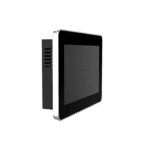
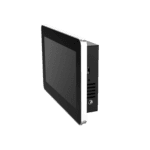
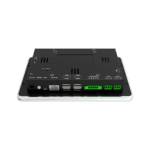
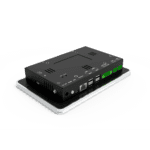

جهاز لوحي أندرويد متكامل بشاشة 7 بوصات






-
المواصفات الأساسية
بلوتوث بلوتوث 4.2وحدة المعالجة المركزية معالج RK3288 رباعي النواة Cortex-A17، بسرعة 1.6 جيجاهرتزأبعاد 195.0 × 128.8 × 36.0 mm (7.68 × 5.07 × 1.42 in)عرض 7 بوصة، 1024 × 600، 450 شمعة/م²، شاشة لمس سعويةإيثرنت 1 × 10/100 ميجابت في الثانيةحماية أمامية IP65نظام التشغيل أندرويد 7.1 / أندرويد 12ذاكرة الوصول العشوائي / التخزين 2 جيجابايت / 8 جيجابايتمسلسل 2 × RS-232، 2 × RS-485USB 4 × USB 2.0واي فاي 802.11b/g/n، وضع العميل/نقطة الوصولدرجة حرارة التشغيل -10 °C ~ 60 °C (14 °F ~ 140 °F)
-
المعالج
وحدة المعالجة المركزية معالج RK3288 رباعي النواة Cortex-A17، بسرعة 1.6 جيجاهرتزفلاش 8 جيجابايتكبش 2 جيجابايت
-
عرض
سطوع 450 شمعة/م² (نموذجي)مقابلة 800:1دقة 1024 × 600مقاس 7"شاشة لمس شاشة لمس سعويةزاوية الرؤية زاوية رؤية كاملة
-
واجهات
هوائي 1 × سما (4G)؛ 1 × RP-SMA (واي فاي)صوتي 1 × SPK، مخرج مكبر صوت ثنائي القناة 8 أوم 5 واط (2.0 مم 4 دبابيس)أزرار زر الطاقة (ضغطة مطولة لإعادة التشغيل، ضغطة قصيرة لإعادة تشغيل واجهة المستخدم)؛ مفتاح الوضعتصحيح الأخطاء 1 × ADBإيثرنت 1 × 10/100 ميجابت في الثانية، WAN/LANمسلسل 2 × RS-232 (3-pin terminal, 3.5mm pitch, no flange, ttyS1/ttyS3) 2 × RS-485 (5-pin terminal, 3.5mm pitch, with flange, ttyS2/ttyS4)شريحة SIM شريحة SIM قياسية واحدةUSB 4 × USB 2.0
-
الاتصال
بلوتوث بلوتوث 4.2خلوي 4G LTEواي فاي 802.11b/g/n، وضع العميل/نقطة الوصول
-
قوة
استهلاك الطاقة < 10 واطمدخل الطاقة 12 فولت تيار مستمر (واجهة دائرية)، بدء التشغيل التلقائي عند التوصيل بالكهرباء
-
ميكانيكياً
تبريد بدون مروحةالأبعاد (العرض × العمق × الارتفاع) 195.0 × 128.8 × 36.0 mm (7.68 × 5.07 × 1.42 in)السكن معدنتثبيت التثبيت على الحائطتصنيف الحماية IP65 (الشاشة الأمامية)
-
البيئة
رطوبة 5 ~ 95% (غير مكثف)درجة حرارة التخزين -40 °C ~ 85 °C (-40 °F ~ 185 °F)درجة حرارة التشغيل -10 °C ~ 60 °C (14 °F ~ 140 °F)
-
مصداقية
RTC ساعة توقيت حقيقية مدمجة (RTC)كلب الحراسة مدعوم
-
التوافق الكهرومغناطيسي
تقنية الحرية النفسية (EFT) المستوى 2التفريغ الكهروستاتيكي المستوى 2طفرة المستوى 2
-
المؤشرات
مؤشر الطاقة يعمل دائماً بعد تشغيل الطاقةمؤشر الحالة الضوئية وميض أثناء التشغيل العادي
-
شهادة
شهادة علامة CE
-
نظام التشغيل
نظام التشغيل أندرويد 7.1 / أندرويد 12
-
شبكة
بلوتوث بلوتوث 4.2شبكة 4Gواي فاي 802.11b/g/n، وضع العميل/نقطة الوصول
-
معالجة الرسومات
الوسائط المتعددة فك تشفير فيديو بدقة 4K و10 بت بصيغة H.265/H.264؛ فك تشفير فيديو متعدد الصيغ بدقة 1080P (VC-1، MPEG-1/2/4، VP8)؛ ترميز فيديو بدقة 1080P (H.264، VP8)؛ معالجة الفيديو اللاحقة: إزالة التشابك، إزالة التشويش، تحسين الحواف/التفاصيل/الألوان
-
التطبيقات
برامج التطبيقات متوافق مع تطبيقات نظام التشغيل أندرويد
-
إدارة التكوين
يرقي ترقية USB محلية
الباقة القياسية*
- جهاز InPAD070S Edge اللوحي *1
- ملحقات اختيارية
- هوائي 4G *1
- هوائي واي فاي *1
- مزود الطاقة *1
* تختلف محتويات العبوة القياسية باختلاف رموز الطلب القياسية.
اتصل بنا للحصول على مزيد من المعلومات حول خيارات التغليف لدينا، يرجى الاتصال بنا مباشرة.
تحديد
-
المواصفات الأساسية
بلوتوث بلوتوث 4.2وحدة المعالجة المركزية معالج RK3288 رباعي النواة Cortex-A17، بسرعة 1.6 جيجاهرتزأبعاد 195.0 × 128.8 × 36.0 mm (7.68 × 5.07 × 1.42 in)عرض 7 بوصة، 1024 × 600، 450 شمعة/م²، شاشة لمس سعويةإيثرنت 1 × 10/100 ميجابت في الثانيةحماية أمامية IP65نظام التشغيل أندرويد 7.1 / أندرويد 12ذاكرة الوصول العشوائي / التخزين 2 جيجابايت / 8 جيجابايتمسلسل 2 × RS-232، 2 × RS-485USB 4 × USB 2.0واي فاي 802.11b/g/n، وضع العميل/نقطة الوصولدرجة حرارة التشغيل -10 °C ~ 60 °C (14 °F ~ 140 °F)
-
المعالج
وحدة المعالجة المركزية معالج RK3288 رباعي النواة Cortex-A17، بسرعة 1.6 جيجاهرتزفلاش 8 جيجابايتكبش 2 جيجابايت
-
عرض
سطوع 450 شمعة/م² (نموذجي)مقابلة 800:1دقة 1024 × 600مقاس 7"شاشة لمس شاشة لمس سعويةزاوية الرؤية زاوية رؤية كاملة
-
واجهات
هوائي 1 × سما (4G)؛ 1 × RP-SMA (واي فاي)صوتي 1 × SPK، مخرج مكبر صوت ثنائي القناة 8 أوم 5 واط (2.0 مم 4 دبابيس)أزرار زر الطاقة (ضغطة مطولة لإعادة التشغيل، ضغطة قصيرة لإعادة تشغيل واجهة المستخدم)؛ مفتاح الوضعتصحيح الأخطاء 1 × ADBإيثرنت 1 × 10/100 ميجابت في الثانية، WAN/LANمسلسل 2 × RS-232 (3-pin terminal, 3.5mm pitch, no flange, ttyS1/ttyS3) 2 × RS-485 (5-pin terminal, 3.5mm pitch, with flange, ttyS2/ttyS4)شريحة SIM شريحة SIM قياسية واحدةUSB 4 × USB 2.0
-
الاتصال
بلوتوث بلوتوث 4.2خلوي 4G LTEواي فاي 802.11b/g/n، وضع العميل/نقطة الوصول
-
قوة
استهلاك الطاقة < 10 واطمدخل الطاقة 12 فولت تيار مستمر (واجهة دائرية)، بدء التشغيل التلقائي عند التوصيل بالكهرباء
-
ميكانيكياً
تبريد بدون مروحةالأبعاد (العرض × العمق × الارتفاع) 195.0 × 128.8 × 36.0 mm (7.68 × 5.07 × 1.42 in)السكن معدنتثبيت التثبيت على الحائطتصنيف الحماية IP65 (الشاشة الأمامية)
-
البيئة
رطوبة 5 ~ 95% (غير مكثف)درجة حرارة التخزين -40 °C ~ 85 °C (-40 °F ~ 185 °F)درجة حرارة التشغيل -10 °C ~ 60 °C (14 °F ~ 140 °F)
-
مصداقية
RTC ساعة توقيت حقيقية مدمجة (RTC)كلب الحراسة مدعوم
-
التوافق الكهرومغناطيسي
تقنية الحرية النفسية (EFT) المستوى 2التفريغ الكهروستاتيكي المستوى 2طفرة المستوى 2
-
المؤشرات
مؤشر الطاقة يعمل دائماً بعد تشغيل الطاقةمؤشر الحالة الضوئية وميض أثناء التشغيل العادي
-
شهادة
شهادة علامة CE
-
نظام التشغيل
نظام التشغيل أندرويد 7.1 / أندرويد 12
-
شبكة
بلوتوث بلوتوث 4.2شبكة 4Gواي فاي 802.11b/g/n، وضع العميل/نقطة الوصول
-
معالجة الرسومات
الوسائط المتعددة فك تشفير فيديو بدقة 4K و10 بت بصيغة H.265/H.264؛ فك تشفير فيديو متعدد الصيغ بدقة 1080P (VC-1، MPEG-1/2/4، VP8)؛ ترميز فيديو بدقة 1080P (H.264، VP8)؛ معالجة الفيديو اللاحقة: إزالة التشابك، إزالة التشويش، تحسين الحواف/التفاصيل/الألوان
-
التطبيقات
برامج التطبيقات متوافق مع تطبيقات نظام التشغيل أندرويد
-
إدارة التكوين
يرقي ترقية USB محلية
التنزيلات
الطلب
الباقة القياسية*
- جهاز InPAD070S Edge اللوحي *1
- ملحقات اختيارية
- هوائي 4G *1
- هوائي واي فاي *1
- مزود الطاقة *1
* تختلف محتويات العبوة القياسية باختلاف رموز الطلب القياسية.
اتصل بنا للحصول على مزيد من المعلومات حول خيارات التغليف لدينا، يرجى الاتصال بنا مباشرة.
سحابة الابتكار بالذكاء الاصطناعي
منصة تشغيل أعمال البيع بالتجزئة غير الخاضعة للرقابة
التكنولوجيا تغير الحياة
وتجعل آلات البيع بالتجزئة التسوق أكثر ملاءمة.
سحابة الابتكار بالذكاء الاصطناعي
قضايا ذات صلة

حلول البيع الذكي السحابية والحافة
تطبيقات وحالات حلول البيع الذكي السحابية والحافة - أهم النقاط الرئيسية...
تعرّف على المزيد →
أكشاك شحن السيارات الكهربائية الذكية
تطبيقات وحالات أكشاك الشحن الذكية للسيارات الكهربائية - أهم النقاط الرئيسية: الشحن الذكي للسيارات الكهربائية...
تعرّف على المزيد →الأسئلة الشائعة
ما الذي يقدمه جهاز InPAD070S؟
جهاز InPAD070S هو جهاز طرفي صناعي يعمل بنظام أندرويد بتقنية الجيل الرابع مزود بـ شاشة لمس سعوية مقاس 7 بوصات بدقة 1024 × 600مصممة لأكشاك الخدمة الذاتية، والخزائن الذكية، وتطبيقات واجهة المستخدم الرسومية. المواصفات الرئيسية:
| — | — |
| عرض | شاشة 7 بوصة، بدقة 1024 × 600، تعمل باللمس السعوي، سطوع نموذجي 450 شمعة/م²، نسبة تباين 800:1، IP65 الشاشة الأمامية |
| الحوسبة | معالج RK3288 رباعي النواة Cortex-A17 بسرعة 1.6 جيجاهرتز، وذاكرة وصول عشوائي 2 جيجابايت، وذاكرة فلاش 8 جيجابايت |
| نظام التشغيل | أندرويد 7.1 أو أندرويد 12 |
| خلوي | 4G LTE؛ FQ58 (أوروبا والشرق الأوسط وأفريقيا / كوريا الجنوبية / تايلاند / الهند)، FQ39 (أمريكا الشمالية)، أو EN00 (بدون اتصال خلوي) |
| واي فاي / بلوتوث | 802.11 b/g/n (وضع العميل ووضع نقطة الوصول)، بلوتوث 4.2 |
| شبكة سلكية | منفذ إيثرنت واحد بسرعة 10/100 ميجابت في الثانية (قابل للتبديل بين الشبكة الواسعة والشبكة المحلية) |
| وحدات الإدخال والإخراج الصناعية | منفذان RS-232 (طرف ثلاثي الأطراف) + منفذان RS-485 (طرف خماسي الأطراف مع حافة)، 4 منافذ USB 2.0 |
| قوة | تيار مستمر 12 فولت (موصل دائري 5521)، أقل من 10 واط، بدون مروحة |
| غلاف / حامل | معدني، 195 × 128.8 × 36 مم، للتثبيت على الحائط أو معيار VESA 75×75 |
| بيئة | نطاق التشغيل من -10 إلى +60 درجة مئوية، ساعة الوقت الحقيقي، مؤقت مراقبة الأجهزة، حاصل على شهادة CE |
التطبيقات النموذجية وفقًا لبيانات المنتج: آلات البيع ذاتية الخدمة، والمتاجر الكبرى غير المأهولة، ومحطات الدفع الذاتي، وخزائن الشحن الذكية، وخزائن إعادة تدوير النفايات، والمعدات الطبية.
كيف أقوم بإعداد الشبكة على جهاز InPAD070S؟
منفذ الإيثرنت هو معطلة افتراضياقم بتفعيله من إعداداتعلى نظام Android 12، انتقل إلى الشبكة والإنترنت > إيثرنتعلى نظام Android 7.1، انتقل إلى الإعدادات > إيثرنتثم قم بتشغيل "استخدام الإيثرنت". يعمل المنفذ كـ WAN افتراضيًا (بروتوكول DHCP، مع خيار عنوان IP ثابت)؛ التبديل إلى وضع الشبكة المحلية لاستخدامه للأجهزة المتصلة (عنوان IP الافتراضي للشبكة المحلية) 192.168.1.100 ).
للاتصال بشبكة Wi-Fi، قم بتوصيل هوائي RP-SMA Wi-Fi أولاً، ثم الشبكة والإنترنت > الإنترنت > واي فاي (أندرويد 12) أو الإعدادات > واي فاي (أندرويد 7.1). حدد اسم شبكة Wi-Fi وأدخل كلمة المرور.
بالنسبة للاتصال الخلوي، قم بتثبيت شريحة SIM في فتحة شريحة SIM القياسية وقم بتكوين APN على الشبكة والإنترنت > شرائح SIM > أسماء نقاط الوصول (أندرويد 12) أو الإعدادات > المزيد > الشبكات الخلوية > أسماء نقاط الوصول (أندرويد 7.1). كشف بروتوكول ICMP يتم تمكينها افتراضيًا - يراقب الجهاز الرابط ويعيد الاتصال تلقائيًا في حالة الفشل؛ ويمكن تكوين الخادم المستهدف والفاصل الزمني من نفس القائمة.
كيف يمكنني ترقية البرامج الثابتة أو تثبيت التطبيقات على جهاز InPAD070S؟
تحديث البرامج الثابتة - طريقتان:
- محرك أقراص USB: أعد تسمية ملف الترقية إلى
update.zipثم انسخ الملف إلى محرك أقراص USB. أدخل محرك الأقراص، ثم انتقل إلى الإعدادات > النظام > تحديثات نظام Udisk (أندرويد 12) أو الإعدادات > حول الجهاز اللوحي > تحديثات نظام Udisk (أندرويد 7.1). يتم تحديث النظام وإعادة تشغيله تلقائيًا. - بث ADB (على غرار FOTA): ينسخ
update.zipإلى الجهاز/sdcardالدليل، تمكين تصحيح أخطاء USB في خيارات المطور، ثم قم بتشغيل:
adb shell am broadcast -a com.ubox.upgraderom --include-stopped-packages
“
قم بتثبيت ملف APK: انسخ ملف APK إلى ذاكرة USB، ثم أدخلها في الجهاز، وافتح مستكشف الملفات، وانقر على ملف APK لتثبيته. عند التثبيت الأول، فعّل مصادر غير معروفة تحت الإعدادات > الأمان.
لتفعيل خيارات المطور على نظام Android 12، انقر الإعدادات > حول الجهاز اللوحي > رقم الإصدار (بعد سلسلة النقرات المتعددة على مستوى تصحيح الأمان لنظام Android / إصدار النطاق الأساسي) حتى ترى "أنت الآن مطور برامج".
كيف تتم مقارنة InPAD070S مع InPAD3101؟
| InPAD070S | InPAD3101 | |
| — | — | — |
| عرض | 7 بوصة، 1024 × 600 | 10.1 بوصة، 1280 × 800 |
| نظام التشغيل أندرويد | نظام التشغيل أندرويد 7.1 أو أندرويد 12 | نظام أندرويد 7.1 فقط |
| أبعاد | 195 × 128.8 × 36 مم | 258 × 172 × 36 مم |
| جميع الأجهزة الأخرى | تطابق | تطابق |
يشترك كلاهما في وحدة المعالجة المركزية RK3288، وذاكرة وصول عشوائي 2 جيجابايت / ذاكرة فلاش 8 جيجابايت، و2× RS-232 + 2× RS-485، و4× USB 2.0، و1× 10/100 إيثرنت، و4G + واي فاي + بلوتوث 4.2، وشاشة أمامية IP65، وهيكل معدني، وطاقة تيار مستمر 12 فولت، وشهادة CE.
اختر InPAD070S عندما يحتاج النشر إلى حجم أصغر (أكشاك صغيرة الحجم، وخزائن ذكية أصغر، ولوحات HMI محمولة باليد) أو عندما تحتاج أندرويد 12 لضمان توافق التطبيقات الأحدث.
—