


EC942
Lightweight
AI Edge Computer
Lightweight RK3568-based AI edge computer for industrial IoT, with a 2.0GHz quad-core ARM Cortex-A55, 4GB RAM, and 16GB eMMC for stable, efficient edge computing.
EC942
Lightweight
AI Edge Computer
Lightweight RK3568-based AI edge computer for industrial IoT, with a 2.0GHz quad-core ARM Cortex-A55, 4GB RAM, and 16GB eMMC for stable, efficient edge computing.
PHOTO
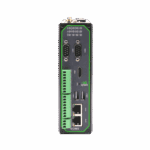
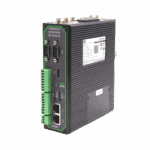
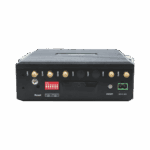
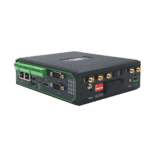
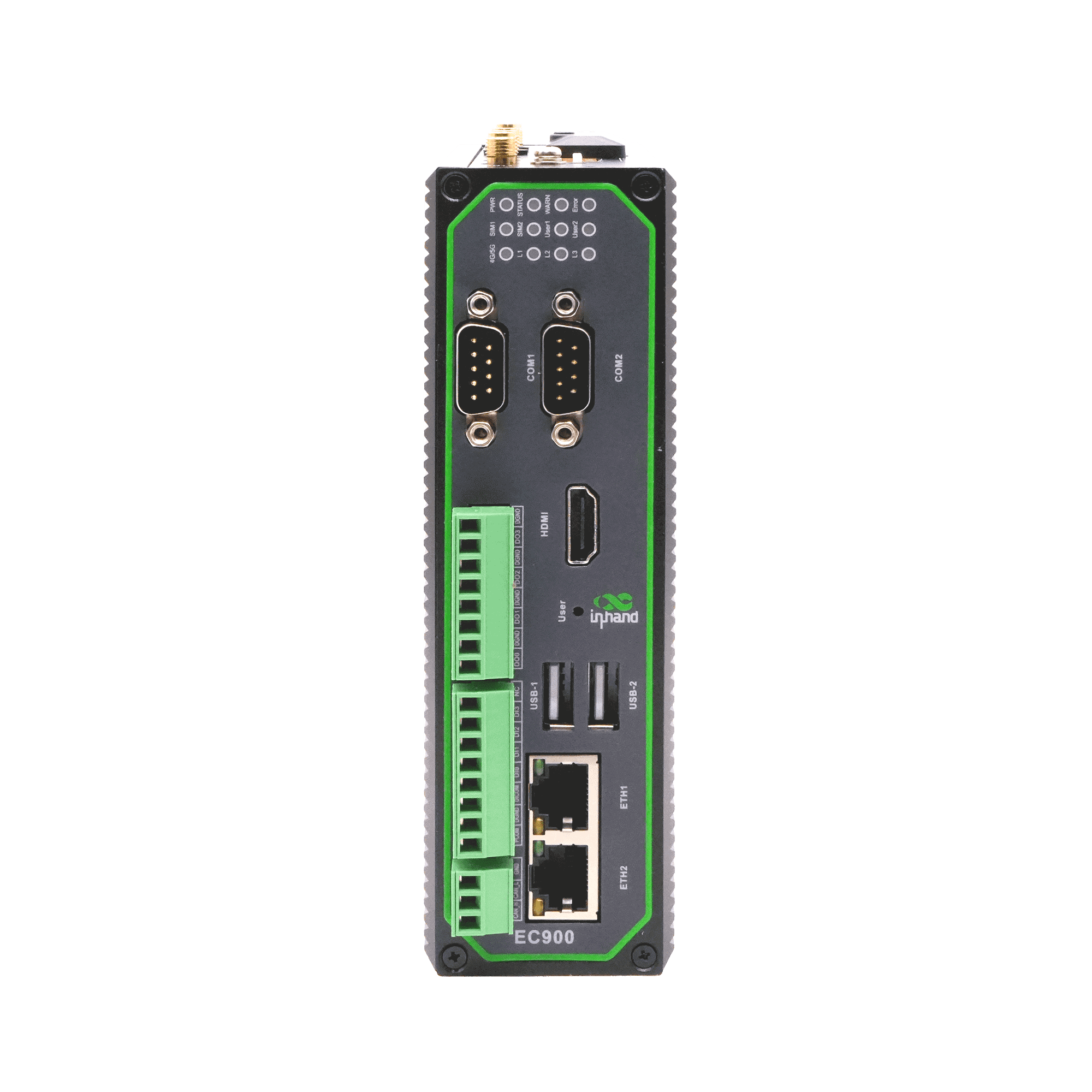
Lightweight Industrial AI Edge Computer





-
Core Technical Specifications
Open Platform Yocto/Linux and Debian 10, Debian package managerCPU/GPU Quad-core [email protected] / Mali-G52 2EERAM/Storage 4GB / 16GB eMMCData Acquisition Modbus RTU/TCP, EtherNet/IP, OPC UA, DNP3.0, BACnet, CNCInterfaces 2×GE, 2×RS-232/485/422, USB2.0, HDMI2.0, mSATA, microSDSecurity (TPM2.0 Optional) Secure Boot, TPM2.0, firewall, VPNCloud Management DeviceLive, HTTP/HTTPS/SSH remote managementCellular Network 5G SA/NSA or LTE Cat.4/Cat.6 (model-dependent)Network Features APN/VPDN, CHAP/PAP, ARP/Ethernet, static IP/DHCPPower Input DC 12~48V (8W)Dimensions (W × D × H) 47.3 × 162.7 × 148.3 mm (1.86 × 6.41 × 5.84 in)Protection Rating IP30
-
Hardware Platform
CPU Quad-core Cortex-A55@ 2.0GHzGPU Mali-G52 2EENPU RKNN AI acceleration engineRAM 4GBFLASH 16GB eMMC
-
Connectivity & Interfaces
Ethernet Ports 2×10/100/1000 Mbps GEI/O Ports (Optional) 4×DI + 4×DO (isolated)Serial Ports 2×RS-232/485/422 (DB9)CAN (Optional) CAN2.0A/B (isolated)Buttons Pinhole reset buttonSIM Card Holders 2×MicroSIMLED Indicators 4G/5G, Signal Strength (L1, L2, L3), SIM1, SIM2, User1, User2, PWR, STATUS, WARN, ERRUSB USB2.0 (2×Type-A + 1×Type-C)microSD Supports microSD cards up to 32GB (recommended maximum capacity)Expansion Interfaces 1x mSATA, supports mSATA SSDHDMI HDMI2.0Wi-Fi (Optional) STA, 802.11ac/a/b/g/n, 2.4G/5G dual bandBluetooth (Optional) BLE4.2GPS (Optional) GPS/Beidou/GLONASS
-
Power & Power Consumption
Input Voltage DC 12~48VPower Interface DC terminal inputMaximum Value (Full Load) 8W
-
Mechanical Specifications
Product Dimensions 47.3 × 162.7 × 148.3 mm (1.86 × 6.41 × 5.84 in)Product Weight 810 g (1.79 lb)Mounting Method DIN-rail / wall mountingProtection Rating IP30Enclosure & Heat Dissipation Metal housing, fanless designTPM (Optional) TPM2.0
-
Environment & Certifications
Storage Temperature -40 °C ~ 85 °C (-40 °F ~ 185 °F)Operating Temperature -20 °C ~ 70 °C (-4 °F ~ 158 °F)Environmental Humidity 5~95% RH (non-condensing)Physical Characteristics IEC60068-2-27 shock resistance IEC60068-2-6 vibration resistance IEC60068-2-32 drop resistanceEMC Standard EN61000-4-2, level 3, Static EN61000-4-3, level 3, Radiation Electric Field EN61000-4-4, level 3, Pulsed Electric Field EN61000-4-5, level 3, Surge EN61000-4-6, level 3, Conducted Disturbance Immunity EN61000-4-8, Power Frequency Field Resistance, horizontal / vertical 400A/m (>level 2) EN61000-4-12, level 3, Shock Wave ResistanceCertifications CE, FCC, PTCRB, Verizon, AT&T, T-Mobile
-
Operating System
Operating System Yocto/Linux, Debian 10 (Kernel 4.19)File System Debian core root filesystemPackage Manager Debian package manager
-
Network Features
Network Access 5G / LTE Cat.4 / LTE Cat.6 (model-dependent), EthernetAccess Authentication APN, VPDN, CHAP/PAPWAN Protocols static IP, DHCPLAN Protocols ARP, Ethernet
-
Security
Secure Boot SupportedTrust Zone Supported
-
Reliability
Link Detection Multi-level link detection and auto-redialBuilt-in Watchdog Embedded watchdogBackup Mechanism Dual-SIM backupDual-SIM Switchover Supported
-
Data Acquisition Protocols (DSA)
Industrial Protocols Modbus RTU Master/Slave, Modbus TCP Master/Slave, EtherNet/IP, ISO on TCP, OPC UA, Mitsubishi family, FINSUDP, HostLink, PPIElectricity Protocols DLT645-2007, IEC101/104, DNP3.0Other Protocols BACnet, CNC
-
Network Management
Upgrade Method Local/remote firmware upgradeLog Functions Local/remote logs with power-off persistenceRemote management DeviceLive / HTTP / HTTPS / SSH remote managementDeviceLive Cloud Supports cloud-based parameter configuration, container management, application and firmware management
Datasheets
 10.9.2026
 2.2 MB
Manuals
Firmware
 6.11.2025 1.3 GB 11.14.2024 1.3 GB 10.16.2024 1.3 GB 4.3.2024 1.3 GB 2.18.2024 1.3 GB
Developer Tools
12.11.2025 100.2 MB 3.17.2025 100.6 MB 10.23.2024 99.4 MB 8.19.2024 99.4 MB 4.18.2024 98.2 MBDeveloper Documentation
6.18.2026 49.4 KB 6.18.2026 40.4 KB 6.18.2026 64.9 KBCertification
10.9.2026 386.7 KB 10.9.2026 444.8 KB 10.9.2026 418.5 KBStandard package*
- EC942 AI Edge Computer *1
- 4G Antenna *1
- 5G Antenna *4
- Wi-Fi Antenna *2
- GNSS Antenna *1
- Ethernet Cable *1
- Optional accessories
- Power Supply *1
* Standard package contents vary by standard order codes.
Contact us directly to learn more about our packaging options.
Specifications
-
Core Technical Specifications
Open Platform Yocto/Linux and Debian 10, Debian package managerCPU/GPU Quad-core [email protected] / Mali-G52 2EERAM/Storage 4GB / 16GB eMMCData Acquisition Modbus RTU/TCP, EtherNet/IP, OPC UA, DNP3.0, BACnet, CNCInterfaces 2×GE, 2×RS-232/485/422, USB2.0, HDMI2.0, mSATA, microSDSecurity (TPM2.0 Optional) Secure Boot, TPM2.0, firewall, VPNCloud Management DeviceLive, HTTP/HTTPS/SSH remote managementCellular Network 5G SA/NSA or LTE Cat.4/Cat.6 (model-dependent)Network Features APN/VPDN, CHAP/PAP, ARP/Ethernet, static IP/DHCPPower Input DC 12~48V (8W)Dimensions (W × D × H) 47.3 × 162.7 × 148.3 mm (1.86 × 6.41 × 5.84 in)Protection Rating IP30
-
Hardware Platform
CPU Quad-core Cortex-A55@ 2.0GHzGPU Mali-G52 2EENPU RKNN AI acceleration engineRAM 4GBFLASH 16GB eMMC
-
Connectivity & Interfaces
Ethernet Ports 2×10/100/1000 Mbps GEI/O Ports (Optional) 4×DI + 4×DO (isolated)Serial Ports 2×RS-232/485/422 (DB9)CAN (Optional) CAN2.0A/B (isolated)Buttons Pinhole reset buttonSIM Card Holders 2×MicroSIMLED Indicators 4G/5G, Signal Strength (L1, L2, L3), SIM1, SIM2, User1, User2, PWR, STATUS, WARN, ERRUSB USB2.0 (2×Type-A + 1×Type-C)microSD Supports microSD cards up to 32GB (recommended maximum capacity)Expansion Interfaces 1x mSATA, supports mSATA SSDHDMI HDMI2.0Wi-Fi (Optional) STA, 802.11ac/a/b/g/n, 2.4G/5G dual bandBluetooth (Optional) BLE4.2GPS (Optional) GPS/Beidou/GLONASS
-
Power & Power Consumption
Input Voltage DC 12~48VPower Interface DC terminal inputMaximum Value (Full Load) 8W
-
Mechanical Specifications
Product Dimensions 47.3 × 162.7 × 148.3 mm (1.86 × 6.41 × 5.84 in)Product Weight 810 g (1.79 lb)Mounting Method DIN-rail / wall mountingProtection Rating IP30Enclosure & Heat Dissipation Metal housing, fanless designTPM (Optional) TPM2.0
-
Environment & Certifications
Storage Temperature -40 °C ~ 85 °C (-40 °F ~ 185 °F)Operating Temperature -20 °C ~ 70 °C (-4 °F ~ 158 °F)Environmental Humidity 5~95% RH (non-condensing)Physical Characteristics IEC60068-2-27 shock resistance IEC60068-2-6 vibration resistance IEC60068-2-32 drop resistanceEMC Standard EN61000-4-2, level 3, Static EN61000-4-3, level 3, Radiation Electric Field EN61000-4-4, level 3, Pulsed Electric Field EN61000-4-5, level 3, Surge EN61000-4-6, level 3, Conducted Disturbance Immunity EN61000-4-8, Power Frequency Field Resistance, horizontal / vertical 400A/m (>level 2) EN61000-4-12, level 3, Shock Wave ResistanceCertifications CE, FCC, PTCRB, Verizon, AT&T, T-Mobile
-
Operating System
Operating System Yocto/Linux, Debian 10 (Kernel 4.19)File System Debian core root filesystemPackage Manager Debian package manager
-
Network Features
Network Access 5G / LTE Cat.4 / LTE Cat.6 (model-dependent), EthernetAccess Authentication APN, VPDN, CHAP/PAPWAN Protocols static IP, DHCPLAN Protocols ARP, Ethernet
-
Security
Secure Boot SupportedTrust Zone Supported
-
Reliability
Link Detection Multi-level link detection and auto-redialBuilt-in Watchdog Embedded watchdogBackup Mechanism Dual-SIM backupDual-SIM Switchover Supported
-
Data Acquisition Protocols (DSA)
Industrial Protocols Modbus RTU Master/Slave, Modbus TCP Master/Slave, EtherNet/IP, ISO on TCP, OPC UA, Mitsubishi family, FINSUDP, HostLink, PPIElectricity Protocols DLT645-2007, IEC101/104, DNP3.0Other Protocols BACnet, CNC
-
Network Management
Upgrade Method Local/remote firmware upgradeLog Functions Local/remote logs with power-off persistenceRemote management DeviceLive / HTTP / HTTPS / SSH remote managementDeviceLive Cloud Supports cloud-based parameter configuration, container management, application and firmware management
Downloads
Datasheets
10.9.2026 2.2 MBManuals
Firmware
6.11.2025 1.3 GB 11.14.2024 1.3 GB 10.16.2024 1.3 GB 4.3.2024 1.3 GB 2.18.2024 1.3 GBDeveloper Tools
12.11.2025 100.2 MB 3.17.2025 100.6 MB 10.23.2024 99.4 MB 8.19.2024 99.4 MB 4.18.2024 98.2 MBDeveloper Documentation
6.18.2026 49.4 KB 6.18.2026 40.4 KB 6.18.2026 64.9 KBCertification
10.9.2026 386.7 KB 10.9.2026 444.8 KB 10.9.2026 418.5 KB
Ordering
Standard package*
- EC942 AI Edge Computer *1
- 4G Antenna *1
- 5G Antenna *4
- Wi-Fi Antenna *2
- GNSS Antenna *1
- Ethernet Cable *1
- Optional accessories
- Power Supply *1
* Standard package contents vary by standard order codes.
Contact us directly to learn more about our packaging options.
DeviceLive
IoT Device Management Platform
Device management, remote monitoring, edge app management, and remote maintenance to help industrial enterprises build intelligent edge networks.
DeviceLive
Related Cases

Safety Monitoring Solution for Vehicle Gas Cylinders
Safety Monitoring Solution for Vehicle Gas Cylinders Applications and Cases Key Takeaways…
Learn More →Frequently Asked Questions
What AI workloads is the EC942 designed for?
The EC942 is a Lite AI Edge Computer with a quad-core ARM Cortex-A55 @ 2.0 GHz CPU and a 1 TOPS NPU (RKNN). Designed for industrial IoT applications — lightweight edge AI inference and industrial data acquisition via the optional DSA service. OS options at ordering: IEOS (default — InHand’s edge runtime with web GUI, container management, and DeviceLive cloud integration) or Debian Linux ( -D suffix). Hardware variants: B is the entry-level config; H adds Wi-Fi, GPS, CAN, Bluetooth, and TPM. Cellular options span LTE Cat 4, 5G NR, regional EU/APAC, and no-cellular SKUs. For heavier vision analytics, step up to the EC3320 (6 TOPS) or EC5350/EC5550 (40 / 100 TOPS).
How do I set up and access the EC942?
The EC942 is a Debian-based edge AI computer with 1× HDMI 2.0 + USB ports — three access methods are supported.
Direct (HDMI): Connect HDMI display + USB keyboard/mouse. Power on and log in with the System User credentials printed on the device nameplate. Use the Linux desktop directly.
Remote — SSH: Connect to the default ETH1 ( 192.168.3.100 ) or ETH2 ( 192.168.4.100 ) IP using an SSH client. Log in with the System User credentials from the nameplate. Note: root SSH login is disabled by default; use sudo -s after logging in as the system user.
Remote — IEOS web: Open https://192.168.4.100:9100 (HTTPS only, port 9100). Log in as username adm with the nameplate password.
Should I choose IEOS or Debian Linux on the EC942?
IEOS (default, no OS suffix) is InHand’s edge operating system. It bundles the web GUI, cellular dialing, VPN, firewall, container management, and DeviceLive cloud integration as a pre-configured stack. Choose IEOS for fastest time-to-deploy and out-of-the-box integration with InHand’s cloud platform.
Debian Linux ( -D suffix) is a standard Debian distribution without InHand’s edge applications. Choose Debian for custom application stacks, third-party runtimes, or your own DevOps tooling — you take on cellular dialing and remote management yourself.
How do I manage the EC942 remotely with DeviceLive?
The EC942 uses InHand DeviceLive for cloud management. Registration is done in the DeviceLive portal — no configuration is needed on the device’s web GUI. Log in to your DeviceLive tenant, click Add Device, and enter the EC942’s serial number and credentials from the device label. Once the device has internet, it auto-connects to DeviceLive. From there, manage the fleet via remote container management and remote firmware/application management across distributed sites.
—

